Geyser

[](LICENSE)
[](https://discord.gg/geysermc)
[](https://translate.geysermc.org/)
Geyser is a bridge between Minecraft: Bedrock Edition and Minecraft: Java Edition, closing the gap from those wanting to play true cross-platform.
Geyser is an [Open Collaboration](https://opencollaboration.dev/) project.
## What is Geyser?
Geyser is a proxy, bridging the gap between Minecraft: Bedrock Edition and Minecraft: Java Edition servers.
The ultimate goal of this project is to allow Minecraft: Bedrock Edition users to join Minecraft: Java Edition servers as seamlessly as possible. However, due to the nature of Geyser translating packets over the network of two different games, *do not expect everything to work perfectly!*
Special thanks to the DragonProxy project for being a trailblazer in protocol translation and for all the team members who have joined us here!
## Supported Versions
| Edition | Supported Versions |
|———|——————————————————————————————————|
| Bedrock | 1.21.130 – 1.21.132, 26.0, 26.1, 26.2, 26.3, 26.10, 26.20 |
| Java | 26.1 (For older versions, [see this guide](https://geysermc.org/wiki/geyser/supported-versions/)) |
## Setting Up
Take a look [here](https://geysermc.org/wiki/geyser/setup/) for how to set up Geyser.
## Links:
– Website: https://geysermc.org
– Docs: https://geysermc.org/wiki/geyser/
– Download: https://geysermc.org/download
– Discord: https://discord.gg/geysermc
– Donate: https://opencollective.com/geysermc
– Test Server: `test.geysermc.org` port `25565` for Java and `19132` for Bedrock
## What’s Left to be Added/Fixed
– Near-perfect movement (to the point where anticheat on large servers is unlikely to ban you)
– Some Entity Flags
## What can’t be fixed
There are a few things Geyser is unable to support due to various differences between Minecraft Bedrock and Java. For a list of these limitations, see the [Current Limitations](https://geysermc.org/wiki/geyser/current-limitations/) page.
## Compiling
1. Clone the repo to your computer
2. Navigate to the Geyser root directory and run `git submodule update –init –recursive`. This command downloads all the needed submodules for Geyser and is a crucial step in this process.
3. Run `gradlew build` and locate to `bootstrap/build` folder.
## Contributing
Any contributions are appreciated. Please feel free to reach out to us on [Discord](https://discord.gg/geysermc) if
you’re interested in helping out with Geyser.
## Libraries Used:
– [Adventure Text Library](https://github.com/KyoriPowered/adventure)
– [CloudburstMC Bedrock Protocol Library](https://github.com/CloudburstMC/Protocol)
– [GeyserMC’s Java Protocol Library](https://github.com/GeyserMC/MCProtocolLib)
– [TerminalConsoleAppender](https://github.com/Minecrell/TerminalConsoleAppender)
– [Simple Logging Facade for Java (slf4j)](https://github.com/qos-ch/slf4j)
GetLogs
# GetLogs
A plugin to upload the latest logs from your minecraft server to mclo.gs.
This plugin can be used to fast and easily publish your latest logs to [MCLogs](https://mclo.gs/), so you don’t need to open your console everytime.
It doesn’t do anything else. It just provides a single command per platform.

– Lightweight (~ 360kB)
– Permissions (`getlogs.command`)
– Compatible with Java 8
– Support for most legacy and modern versions
– One jar file for all platforms
## Commands
### Bukkit / Spigot / Paper
– `/getlogs`
– Permissions: `getlogs.command`
### Bungeecord / Velocity
– `/getlogsproxy`
– Permissions: `getlogs.command`

– [MCLogs](https://mclo.gs/) for providing such an awesome service!
– [ChatGPT](https://chat.com) for generating the plugin’s logo!
Geo Restrict
As the name suggests, Geo Restrict is a geo-restriction plugin. It allows you to block/allow certain countries and ASNs. In the config, you can enable VPN check, which is very simple and uses flagged keywords. The plugin does **not** require any API key, just drop it in your plugin folder and it’s ready to use. It also has Discord webhook notifications so you can keep logs of some kind.
—
### bstats
new:
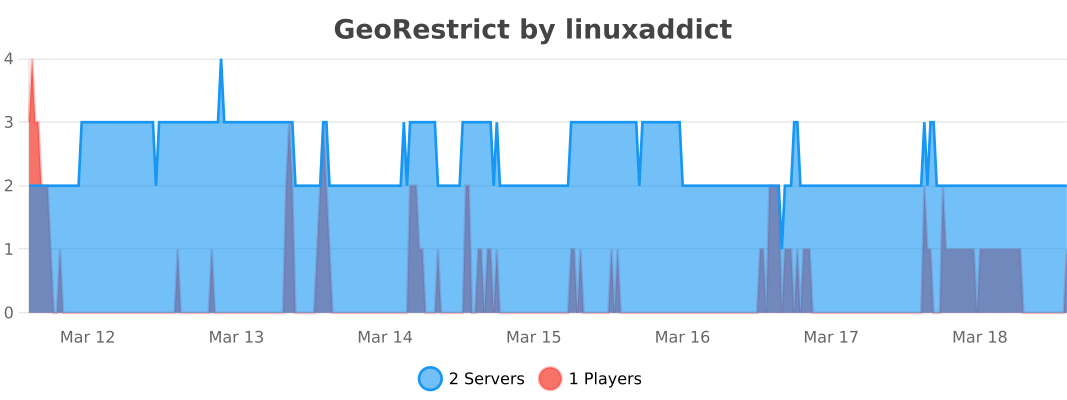
old:
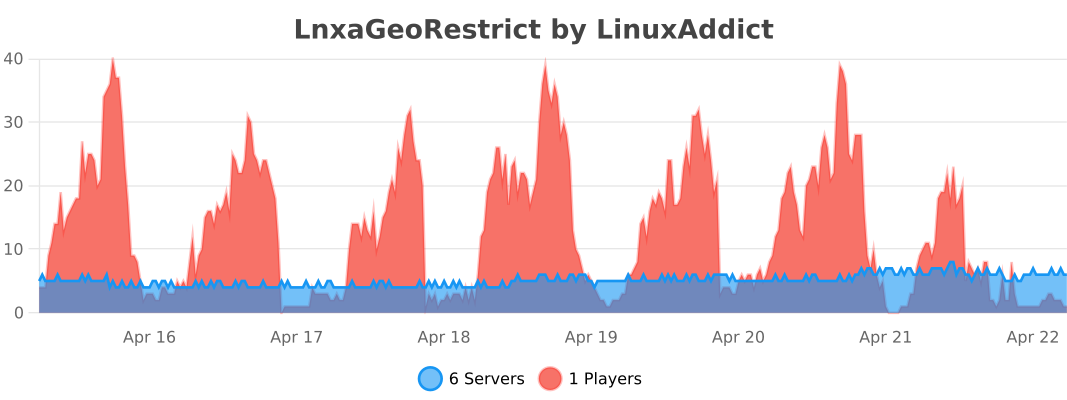
—
### **Configuration**
“`
# GeoRestrict Configuration
#
# Modes: ALLOWLIST, BLOCKLIST, DISABLED
# Country Restriction Settings
# If mode is ALLOWLIST, only countries in the list are allowed.
# If mode is BLOCKLIST, countries in the list are blocked.
countryMode: BLOCKLIST
countries:
– EE
– RU
– KP
# ASN Restriction Settings
# Same logic as countries.
asnMode: DISABLED
asns:
– AS12345
# VPN / Proxy Detection Settings
vpnCheckEnabled: true
vpnKeywords:
– vpn
– proxy
– tunnel
– socks
– shadowsocks
– wireguard
– openvpn
– hosting
– datacenter
– “data center”
– colocation
– colo
– cloud
– vps
– “virtual private server”
– “dedicated server”
– amazon
– aws
– azure
– “google cloud”
– gcp
– digitalocean
– linode
– vultr
– hetzner
– ovh
– scaleway
– contabo
– hostinger
– godaddy
– namecheap
– bluehost
– dreamhost
– hostgator
– nordvpn
– expressvpn
– surfshark
– protonvpn
– mullvad
– privateinternetaccess
– pia
– cyberghost
– relay
– tor
– “exit node”
– “residential proxy”
– “mobile proxy”
– rackspace
– cloudflare
– fastly
– akamai
– ionos
– liquidweb
– interserver
– a2hosting
– siteground
– inmotion
– nexcess
– wpengine
– kinsta
– serverspace
– kamatera
– “atlantic.net”
– phoenixnap
– “cherry servers”
– serverhub
– quadranet
– choopa
– ramnode
– buyvm
– frantech
– incognet
– m247
– psychz
– coresite
– equinix
– “ip address”
– anonymous
– “vpn server”
– “proxy server”
– “hide ip”
– “mask ip”
– “vpn tunnel”
– “encrypted connection”
– “no-log”
– “private network”
– “secure connection”
– unblock
– bypass
– geolocation
– “ip masking”
– anonymizer
– hidemyass
– windscribe
– ipvanish
– vyprvpn
– “hotspot shield”
– tunnelbear
– zenmate
– “hide.me”
– “perfect privacy”
– airvpn
– ivpn
– “trust.zone”
– purevpn
– safervpn
– astrill
– “goose vpn”
# Messages
kickMessageCountry: “Your country is not allowed.”
kickMessageASN: “Your ISP/ASN is not allowed.”
kickMessageVPN: “VPN or Proxy detected.”
# Discord Webhook Settings
discord:
webhook: “”
maskIp: true
title: “GeoRestrict”
colorAllowed: 65280
colorDenied: 16711680
fields:
– name: “Player”
value: “%player%”
inline: true
– name: “Status”
value: “%status%”
inline: true
– name: “IP”
value: “%ip%”
inline: true
– name: “Country”
value: “%country%”
inline: true
– name: “ASN”
value: “%asn%”
inline: true
– name: “ISP”
value: “%isp%”
inline: false
– name: “Reason”
value: “%reason%”
inline: false
“`
—
Looking for hosting? Check out https://nexeu.zip/ – budget-friendly hosting.

Gatekeeper



Gatekeeper is a lightweight, highly optimized Minecraft plugin that defends your server from VPNs, proxies and abusive ISP ranges. It combines fast local ASN analysis with optional external IP checks to give you a multi-layered protection system that’s tuned for high connection volumes.
## ⚡ Requirements & Compatibility
– **Java:** 11 or later
– **Server:** **Bukkit** (**Spigot, Paper, Purpur** etc) / **Bungeecord** / **Velocity**
– **Version range:** `1.8` – `26.1.2`
## 🧩 Modules Overview
| Module | Description & Features |
| :— | :— |
| **AccountLimit** | Keets your server fair by limiting how many accounts can connect from a single IP – perfect for stopping alt abuse. |
| **AntiVpn** | Scans connections through an external API to catch even the most sneaky VPNs and proxies – extremely accurate, with a tiny trade-off in speed for that extra peace of mind. |
| **AsnFilter** | Blocks traffic from dangerous or suspicious ASNs in milliseconds – not quite as precise as a full VPN detector, but blazing fast and catches most bad actors instantly. |
| **Blacklist** | Gives you full control to permanently ban any IP or username – simple, reliable, and instantly effective. |
| **CountryFilter** | Instantly blocks entire countries you don’t trust – clean and ruthless traffic filtering with zero lag. |
| **RateLimit** | Prevents connection floods and brute-force attacks by limiting how often clients can knock on your server’s door – smooth and stable, even under heavy fire. |
| **IpFilter** | Blocks known proxy IPs gathered from popular public proxy lists – keeps your server safe from cheap bypass attempts without costing a dime on external APIs. |
## Why choose Gatekeeper?
Gatekeeper gives you the best of both worlds: **speed and precision**. Local ASN analysis delivers a verdict in milliseconds with almost zero CPU cost. The external API catches anything the local check misses. The result? Fewer false negatives, minimal resource usage, and enterprise-grade features – without a paywall.
## Quick install
1. Drop `Gatekeeper.jar` into your server’s `plugins` folder.
2. Restart the server – the default config will be generated automatically.
3. Edit module configs to add API keys, ASN lists, rate limits, and country rules.
4. Run `/gatekeeper reload` or restart your server.
## Who is Gatekeeper for?
✅ Large public servers and networks
✅ Hubs and communities prone to proxy abuse
✅ Admins who want advanced blocking (ASN, country, rate limits) without tanking performance
> 💡 **One last thing** – Gatekeeper works right out of the box. But its true power unlocks after just 5 minutes of configuration: add your API keys, tweak your ASN lists, set your limits. That’s when your server becomes an impenetrable fortress, and your players will feel the difference. Join us on Discord and see how easy it is to keep your lobby clean.
GamePanel for TeamPanel
### 🎮 TeamPanel GamePanel – Minecraft (BungeeCord/Velocity) Integration
> ⚠️ **Note:** This plugin is currently in **Beta**. Please report any issues or feedback to our team.
Seamlessly connect your Minecraft proxy server (BungeeCord or Velocity) with TeamPanel. This plugin enables deep integration to track server statistics in real-time, synchronize player activity, and execute remote control commands directly from the TeamPanel dashboard.
—
### 🚀 Overview
The **GamePanel Minecraft Plugin** acts as a bridge between your proxy server and the TeamPanel ecosystem. It automates data collection and provides administrators and community leaders with valuable insights into server performance and player behavior across your entire network.
#### Key Features:
* **Real-time Statistics:** Automatic transmission of player counts (Online, Joins, Leaves, New Players).
* **Online Time Tracking:** Precise recording of play sessions for all users, perfect for leaderboards or reward systems.
* **Real-time Events:** Receive and process custom commands and messages directly from the TeamPanel dashboard.
* **Automated Synchronization:** Statistics are transmitted in the background at regular intervals (every minute) without affecting server performance.
* **Group Sync (new):** Manual synchronization of your TeamPanel groups via `/syncgroups` (with 30s cooldown) – e.g. for LuckPerms or custom commands.
* **Central SyncProxy Configuration (new):** Unified management of tabs, MOTDs, and settings (whitelist mode, slots, version range) directly in TeamPanel.
—
### 🛠 Installation
1. Download the latest `.jar` file.
2. Move the file into the `plugins` folder of your BungeeCord or Velocity server.
3. Start the server once to generate the configuration folders.
4. Edit the `plugins/GamePanel/config.json` (see below).
5. Restart the server to activate the connection to TeamPanel.
—
### ⚙️ Configuration
The configuration is located at `plugins/GamePanel/config.json`. You must enter your credentials here so the plugin can communicate with the API.
“`json
{
“apiKey”: “YOUR_API_KEY”,
“gameServerId”: “YOUR_SERVER_UUID”,
“apiHost”: “teampanel”,
“debug”: false
}
“`
#### Parameter Explanation:
* **apiKey**: Your personal API key, which you can generate in the TeamPanel dashboard. It is used to authenticate your requests.
* **gameServerId**: The unique UUID of your server from TeamPanel.
* **apiHost**: The target address for API requests (defaulted to “teampanel”).
* **debug**: Set this value to `true` if you want to see detailed logs in the console (useful for troubleshooting).
—
### 🔁 Group Sync (/syncgroups)
* Command: `/syncgroups` (Player)
* Aliases: `/syncgroup`, `/sgroup`, `/sgoups`
* Cooldown: 30 seconds per player
* Description: Allows players to manually synchronize their TeamPanel groups with the server (e.g., to receive their LuckPerms ranks or other rewards).
* Behavior: Triggers group synchronization with TeamPanel. Returned commands (e.g., LuckPerms) are automatically executed via the server console.
BungeeCord and Velocity register the command natively; usable only for players (UUID required). Console outputs inform about start and completion.
—
### 🧩 Central Configuration
As of version 1.0.1, the plugin utilizes unified configurations manageable directly via the TeamPanel UI:
#### 1. SyncProxy Configuration (Key: `syncproxy_config`)
Manages the proxy-specific settings:
* **Tabs:** Multi-language headers and footers.
* **MOTDs:** Customizable messages for different whitelist modes.
* **Settings:** Whitelist mode, max player count, and supported protocol versions.
#### 2. Game Group Sync (Key: `game-sync`)
Controls how TeamPanel groups are synchronized with the server:
* `sync-enabled` (Boolean) – Enables/Disables synchronization.
* `default-command` (String) – Optional fallback command if no mapping matches.
* `sync-commands` (Array) – Rules per TeamPanel group (e.g., mapping to in-game groups/permissions).
All configurations can be reloaded in real-time without restarting the server.
—
### 💡 Advanced Features
* **Auto-Reconnect:** The real-time client includes automatic reconnection logic for network interruptions.
* **Proxy Support:** Designed specifically for proxy environments to handle global player statistics efficiently.
* **Extensible:** The plugin is built on a modular architecture, allowing for easy expansion and custom event handling.
—
### 🔒 Permissions
The following permissions are used by the SyncProxy integration.
– `syncgroups.use` — Allows using `/syncgroups` and its aliases
– `syncproxy.admin` — Allows using `/syncproxy` and its subcommands
– `syncproxy.bypass.whitelist.team` — Bypass TEAM whitelist mode
– `syncproxy.bypass.whitelist.development` — Bypass DEVELOPMENT whitelist mode
– `syncproxy.bypass.whitelist.beta` — Bypass BETA whitelist mode
– `syncproxy.bypass.maxPlayerCount` — Bypass the max player limit
Friend
Friends is a social plugin that lets players add friends, send messages, mail, gifts, and create parties on your server. Works across BungeeCord and Velocity networks, with full Folia support.
## Features
– **Friend System** – Add friends, best friends, favorites, groups, notes, and nicknames.
– **Friend Chat** – `/fc` channel to broadcast to all online friends at once.
– **Gift System** – Send items to friends with anti-abuse protection (cooldowns, daily limits, blacklist).
– **Private Messaging** – Direct messages with reply functionality and sound notifications.
– **Mail System** – Send offline messages to players who aren’t online. Can be disabled server-wide.
– **Party System** – Create parties, invite friends, and manage groups.
– **Party Effects** – Party members get potion effects with proximity-based activation.
– **Party Waypoints** – Action-bar arrow pointing at the nearest member or a specific locked target.
– **Last-Seen Lookup** – `/friend seen ` checks when any player was last online.
– **Leaderboards** – Rankings for most friends, gifts sent, and messages.
– **Statistics** – Track your social stats and see your rankings.
– **GUIs** – Clean inventory menus with custom model data support for resource packs.
– **Cross-Server** – Full BungeeCord and Velocity support in a single jar.
– **Folia Support** – Works on Folia’s region-threaded scheduler out of the box.
– **PlaceholderAPI** – 25+ placeholders for scoreboards and more.
– **WorldGuard** – Friend groups can auto-share your WG region access.
– **GriefPrevention** – Party members auto-trusted in leader’s claims.
– **Database** – MySQL and SQLite with auto-migration.
– **Developer API** – Full API for integration.
## Commands
### Friend
– `/friend add ` – Send a friend request.
– `/friend remove ` – Remove a friend.
– `/friend accept ` – Accept a request.
– `/friend deny ` – Deny a request.
– `/friend list` – View your friends.
– `/friend requests` – View pending requests.
– `/friend best ` – Toggle best friend status.
– `/friend fav ` – Toggle favorite status.
– `/friend nick ` – Set a nickname for a friend.
– `/friend note ` – Add a note about a friend.
– `/friend group create/delete/set/list` – Manage friend groups.
– `/friend tp ` – Teleport to a friend.
– `/friend jump ` – Jump to a friend’s server.
– `/friend info ` – View friend details.
– `/friend seen ` – Last-seen lookup for any player.
– `/friend block/unblock ` – Block or unblock a player.
– `/friend chat [message]` – Toggle friend chat mode or send a one-shot message.
– `/friend compass` – Toggle the party compass.
– `/friend waypoint ` – Lock the compass on a specific member.
– `/friend emote ` – Send a particle emote.
– `/friend status ` – Set your status message.
– `/friend menu` – Open the friends menu.
### Messaging & Mail
– `/msg ` – Send a private message.
– `/reply ` – Reply to the last message.
– `/mail read [page]` – Read your mail.
– `/mail send ` – Send mail.
– `/mail delete ` – Delete mail.
– `/fc [message]` – Friend chat channel.
### Party
– `/party create` – Create a party.
– `/party invite ` – Invite a player.
– `/party accept/deny ` – Handle invitations.
– `/party leave` – Leave your party.
– `/party kick ` – Kick a player.
– `/party info` – View party info.
– `/party disband` – Disband your party.
– `/party transfer ` – Transfer leadership.
– `/party effects` – View active effects.
– `/party shop` – Purchase party effect upgrades (requires Vault).
– `/party chat [message]` – Toggle party chat mode or send a one-shot message.
– `/pc [message]` – Party chat shortcut.
### Gifts
– `/gift ` – Send the held item to a friend.
– `/gift pending` – View pending gifts.
– `/gift accept ` – Accept a gift.
– `/gift deny ` – Deny a gift.
### Menus & Admin
– `/settings` – Open notification settings menu.
– `/stats` – View your social statistics.
– `/leaderboard` – View friend leaderboards.
– `/freload` – Reload the plugin configuration.
– `/fupdate` – Check for plugin updates.
All primary commands also accept f-prefixed aliases (`/fmsg`, `/freply`, `/fmail`, `/fparty`, `/fgift`, `/fstats`, `/fsettings`, `/fleaderboard`) for servers with naming conflicts. On startup, the plugin warns if another plugin owns any primary name.
## Permissions
| Permission | Default | Description |
|—|—|—|
| `friends.use` | true | Basic friend commands |
| `friends.mail` | true | Mail system access |
| `friends.party` | true | Party system access |
| `friends.party.effects` | true | Party effects access |
| `friends.chat` | true | Friend chat channel access |
| `friends.teleport` | true | Teleport to friends |
| `friends.jump` | true | Jump to a friend’s server |
| `friends.network` | true | Cross-server features |
| `friends.reload` | op | Reload command |
| `friends.admin` | op | All admin commands |
## PlaceholderAPI
– `%friends_count%` – Total friends
– `%friends_online%` – Online friends
– `%friends_offline%` – Offline friends
– `%friends_best_friends%` – Best friends count
– `%friends_favorites%` – Favorite friends count
– `%friends_max%` – Max friends limit
– `%friends_requests%` – Pending friend requests
– `%friends_gifts_pending%` – Pending gifts
– `%friends_gifts_sent%` – Total gifts sent
– `%friends_gifts_received%` – Total gifts received
– `%friends_gifts_daily_remaining%` – Gifts you can still send today
– `%friends_gifts_cooldown%` – Gift cooldown remaining (seconds)
– `%friends_messages_sent%` – Messages sent
– `%friends_mail_total%` – Total mail
– `%friends_mail_unread%` – Unread mail
– `%friends_messaging_enabled%` – Private messages toggle
– `%friends_status%` – Your status message
– `%friends_in_party%` – In party (true/false)
– `%friends_party_size%` – Party size
– `%friends_party_name%` – Party name
– `%friends_party_leader%` – Party leader name
– `%friends_is_party_leader%` – Are you party leader (true/false)
– `%friends_rank_friends%` – Leaderboard rank (friends)
– `%friends_rank_gifts%` – Leaderboard rank (gifts)
– `%friends_rank_messages%` – Leaderboard rank (messages)
## Multi-Server Setup (BungeeCord / Velocity)
Only one jar is shipped: `Friends.jar`. It goes on every backend Spigot/Paper/Folia server. Nothing on the proxy.
**1. Install the plugin**
Drop `Friends.jar` into `/plugins/` on every backend server in your network.
**2. Set up MySQL**
All servers share the same database. Open `database.yml` on each server and set:
“`yaml
database:
type: mysql
host: your-database-ip
port: 3306
name: friends
username: your-user
password: your-password
pool:
max-connections: 10
timeout: 30000
keep-alive: true
“`
Make sure the `friends` database exists. Tables are created on first boot.
**3. Configure each server**
In `config.yml` set a unique name and enable networking:
“`yaml
server-name: “lobby”
network:
enabled: true
channel: “friends:network”
“`
Use a unique `server-name` per backend (e.g. `survival`, `skyblock`, `lobby`).
**4. Enable proxy mode on each backend**
BungeeCord (`spigot.yml`):
“`yaml
settings:
bungeecord: true
“`
Velocity (`paper-global.yml`):
“`yaml
proxies:
velocity:
enabled: true
online-mode: true
secret: “your-velocity-secret”
“`
**5. Restart every backend.** Friend requests, messages, mail, and party invites sync across the network.
### Quick Checklist
– [x] Friends.jar on every backend server
– [x] MySQL database shared across all servers
– [x] Unique `server-name` on each server
– [x] `network.enabled: true` on each server
– [x] BungeeCord mode or Velocity forwarding enabled
### Troubleshooting
– **Friends not syncing?** Check every server points to the same MySQL database.
– **Cross-server messages not working?** `bungeecord: true` (BungeeCord) or Velocity forwarding must be enabled.
– **Players show wrong server?** Each server needs a unique `server-name` in config.yml.
– **Another plugin owns /msg, /party etc.?** Use the f-prefixed aliases (`/fmsg`, `/fparty`) or `/friends:`.
## Config
“`yaml
server-name: “lobby”
settings:
max-friends: 0
best-friends:
max-limit: 5
enabled: true
friend-groups:
enabled: true
max-groups: 10
friend-teleport:
enabled: true
cooldown: 30
friend-jump:
enabled: true
cooldown: 10
private-messages:
friends-only: false
log-to-console: false
sounds: true
cross-server: true
allow-toggle: true
party:
max-size: 8
allow-public-parties: true
effects:
enabled: true
proximity-required: true
proximity-range: 50
scaling-strength: true
scale-percentage: 10
update-interval: 100
compass:
enabled: true
update-interval: 20
shop:
enabled: true
leader-only: true
reset-on-disband: true
integrations:
grief-prevention:
enabled: true
shared-building: true
shared-containers: true
shared-interactions: true
shared-entities: true
luck-perms:
enabled: true
worldguard:
enabled: false
shared-groups:
– trusted
– build
network:
enabled: true
channel: “friends:network”
mail:
enabled: true
auto-cleanup:
enabled: true
days-old: 30
gifts:
enabled: true
cooldown: 60
max-daily: 10
max-stack-size: 64
expiry-days: 7
blacklist:
– BEDROCK
– BARRIER
– COMMAND_BLOCK
emotes:
enabled: true
cooldown: 5
range: 10
debug: false
“`
## API Usage
**Friend Management**
“`java
FriendsAPI.getFriends(playerUUID); // Get a player’s friends list
FriendsAPI.getOnlineFriends(playerUUID); // Get only online friends
FriendsAPI.areFriends(playerUUID, otherUUID); // Check friendship status
FriendsAPI.addFriend(playerUUID, friendUUID); // Add a friend directly
FriendsAPI.removeFriend(playerUUID, friendUUID); // Remove a friend
“`
**Friend Requests**
“`java
FriendsAPI.sendFriendRequest(senderUUID, receiverUUID);
FriendsAPI.getPendingRequests(playerUUID);
FriendsAPI.acceptFriendRequest(receiverUUID, senderUUID);
FriendsAPI.denyFriendRequest(receiverUUID, senderUUID);
“`
**Messaging & Mail**
“`java
FriendsAPI.sendMessage(senderUUID, receiverUUID, message);
FriendsAPI.getPlayerMail(playerUUID);
FriendsAPI.sendMail(senderUUID, receiverUUID, content);
“`
**Party System**
“`java
FriendsAPI.createParty(leaderUUID);
FriendsAPI.disbandParty(partyId);
FriendsAPI.invitePlayerToParty(partyId, playerId);
FriendsAPI.getPlayerParty(playerId);
FriendsAPI.getPartyEffects(partyId);
FriendsAPI.sendPartyMessage(player, message);
FriendsAPI.isPartyChatEnabled(playerUUID);
“`
**Settings & Stats**
“`java
FriendsAPI.getPlayerSettings(playerUUID);
FriendsAPI.getPlayerStats(playerUUID);
FriendsAPI.getLeaderboard(type, limit);
“`
## Optional Dependencies
– **PlaceholderAPI** – For placeholders
– **LuckPerms** – For permission integration
– **GriefPrevention** – For claim trust integration
– **WorldGuard** – For region sharing by friend group
– **Vault** – For the party effects shop
– **ProtocolLib** – For enhanced features
FoxViaRestore
### If you find any errors or bugs, kindly report them on the Discord server (my discord is imfoxer).
[](http://discord.idcteam.xyz/)
**FoxViaRestore** is an addon for **[ViaVersion](https://modrinth.com/plugin/viaversion)**, this restore old API class of **[ViaVersion](https://modrinth.com/plugin/viaversion)**, useful for plugins that only use old **ViaVersion API**. Why this plugin? **ViaVersion** **_(5.x.x)_** deleted the old API (us.myles) and some plugins don’t receive updates, so… this **allow again the usage of that plugins with adding again the packages of that API** and also, **including the new versions values**. This also now support **BungeeCord** (+ Forks) and **Velocity** (+ Forks).
### Versions added and/or edited:
“`
public static final ProtocolVersion v1_20_5 = register(766, “1.20.5-1.20.6”, new VersionRange(“1.20”, 5, 6));
public static final ProtocolVersion v1_21 = register(767, “1.21-1.21.1”, new VersionRange(“1.21”, 0, 1));
public static final ProtocolVersion v1_21_2 = register(768, “1.21.2-1.21.3”, new VersionRange(“1.21”, 2, 3));
public static final ProtocolVersion v1_21_4 = register(769, “1.21.4”);
public static final ProtocolVersion v1_21_5 = register(770, “1.21.5”);
public static final ProtocolVersion v1_21_6 = register(771, “1.21.6”);
public static final ProtocolVersion v1_21_7 = register(772, “1.21.7-1.21.8”, new VersionRange(“1.21”, 7, 8));
public static final ProtocolVersion v1_21_9 = register(773, “1.21.9-1.21.10”, new VersionRange(“1.21”, 9, 10));
public static final ProtocolVersion v1_21_11 = register(774, “1.21.11”);
public static final ProtocolVersion v26_1 = register(775, “26.1-26.1.2”, new VersionRange(“26.1”, 0, 2));
“`
Do you need support? Please, join to our **[discord support](https://discord.idcteam.xyz/)**. _(tested with ViaVersion 5.8.1)_
FoxGate AntiVPN

### FoxGate
**The #1 AntiVPN Plugin from the market.**
_”It’s time to limit your server to legitimate and real traffic.”_
➡️ **FoxGate** (formerly, **FoxAntiVPN**) is a **powerful tool designed to protect your Minecraft server from unwanted visitors using VPNs**. This plugin prevents players from bypass ip bans by allowing server owners to detect and block **VPN’s**, **Proxy’s** and **more**. This plugin connects to a configerable list of services which detect VPN’s without any hassel. **This plugin is extremely hard to bypass**. With numerous APIs working together, **bypassing this AntiVPN is very difficult**. The more services you enable, the harder it becomes for users to evade detection. Currently supporting **Spigot** `+ Forks`, **BungeeCord** `+ Forks`, **Velocity** `+ Forks`, **FOLIA** `+ Forks`, **Nukkit**/**PowerNukkitX** `+ Forks`, **WaterdogPE** and **Hytale**.
# ⭐ Features:
> **Supports different types of databases with HikariCP Connection**. Allows to the user chooise their best option for storing data. Available options: **MySQL**, **MariaDB**, **PostgreSQL**, **H2**, **SQLite**, **Jaybird** and **Custom** (in case you want to use any other local/remote database).
“`yaml
# ___ _ _
# / __ _| |_ __ _| |__ __ _ ___ ___
# / / / _` | __/ _` | ‘_ / _` / __|/ _
# / /_// (_| | || (_| | |_) | (_| __ __/
# /___,’ __,_|____,_|_.__/ __,_|___/___|
#
# Configure a database for use.
#
# ❓ Has questions? Join to the discord server:
# – https://discord.zowi.gay/
# – https://discord.idcteam.xyz/
database:
# ⚙ Determine the type of DataBase will be used.
# – Available options in type.
# All options use HikariCP for better performance.
#
# |=> MySQL
# |=> MariaDB
# |=> PostgreSQL
# |=> SQLite (COULD CAUSE ISSUES IN OLDER VERSIONS!)
# |=> H2
# |=> JayBird
# |=> Custom
#
# —————————————————————————–
# Type | Stability | Performance | Support | Popularity | Concurrence |
# —————————————————————————–
# MariaDB | 4⭐ | 4⭐ | 5⭐ | 5⭐ | 5⭐
# MySQL | 4⭐ | 4⭐ | 5⭐ | 5⭐ | 4⭐
# PostgreSQL | 5⭐ | 5⭐ | 4⭐ | 3⭐ | 5⭐
# SQLite | 1⭐ | 3⭐ | 3⭐ | 2⭐ | 4⭐
# H2 | 2⭐ | 4⭐ | 3⭐ | 2⭐ | 1⭐
# Jaybird | 2⭐ | 2⭐ | 1⭐ | 1⭐ | 1⭐
#
# 📚 Note: In case you change this configuration and your server is
# already started, use the command “/foxgate db reconnect” to restart
# your database without restarting plugin or server. Always remember do
# “/foxgate reload” before using this command to apply.
type: H2
# 🔩 Set the table’s name inside the DataBase.
# – Modify in case you want mantain older stats while using another
# new. This can also help in case a conflict occurrs.
#
# 📚 Note: If you want restore older stats used in Older versions
# of FoxGate (1.0.5-pre4 or older), use the next:
# – ‘vpn_cache’
table: foxgate
# 🔩 Save the cache inside the database instead of a file?
# – Use this only if you want to use multi-proxy or you’re sure
# this will don’t cause problems with your database.
cache_database: false
# 🔩 Enable whitelist based in DataBase?
# – Set this feature to enabled in case you want to save
# whitelist IP’s/names in a database instead of a file.
# Extremely recommended for Multi-Proxy.
#
# 📚 Note: Available only in MySQL, MariaDB and PostgreSQL.
whitelist_database: false
“`
> The plugin is **trying to support all types of software with any version of Minecraft**, since **1.3.x**; all softwares, **can probably works correctly with this plugin**, because this __**already download their own libraries for avoid any type of problems**__. Now supporting **Nukkit**, **PowerNukkitX** and **WaterdogPE**, bedrock softwares and **Hytale**.
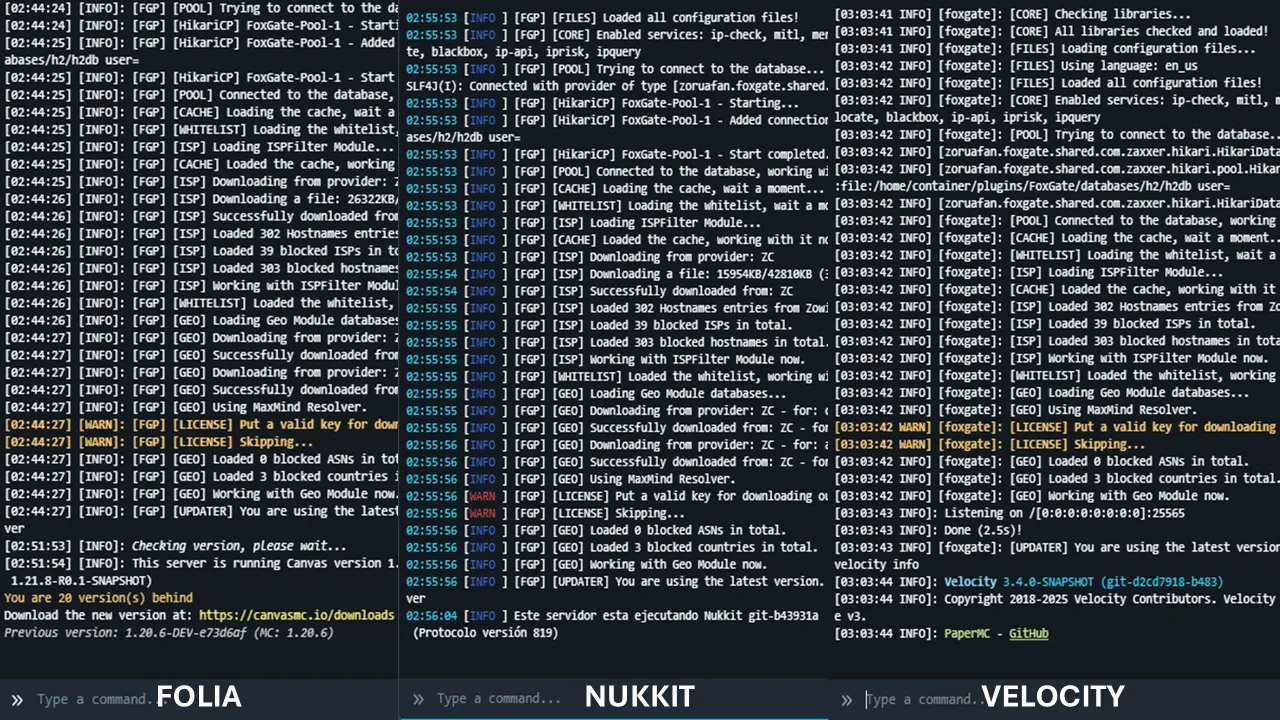
> **Customize the messages how you want**! This plugins supports **MiniMessage** and **Legacy** colors in all versions; also the **configuration it’s too extended for an extremely customization** in base of your needs!
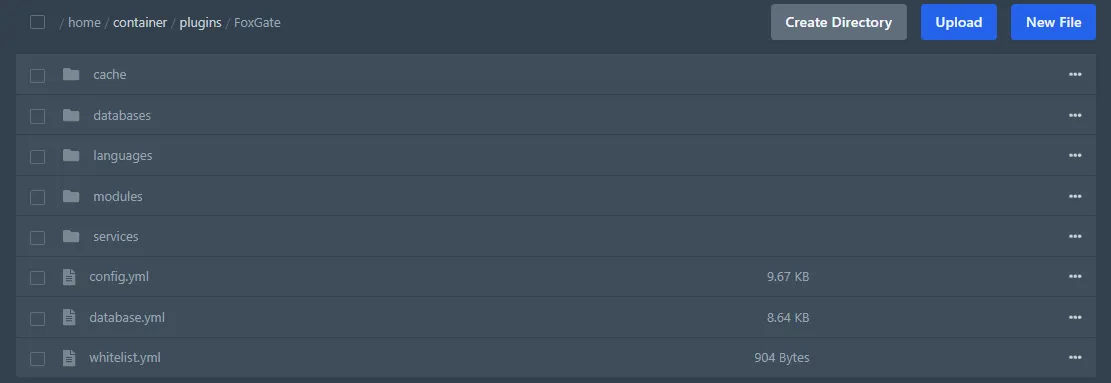
> Downloads **their libraries automatically when starting for adding more options available for you**! Every update, the libraries get downloaded and **automatically updates** for you to mantain always up-to-day in functions and fixes vulnerabilities.
Check all libraries downloaded by the plugin: [Click here to see ‘Dependencies’ tab from BuiltByBit](https://builtbybit.com/resources/61530/field?field=dependencies).
_(Sometimes can be outdated that list; the plugin always download from trusted sites)_
> The **default config is setup to block most VPN’s**, although you can **add a custom service** or **modify existing services in the config**. The plugin was made for support multi-services for detection, and for it, we provide a lot of tools for you: **Send requests with Headers**, **Condition systems for Flag**/**Bypass** (ignore detection) and custom VLs per service (for add VLs to reach maxFlags).
“`yaml
# __ _
# / _ ___ _ ____ _(_) ___ ___ ___
# / _ | ‘__ / | |/ __/ _ / __|
# _ | __| | V /| | (_| ____
# __/___|_| _/ |_|______|___/
#
# The configuration is generated with our File Manager,
# which overrides the real comments. See the description of
# every available services in our GitHub repository of
# issues and wiki.
#
# GitHub:
# https://github.com/IDCTeam-Group/FoxGate-Issues/wiki/Services
#
# Note: Use ‘Ctrl+F’ to search the service, and put the file
# name for search more easy. ^^
# Enable this service?
enabled: true
# Add this field in case require key.
# – This is used for ‘{KEY}’ variable in the
# headers or URL fields.
key: ”
# The plugin should output errors though
# the console?
# – Enable this option if you want get output
# in case a service give errors in the console.
# Useful for debug responses while debugging it’s
# disabled.
#
# Note: This only works in certain scenearies, like
# an API returning ‘nullable’ value or another.
output_errors: true
# Model of the response.
# – Add the model to handle the response of
# the API. Check the response type and set one
# correctly for making this works properly.
#
# Supported values:
# – HTML
# – JSON
# – CONTAINS
model: JSON
# Flags to add when it’s detected in this service.
# – Option for add more VLs to reach the maxFlags
# in each services. Useful if you trust in a service
# and want make it count more VLs.
vls: ‘2’
# URL of the API.
# – This field is important, insert the URL of
# the service for response.
#
# Supported placeholders:
# – {IP} – Return the player’s IP.
# – {KEY} – Return ‘key’ field value.
url: https://central.zowi.gay/check/{IP}
# ⛓ Headers to use.
# – Set custom headers in case it’s required.
# The values can be in List or Map.
#
# Note: Set to ‘[]’ or ‘{}’ to disable.
headers: {
}
# Values to check.
values:
# Fields to check.
# – Disable the fields to check with using
# the value ‘{}’. If you exclude this value,
# field ‘type’ will check if the final
# response contains that value.
fields:
– malicious
# Type to determine.
# – Determine which value needs to determine
# if the connection it’s a VPN/Proxy or another,
# this will check for a String.
#
# Note: Use ‘boolean’ for check for any boolean
# boolean, like: ‘true’/’false’ or ‘0’/’1′.
type: boolean
# Custom conditions to determine bypass or detection logic.
# – These conditions allow advanced control based on fields from the
# API response.
#
# Structure:
# – Each key (e.g. ‘1’, ‘2’, etc.) holds a list of conditions.
# – Each list works with AND logic (all conditions must match).
# – Multiple keys result in OR logic (at least one group must match).
#
# Syntax:
# – Use {field} to refer to response fields (e.g. {score}).
# – Supported operators: ‘=’, ‘!=’, ‘>’, ‘>=’, ‘<', '<='.
# - Values can be strings (true/false) or numbers.
#
# Note: This feature only works in 'JSON' and 'HTML' type,
# and for make this works in HTML, always use '{foxgate_check}' for
# use field (only exists this in HTML).
conditions:
# Conditions for Bypass
# - If any group of conditions here matches, the player will be
# ignored (not flagged). Use this for trusted connections like mobile
# users or low score in risk/fraud.
#
# Note: Disable this condition with 'bypass: {}'.
bypass: {
}
# Conditions for Flag.
# - If any group of conditions here matches, the player will
# be flagged (detected). Useful for detecting based on high
# risk/fraud score, known abuse, etc.
#
# Note: Disable this condition with 'flag: {}'.
flag: {
}
```
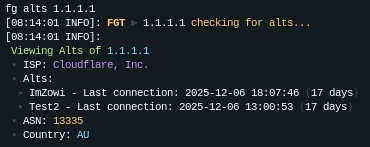
> **View alts from a certain IP with one command**! See and check any IP to verify all accounts cached their last connection, **providing to you exactly data** and **totally configurable message** for you.
> **Limit the maxium connections per IP to prevent players with a lot of accounts simultaneous or bots in your server**. You can **change the limit**, **enable**/**disable feature** and **change the kick message**, using our **IPLimiter** module for making that detection, also, can works based in time, useful for specific scenaries.
“`yaml
# _____ ___ __ _ _ _
# _ / _ / /(_)_ __ ___ (_| |_ ___ _ __
# / // /_)/ / | | ‘_ ` _ | | __/ _ | ‘__|
# // /_/ ___/ /__| | | | | | | | || __| |
# ____// ____|_|_| |_| |_|_|_____|_|
#
# Limit maximum connections per IP to avoid multi-accounts
# or bots.
# When a player join, this start a count in their IP, where
# a new connection in the IP it’s 1 point more, and if
# that IP reachs a certain amount of points, the connection
# will be denied. But, if the player leave the server, the IP
# discount 1 point.
#
# Note: This feature it’s experimental and could be unstable
# in some cases, try using this with precaution. Every update,
# this tries to be more stable while tries to be optimized.
#
# ❓ Has questions? Join to the discord server:
# – https://discord.zowi.gay/
# – https://discord.idcteam.xyz/
# Enable this feature?
enable: true
# Determine the maximum limit of points per
# IP to start blocking coming new connections
# from that IP.
# – Avoid using a low value, because exists rare
# cases where an user joins with a duplicate IP
# in the same city from same provider of ISP.
#
# ⭐ Recommended: 3
maximum: 3
# ⏳ Base in time.
# – When enabled, the IP counter will automatically reset
# after the specified time period. This prevents permanent
# IP blocks and allows users from the same network
# (like family, school, or workplace) to join again
# after the time expires.
#
# With ’30m’ and maximum=3: If 3 players from the same
# IP join within 30 minutes, the 4th will be blocked.
# After 30 minutes, the counter resets to 0.
# If the module it’s disabled, the counter never resets
# automatically, only will allow if one player leaves the
# server, this discount 1 from the counter and the 4th
# can enter.
#
# ⭐ Recommended: 30m
# Note: Use ‘DISABLE’ for disable this feature.
time: DISABLE
“`
**AND**…
– The plugin has **minimal performance impact** due to it running **asynchronously** and in **parallel**.
– Debug the things that **FoxGate** does for **transparency** and **check what returns the API** when a user/ip is scanned with **FoxGate**.
– **Filter all messages** of disconnection when is made by **FoxGate**. This **don’t hide messages that aren’t made by the plugin**, supporting multi-platform. (This was a previously feature of **FoxGate Plus Edition**, passed to **Free Edition**)
– **Blacklist** or **Bypass** specific **ISP** (Internet Service Provider) that you want with our **ISP Module** using **IPInfo** service. It’s free and faster in **FoxGate**!
– **FoxGate** supports **auto-update configuration** and **multi-language**, you can **contribute in translate our plugin** in our [**GitHub repository**](https://github.com/IDCTeam-Group/FoxGate-Issues/tree/main/languages)!
– Supported **IPv4** and **IPv6** on their commands, services and modules.
– **Use your server software firewall for blocking instead of a disconnect message**. If you’re using a supported server’s software (Flamecord, VeloFlame, …), you can use their module of firewall for blocking instead of using server events.
– **Easy to fix a false flag**. You can use Custom VLs per service, remove a wrongly flagged ASN, hostname, using conditions system per service or increase the maximum flags to kick player. You can join to our discord support for ask a great configuration in base of your amount of services and module settings.
– **Perfect detection**. The plugin contains a **lot of modules** for detect any type of **malicious actors**, modules like **ISPFilter**, **GeoLocation**, **IPRange** and **Services**. Also, our new **IPRange** system with new structure, allows to download **custom sources/lists** for different purposes, like: **Proxies**, **Tors** and even **Residential Proxies**! (Check our addon in a page with Plus Edition).
– **Block any connection from Bogon IP** in case an user it’s trying to connect for bypass stuffs. You can toggle this in configuration.
– **Easy and friendly whitelist command**. Gives whitelist to users to avoid the modules with a single command, using __**/fg whitelist **__, in that command you can **add** a user/IP to the whitelist with optional reason and a duration time, see info about a user/IP in whitelist, **remove** a player from whitelist and **purge** the list.
– **Passive mode**. This makes the plugin doesn’t detect on every player join, but allows to has compatibility with another AntiVPN’s or checking with the command manually, useful for checking only in certain cases in every services.
– **Highly recommended**. This is a better solution for replace your another **AntiVPN** plugin for this, customize how you want, change the things for your benefit and enjoy with **FoxGate**!

**FoxGate** It is lightweight and fast in making multi-verification.
**Want see first the Plus version?**
`(Plus version add new features that it’s perfect for an antivpn)`
| BuiltByBit | Polymart | Spigot
|:———————:|:———————:|:———————:|
| [builtbybit.com](https://builtbybit.com/resources/61530) | [polymart.org](https://polymart.org/resource/7327) | [spigotmc.org](https://www.spigotmc.org/resources/123563/)
| See the Plus version in BuiltByBit now. | See the Plus version in Polymart now. | See the Plus version in SpigotMC now. |
## 🚀 Services available in the default config.
> **❝ Do these services in the config works correctly?**
> The list of services in the default config have all been tested at least once. You can still configure each services values as well as edit or add more services (like in the example above). Services may not always function due to issues on their end or because of how they where added to the config.
Some services are **disabled by default** because **they require an API key to function**. However, **thirteen of these services** work without a key and are enabled by default, providing basic **VPN** and **proxy** detection right away. To maximize protection against **VPNs**, **proxies**, and **other threats**, it is recommended to obtain API keys for the remaining services. Doing so will enhance the accuracy and effectiveness of detection.
See more about these services in [**our wiki in GitHub**](https://github.com/IDCTeam-Group/FoxGate-Issues/wiki/Services).
| ✅ FREE SERVICE – No key required for work. | ⭕ KEY REQUIRE SERVICE – Key required for work. |
| :— | :— |
| 1. [**BlackBox**](https://github.com/IDCTeam-Group/FoxGate-Issues/wiki/Services#blackbox) | 1. [**2IP**](https://github.com/IDCTeam-Group/FoxGate-Issues/wiki/Services#2ip) |
| 2. [**BlockListDE**](https://github.com/IDCTeam-Group/FoxGate-Issues/wiki/Services#blocklistde) | 2. [**AbuseIPDB**](https://github.com/IDCTeam-Group/FoxGate-Issues/wiki/Services#abusepidb) |
| 3. [**CINSscore**](https://github.com/IDCTeam-Group/FoxGate-Issues/wiki/Services#cinsscore) | 3. [**AntiVPN.io**](https://github.com/IDCTeam-Group/FoxGate-Issues/wiki/Services#antivpn-io) |
| 4. [**FastAsFuck**](https://github.com/IDCTeam-Group/FoxGate-Issues/wiki/Services#fastasfuck) | 4. [**BanProxy**](https://github.com/IDCTeam-Group/FoxGate-Issues/wiki/Services#banproxy) |
| 5. [**FunkeMunky**](https://github.com/IDCTeam-Group/FoxGate-Issues/wiki/Services#funkemunky) | 5. [**FocSec**](https://github.com/IDCTeam-Group/FoxGate-Issues/wiki/Services#focssec-14-days-trial-paid-service) |
| 6. [**GreenSnow**](https://github.com/IDCTeam-Group/FoxGate-Issues/wiki/Services#greensnow) | 6. [**FreeIPAPI**](https://github.com/IDCTeam-Group/FoxGate-Issues/wiki/Services#freeipapi) |
| 7. [**IPLocate**](https://github.com/IDCTeam-Group/FoxGate-Issues/wiki/Services#iplocate) | 7. [**GetIPIntel**](https://github.com/IDCTeam-Group/FoxGate-Issues/wiki/Services#getipintel) |
| 8. [**IP-API**](https://github.com/IDCTeam-Group/FoxGate-Issues/wiki/Services#ip-api) | 8. [**GreIP**](https://github.com/IDCTeam-Group/FoxGate-Issues/wiki/Services#greip) |
| 9. [**IP-Check**](https://github.com/IDCTeam-Group/FoxGate-Issues/wiki/Services#ip-check) | 9. [**IP2Location**](https://github.com/IDCTeam-Group/FoxGate-Issues/wiki/Services#ip2location) |
| 10. [**IPAPI.is**](https://github.com/IDCTeam-Group/FoxGate-Issues/wiki/Services#ipapi-is) | 10. [**IPDetective**](https://github.com/IDCTeam-Group/FoxGate-Issues/wiki/Services#ipdetective) |
| 11. [**IPQuery**](https://github.com/IDCTeam-Group/FoxGate-Issues/wiki/Services#ipquery) | 11. [**IPGeolocation**](https://github.com/IDCTeam-Group/FoxGate-Issues/wiki/Services#ipgeolocation-paid-service) |
| 12. [**IPRisk**](https://github.com/IDCTeam-Group/FoxGate-Issues/wiki/Services#iprisk) | 12. [**IPHub**](https://github.com/IDCTeam-Group/FoxGate-Issues/wiki/Services#iphub) |
| 13. [**MarvinMC**](https://github.com/IDCTeam-Group/FoxGate-Issues/wiki/Services#marvinmc) | 13. [**IPHunter**](https://github.com/IDCTeam-Group/FoxGate-Issues/wiki/Services#iphunter) |
| 14. [**MerakiStudios**](https://github.com/IDCTeam-Group/FoxGate-Issues/wiki/Services#merakistudios) | 14. [**IPQualityScore**](https://github.com/IDCTeam-Group/FoxGate-Issues/wiki/Services#ipqualityscore) |
| 15. [**NegativityAPI**](https://github.com/IDCTeam-Group/FoxGate-Issues/wiki/Services#negativity-api) | 15. [**IPStack**](https://github.com/IDCTeam-Group/FoxGate-Issues/wiki/Services#ipstack) |
| 16. [**Rayzs.de**](https://github.com/IDCTeam-Group/FoxGate-Issues/wiki/Services#rayzs-de) | 16. [**IsProxyAPI**](https://github.com/IDCTeam-Group/FoxGate-Issues/wiki/Services#isproxyip) |
| 17. [**TCPShield**](https://github.com/IDCTeam-Group/FoxGate-Issues/wiki/Services#tcpshield) | 17. [**NoProxy**](https://github.com/IDCTeam-Group/FoxGate-Issues/wiki/Services#noproxy-paid-service) |
| 18. [**ZowiCentral**](https://github.com/IDCTeam-Group/FoxGate-Issues/wiki/Services#zowis-central) | 18. [**ProtectCord**](https://github.com/IDCTeam-Group/FoxGate-Issues/wiki/Services#protectcord) |
| **- NO MORE -** | 19. [**ProxyCheck**](https://github.com/IDCTeam-Group/FoxGate-Issues/wiki/Services#proxycheck) |
| | 20. [**ProxyRadar**](https://github.com/IDCTeam-Group/FoxGate-Issues/wiki/Services#proxyradar) |
| | 21. [**VPNAPI**](https://github.com/IDCTeam-Group/FoxGate-Issues/wiki/Services#vpnapi) |
| | 22. [**VPNBlocker**](https://github.com/IDCTeam-Group/FoxGate-Issues/wiki/Services#vpnblocker) |
> **❝ Want to know how to configure these services?**
> Check the configuration section below for examples and templates. When a player is detected using a VPN or proxy, the plugin automatically stores this information in a database. This prevents repeated API requests for the same IP address for a configurable number of hours, reducing unnecessary API calls and improving efficiency.
By using both services that are enabled-by-default and those that require API keys, you can create a robust detection system that effectively identifies and blocks **VPN**, **proxy**, and **other undesired connections**. See more information in the [**documentation section**](https://github.com/IDCTeam-Group/FoxGate-Issues/wiki/Configuration#1-how-can-i-add-a-custom-api-in-case-the-plugin-doesnt-have-one-in-the-default-list).
## 📊 Statistics.
> **❝ What data is collected?**
> We are using **[bStats](https://bstats.org/)**, this **does not collect any personal data**. Most of the collected data is information about the plugin’s server like **player count**, **online mode**, **Minecraft version**, **Java version**, and **more**. All data gets sent and stored completely anonymously. See more in information about this in **[bStats: Getting Started](https://bstats.org/getting-started)**.
This stats are collected by **[bStats.org](https://bstats.org/)**, the information under are shared with the **Plus** version, which is identified as “-pv” in version of the plugin, this can help to the creator to view some statistics without taking some performance. Read quote about the data collected, you can always disable the collection in our **config.yml** available in the plugin’s folder. Since **1.0.2 (plus)** and **1.1.0 (free)**, **FoxGate** uses their own code base for **Metrics**, but following their rules.
This use **asynchronous methods to send data** and **changes to Gson** for better stability; improving the performance of this. **You can safety has enable** this to help to the creator **without affecting the performance**.
**JAVA SOFTWARES**
| Bukkit | BungeeCord | Velocity |
|:—:|:—:|:—:|
| 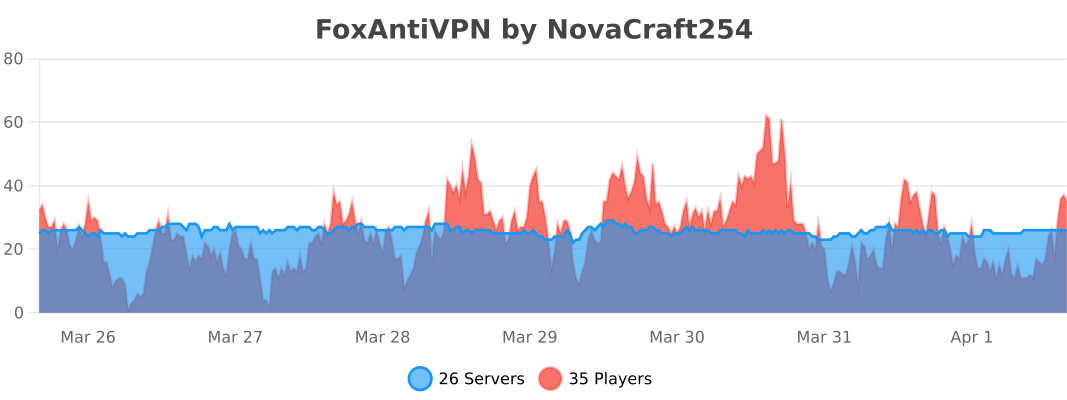 | 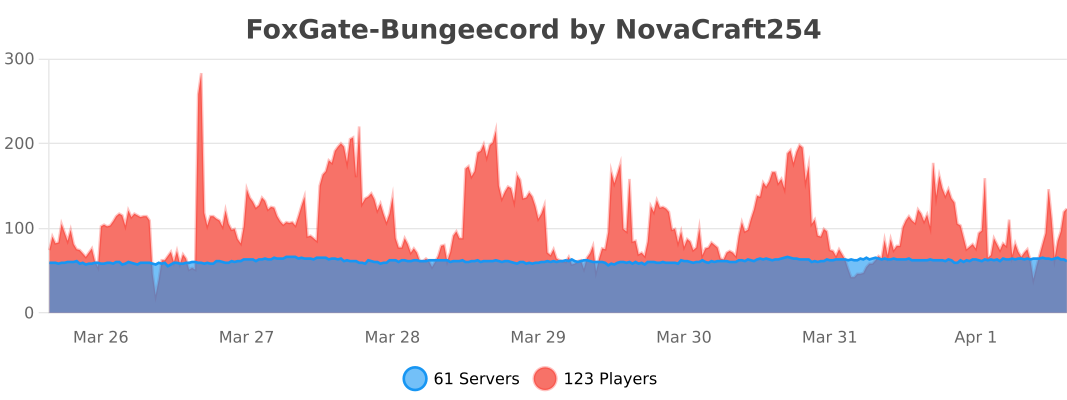 | 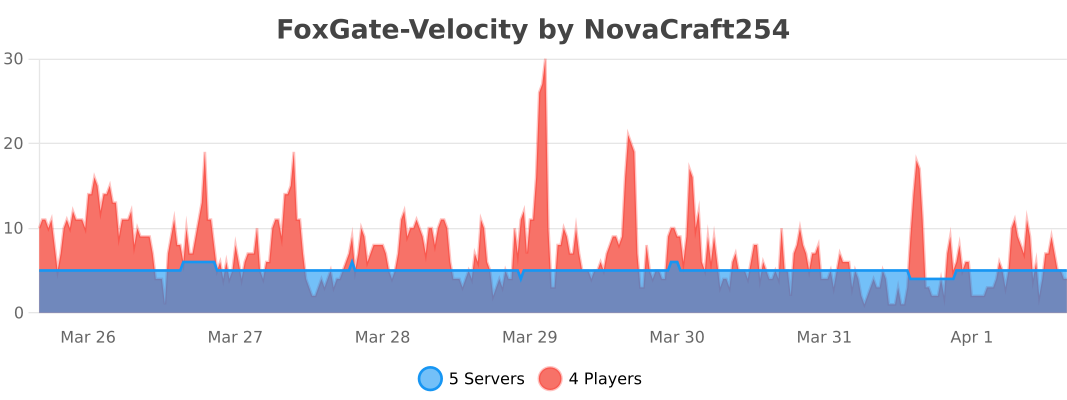 |
| **Bukkit**
[➡️ Show through bStats site.](https://bstats.org/plugin/bukkit/FoxAntiVPN/22142)
View statistics of **Bukkit** platform by clicking above. | **BungeeCord**
[➡️ Show through bStats site.](https://bstats.org/plugin/bungeecord/FoxGate-Bungeecord/22460)
View statistics of **BungeeCord** platform by clicking above. | **Velocity**
[➡️ Show through bStats site.](https://bstats.org/plugin/velocity/FoxGate-Velocity/22969)
View statistics of **Velocity** platform by clicking above. |
**OTHERS SOFTWARES: BEDROCK MINECRAFT AND HYTALE SOFTWARE**
| Nukkit | WaterdogPE | Hytale |
|:—:|:—:|:—:|
| 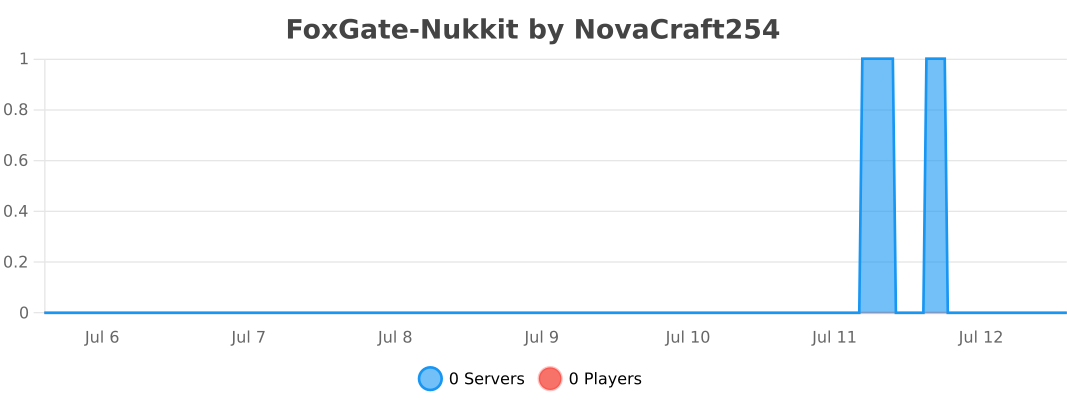 |  |  |
| **Nukkit**
[➡️ Show through bStats site.](https://bstats.org/plugin/bukkit/FoxGate-Nukkit/26461)
View statistics of **Nukkit** platform by clicking above. | **WaterdogPE**
[➡️ Show through bStats site.](https://bstats.org/plugin/bungeecord/FoxGate-WaterdogPE/26515)
View statistics of **WaterdogPE** platform by clicking above. | **Hytale**
[➡️ Show through bStats site.](https://bstats.org/plugin/bukkit/FoxGate-Hytale/28871)
View statistics of **Hytale** platform by clicking above. |
## 🔗 Links.
| Documentation | Discord |
|:———————:|:———————:|
| [github.com](https://github.com/IDCTeam-Group/FoxGate-Issues/wiki) | [discord.idcteam.xyz](https://discord.gg/FTtVXfj) |
| Some documentation for help. | Join our community for technical support. |
FoxCore
FoxCore is a framework used to provide support for tool libraries and cross loader configuration file systems. Currently, the following configuration file formats are supported:
1. toml (default)
2. json
3. setting (deprecated)
Currently, there is no complete implementation of I18N, but the front-end of the web configurator is fully compatible with web translator plugins (such as those included with Edge). Non Chinese users are advised to use a web translator.
FoxCore itself provides the following features:
1. Minecraft Server online configuration file management
2. Other languages supported by Minecraft Server MOTD (other languages will be automatically transcoded and decoded during loading)
The above functions are only effective on Fabric, NeoForge, and Paper servers. We did not use Mixin in the implementation of these functions to ensure maximum compatibility.
In addition, the front end of FoxCore is completely independent of the back end, which means that you can use any FoxCore front end to access any FoxCore back end, just fill in the corresponding server address in the settings (for the current server, it defaults to **/api** ).
Here are some previews of front-end web pages:


FlowGate Lite

—
[](https://discord.com/invite/88avyryBgt)
—


—

—


—

—


—

—
