# KauriVPN
The most accurate and lightweight AntiVPN plugin
*If you’re enjoying the service, please leave a review!*
*Join our [Discord](https://discord.gg/CmAvzTgz43) for support!*
## Web Based Proxy Lookup: [isitbad.io](https://isitbad.io)
—
## Description
This AntiVPN plugin isn’t like other AntiVPN plugins, which use external databases and services not made by the developer themselves. We use our own in-house API to keep things fast and well integrated. And, it’s **compatible with [Velocity](https://velocitypowered.com), [BungeeCord](https://www.spigotmc.org/resources/bungeecord.2719/), and [Spigot](https://www.spigotmc.org/)** in the same JAR!
## Why KauriVPN?
We don’t use any external APIs on our backend, just our homemade special sauce for detecting VPNs, Proxies, and TOR. Not only do we have a **high accuracy** and detection rate, but we also process your queries **fast** in under 2ms! Our API updates its IP tables every 10 minutes, so you don’t have to worry about outdated information allowing bad actors on your server or blocking legitimate connections.
We have multiple regions for our API, allowing for extremely low network latency for most locations!
You can test our API with your own VPN [here](https://funkemunky.cc/vpn/amiusingavpn)!
—
## Plugin Features!
– Optional use of MySQL databases to cache query results.
– Exemption of individual uuids/players from VPN checking.
– Block players based on prefix so you can exempt Bedrock players.
– Ingame player IP lookups, with very extensive detail.
– Get alerts when players join on VPNs!


—
## Plugin Information *(IMPORTANT TO READ)*
### Compatibility
– **BungeeCord Versions**: b1100 and newer have been tested to work
– **Bukkit/Spigot Versions**: 1.7.10 and newer have been tested to work
– **Velocity Versions**: 3.0.1 and newer have been tested to work
### TCPShield
If you are going to be using TCPShield, please ensure you are using their [provided “RealIP” plugin](https://github.com/TCPShield/RealIP/releases). Without this plugin, KauriVPN will see players joining from TCPShield proxies. This means players will always be seen as on a VPN, even if they are not using one.
### GeyserMC Users
Be wary of how you configure GeyserMC for your server. Some configurations of KauriVPN and GeyserMC will result in all Bedrock players being detected as using a proxy. If this is the case for you, please set your player names to use a prefix and configure the `prefixWhitelist` section of KauriVPN with your prefix to prevent detection.
### Commands
– `/antivpn` – View all commands you can use. – `antivpn.command`
– `/antivpn lookup ` – Lookup player IP information – `antivpn.command.lookup`
– `/antivpn alerts` – Toggle your VPN usage alerts – `antivpn.command.alerts`
– `/antivpn allowlist ` – Exempt players or IPs from proxy checks – `antivpn.command.allowlist`
– `/antivpn clearcache` – Clear the API response cache if problems occur
– `/antivpn plan` – View your KauriVPN Plan and Queries Info
– `/antivpn reload` – Reload the KauriVPN plugin
### Other Permissions
– `antivpn.bypass`: Allow a player to bypass the checking/kicking for proxies.
### Generated Files
**config.yml**
“`yaml
#####################################################
# KauriVPN Config #
# by Brighten Development #
#####################################################
# If you find that you run out of your free 20,000 queries, you may purchase a license on https://funkemunky.cc/shop
license: ”
# Message only sent with commands disabled below. Supports color codes (‘&’)
kickMessage: Proxies are not allowed on our server
# Caching results will lower your query usage, but results may be out of date.
cachedResults: true
# All players with any of the following characters in the beginning of their name will be whitelisted
# This is a useful feature for servers that allow players through Geyser and their IPs are not forwarded, causing
# players to be removed falsely for use of proxy.
prefixWhitelists: []
# Configure your database here.
database:
# Enable to cache queries and save alerts state beyond restarts
enabled: false
useCredentials: true
#Options Mongo and MySQL
type: MySQL
# The database name you would like to use
database: kaurivpn
# Can be used if you prefer to authenticate via Mongo URL
mongoURL: ”
# Your database username
username: root
# Your database password
password: password
# The IP of your database goes here
ip: localhost
# -1 will use default port of databases (MySQL:3306, Mongo:27017). Otherwise, enter alternative ports here.
port: -1
commands:
# Enable this to override the default kick function of the plugin with your own commands
enabled: false
# List of commands to run when a player is detected to be using a proxy. Supports color codes (‘&’)
execute:
– kick %player% VPNs are not allowed on our server!
# Enable/disable the default kicking feature of KauriVPN.
kickPlayers: true
# Configure all alerting functionality
alerts:
# You may set to ‘false’ to disable all alerts functionality
enabled: true
# Message to send to users with alerts enabled
# Placeholders: %country% (Country name), %player% (Player name), %reason% (Proxy detection method),
# %city% (City name).
message: ‘&8[&6KauriVPN&8] &e%player% &7has joined on a VPN/proxy &8(&f%reason%&8)
&7in location &8(&f%city%&7, &f%country%&8)’
# Configuration for country gatekeepings
countries:
# You must use ISO codes for country configuration: https://www.iban.com/country-code
# Leave empty to disable this configuration
list: []
# Set whitelist to true to only allow listed country codes, and false to deny listed country codes.
whitelist: true
# The commands to be run if the player is not allowed on the server with the above configured conditions
# Placeholders: %country% (Country name), %player% (Player name), %code% (Country ISO Code)
# Keep this empty with “[]” if you want to use the built-in kicking system.
commands: []
# The kick message that will be used if commands are configured to use the built-in kicking sytem.
# PlaceHolders: %country% (Country name), %player% (Player name), %code% (Country ISO Code)
vanillaKickReason: “&cSorry, but our server does not allow connections fromn&f%country%”
# This will disable any information being sent to https://bstats.org. We recommend you keep this enabled as it helps
# us understand our users and put effort where it is needed. All information sent goes under their privacy as seen
# here: https://bstats.org/privacy-policy
bstats: true
“`
## Dependencies
None 🙂
—
## Free AntiVPN?
Yes, it’s free! You don’t even have to pay for an external API. Our service offers a generous 20,000 queries per month for free. If you are a server with less than 80 players concurrently, you are highly unlikely to reach this cap and won’t need to upgrade. If you start reaching the cap, you can upgrade your plan on [https://funkemunky.cc/shop](https://funkemunky.cc/shop) and insert your license into the `config.yml`.
JustOneMore
# JustOneMore
JustOneMore automatically increases your server’s max player count by 1, based on the current number of players.
Velocity, Spigot & BungeeCord are supported.
# Example:
If you have 69 players on your server, the max player count will automatically adjust to 70.
# Installation:
1. Download the plugin jar file.
2. Place it in the plugins folder.
3. Start your server. That’s it!
# Need Help?
If you encounter any issues, contact me on Discord: xii69
JoinMusic
**German Version below**
For support, join my [Discord server](https://discord.gg/qkskydbamw).
—
## Englisch
### JoinMusic – Plays Music on Player Join
**JoinMusic** enhances your Minecraft server’s atmosphere by playing custom sounds or music when a player joins. Perfect for special events, seasonal themes, or simply to welcome players, JoinMusic makes every arrival feel unique and festive.
#### Key Features
– **Seasonal and Event-Specific Music:** Set custom sounds for various times of the year or specific events (e.g., Halloween, Christmas, anniversaries).
– **Compatibility:** Works with Bukkit, Spigot, PaperMC, and BungeeCord. For BungeeCord, you can configure sounds to play only when a player joins the lobby server for the first time.
– **Easy Configuration:** Customize sounds via simple configuration files.
JoinMusic brings your server to life, setting a welcoming tone as soon as players step into your world.
### Functionality
– **Play Music on Join:** Play an `.nbs` file for players who join the server.
– **Adding Files:** Place `.nbs` files in the plugin folder and add the filename to `config.yml`. A list of `.nbs` files can be found [here](https://github.com/thatcraniumguy/songs/tree/master/nbs%20files).
**Optional Feature (from version 4.0):**
Set `options.music.random` to `true` in `config.yml`, and place multiple `.nbs` files in the specified folder (`random` by default, or as set in `options.music.RandomFoldername`). A random song will be selected each time a player joins.
### Installation
1. Download the latest `PlayMusic.jar` file.
2. Download the [NoteBlockAPI](https://www.spigotmc.org/resources/noteblockapi.19287/).
3. Stop your server.
4. Place `PlayMusic.jar` and the `NoteBlockAPI` file in the `/plugins` folder.
5. Restart your server.
### JoinMusic – Musik beim Betreten des Servers abspielen
**JoinMusic** verleiht deinem Minecraft-Server eine besondere Atmosphäre, indem es Musik oder Töne abspielt, sobald ein Spieler beitritt. Ideal für Events, saisonale Themen oder als Willkommensgruß – JoinMusic macht den Spielerempfang besonders.
#### Funktionen
– **Musik beim Server-Betreten:** Spielt eine `.nbs` Datei, wenn ein Spieler den Server betritt.
– **Dateien Hinzufügen:** Lege `.nbs` Dateien im Plugin-Ordner ab und füge den Dateinamen in die `config.yml` hinzu. Eine Liste von `.nbs` Dateien findest du [hier](https://github.com/thatcraniumguy/Songs).
**Optional (ab Version 4.0):**
Setze `options.music.random` auf `true` in der `config.yml`. Lege mehrere `.nbs` Dateien im festgelegten Ordner (standardmäßig `random` oder nach Einstellung unter `options.music.RandomFoldername`) ab, und es wird automatisch ein Song beim Server-Betritt ausgewählt.
### Installation
1. Lade die neueste `PlayMusic.jar` Datei herunter.
2. Lade die [NoteBlockAPI](https://www.spigotmc.org/resources/noteblockapi.19287/) herunter.
3. Stoppe den Server.
4. Lege die `PlayMusic.jar` und die `NoteBlockAPI` Datei in den `/plugins` Ordner.
5. Starte deinen Server neu.
—
## Additional Information
### To-Do List
– [To-Do List on GitHub](https://github.com/T0biii/JoinMusic/projects)
### Updater
**JoinMusic** uses Gravity’s Updater, which only informs you about updates.
To disable update notifications, set `’update-check’` and `’updateinfo’` to `false` in `config.yml`.
To only show updates in the console, set `’update-check’` to `true` and `’updateinfo’` to `false`.
### Metrics
**JoinMusic** uses [bstats.org](https://bstats.org/plugin/bukkit/joinmusik/6447) to collect anonymous data starting from version v2.2. Default data includes:
– Server’s UUID
– Player count
– Server’s online mode
– Server’s Bukkit version
– Java version and OS details
– System cores and supported plugins
To disable metrics, set `”options.Metrics”` to `false` in `config.yml`.
JoinMeBungee
# JoinMeBungee
JoinMeBungee is a lightweight BungeeCord / proxy plugin that allows players to send a clickable JoinMe message across the entire network.
With `/joinme`, players can promote the server they are currently playing on, and other players can instantly join that server by clicking the chat message.
To prevent spam, the plugin includes a built-in token system. Each JoinMe can require tokens, allowing usage to be limited, controlled, and balanced across the network.
This makes the plugin especially useful for minigames, private rounds, event lobbies, party sessions, and general community activity on BungeeCord or Waterfall networks.
## Features
– Clickable JoinMe chat messages
– Instant server joining
– Built-in token system for JoinMe usage control
– Anti-spam usage limiting
– FILE and MySQL storage support
– Configurable messages
– Hex color and gradient support
– Active JoinMe expiry system
– LuckPerms rank formatting support
– Player registry for known player lookup
– Admin token management commands
## Commands
### `/joinme`
Creates a JoinMe for the server the player is currently playing on.
### `/token`
Shows your own JoinMe token amount.
### `/token `
Shows the token amount of another known player.
### `/tokens add `
Adds tokens to a player.
### `/tokens remove `
Removes tokens from a player.
### `/tokens set `
Sets a player’s token amount.
### `/tokens reset `
Resets a player’s token amount.
1. Put the plugin `.jar` into your proxy `plugins` folder
2. Start the proxy once
3. Open the generated `config.yml`
4. Configure storage, messages, token settings, and rank formatting
5. Restart the proxy
## Storage
Supported storage types:
– FILE
– MySQL
## Important
– This is a BungeeCord / proxy plugin
– This plugin is made for network-wide JoinMe usage
– The token system is part of the JoinMe workflow and is used for anti-spam / usage control
– This is **not** a Bukkit / Spigot / Paper plugin for single servers
– You only need to install it on the proxy
IOMawaba
Mawaba: **Ma**nage **wa**rnings and **ba**ns for players on a Minecraft server.
This tool is designed to allow a server or network’s staff members to handle the community. Warnings, kicks and bans are included in these measures. The plugin works in dual mode: it can be installed on both Bungee and Spigot (or equivalents) to provide various operations. For the best results, install it on both.
The kicks and bans commands were designed to reuse the syntax of [Bungee Admin Tools](https://github.com/alphartdev/BungeeAdminTools) as the staff was already familiar with the syntax.
A MySQL database is required.
# Warnings
Warnings are meant to tell a player that they’re violating the rules, using a method more direct than a simple chat message. The staff can enter `/warning PLAYER [reason]` to tell someone to back off. If no reason is provided, a default explanation about griefing will appear.
A core concept is that the staff members don’t have to know how many times someone has been warned: they can just `/warning` them over and over again and the effects will stack automatically.
Warnings older than six months aren’t counted.
1. The first `/warning` shows a clear “Pay attention” message to the target and slows them down for 30 seconds to grab their attention.
2. The second warning does the same as the above, plus kicks them out after a delay.
3. The third warning completely stops the player, displays the message then kicks them as a final warning.
4. The fourth warning bans for 30 days.
5. The fifth warning gives a permanent ban.
If a warning has been given by mistake, `/warning PLAYER clear` will remove the latest one, ensuring their standing is correctly set.
# Kicks and bans
You should know what to expect from these. Temporary and permanent options are offered, the full syntax is described below.
# Setup guide
1. Download the plugin and place it in the plugins/ directory of the server / Bungee.
2. Start and stop the server / Bungee to create the configuration file.
3. Edit `plugins/IOMawaba/config.yml` to set your settings, described below.
4. Restart the server / Bungee.
# Wishlist
* Implement the kicks and bans commands at the server level for standalone use.
* Implement the warnings at the Bungee level to avoid requiring local installs.
* Allow the ban methods to apply to a single server on a network.
* Flexible notifications and warning effects.
# Configuration
`database.host`: Database host
`database.port`: Database port
`database.base`: Database name
`database.username`: Database username
`database.password`: Database password
`bungee.use-broadcast`: Set to true if used in a Bungee environment
# Commands
## Bungee
The “g” prefix stands for “global”, as in the entire network. Any [reason] message is optional.
`/gkick PLAYER [reason]`: Kick a player from the network, with an optional message
`/gtempban PLAYER DURATION [reason]`: Temporarily ban a player from the network
`/gtempbanip IP DURATION [reason]`: Temporarily ban an IP address from the network
`/gban PLAYER [reason]`: Permanently ban a player from the network
`/gbanip IP [reason]`: Permanently ban an IP address from the network
`/gunban PLAYER`: Unban a player from the network
`/gunbanip IP`: Unban an IP address from the network
DURATION for temporary bans supports a mix of any of the following:
* 7y or 7years: 7 years
* 6mo or 6months: 6 months
* 5w or 5week: 5 weeks
* 4d or 4days: 4 days
* 3h or 3hours: 3 hours
* 2m or 2mins: 2 minutes
* 1s or 1second: 1 second
Plural and singular forms can be used and mixed in any order. For example, 2y4mo would ban for 2 years and 4 months. 3mins5day would be 5 days and 3 minutes. 10s would be 10 seconds.
## Server
`/warning PLAYER [reason]`: Issue a warning to the player
`/warning PLAYER clear`: Clear the latest warning provided
`/w`: Alias for `/warning`
# Permissions
`iomawaba.admin`: Access to the full suite of commands
`iomawaba.warning`: Allow the user to issue warnings or retract them
# Why is this plugin reliable?
I use all of my plugins on my own servers, and I like my plugins to be stable, reliable and low maintenance. Breaks on version upgrades are not expected, but should they happen, they will be quickly fixed.
# Support my work
If you enjoy my work, I [welcome sponsors](https://www.interordi.com/sponsor.php)! I’ve been running Minecraft servers since 2011, developed several plugins and tools for server owners, and I’m now working my way through releasing many of them. Your support would go a long way toward encouraging me to put more time and effort into this, plus fix any issues that might be discovered over time!
## About
The chat is great, players can socialize with each other. But here’s the thing, why not make it even more interact-able?
With this plugin, you will be able to show your item in hand, inventory content and ender chest content with your friends! Even across servers in your global bungeecord chat!
This plugin also allows you to create your own interactive keywords for your players to use in chat!
**InteractiveChat is designed to work on top of your existing chat formatting plugin, not as a replacement!**
***
###  Using [DiscordSRV](https://modrinth.com/plugin/discordsrv/)?
Check out [**this addon**](https://modrinth.com/plugin/interactivechat-discordsrv-addon/) which lets you show placeholders and show inventories from InteractiveChat on discord!
You can also have images sent from discord previewed on maps and have attachments beautified into clickable and hoverable text in-game!
***
## Features
Video by [Server.pro](https://www.youtube.com/channel/UCeQW27n9FmeYcMJrUjusnHg) featuring **an outdated version of InteractiveChat (v2)**
### 1. Item Display Functions
– Type **[item]** in chat to show off the item in your hand!
– Type **[inv]** in chat to show off your inventory
– Type **[ender]** and you guessed it! Show your ender chest!
*(Each of them can be toggled in the config as well as changing their keyword)*
*^ The two types of inventory display layout you can choose from (Layout 0 & 1)*
### 2. Custom Interactive Chat Keywords
– You can create whatever placeholder you want and have them replace keywords in the chat
– Or simply just add a hover message as well as click actions to keywords
– Or both!
– Supports multiple lines of hover text
*v [pos] is one of the default example custom interactive keyword*
### 3. Interactive Player Names
– Replace all player names that appear in the chat with interactive content, such as hover messages and click actions!
*(Supports [URL=’https://www.spigotmc.org/resources/essentialsx.9089/’]Essentials [/URL]Nicknames! You can create an addon through the API if you need support for your own nicknaming plugins.)*
### 4. Player Mentioning
– If a player’s name is mentioned by another player, they will be notified with a sound and a message!
– Notify the player with a Title/SubTitle/ActionBar/BossBar/Toast, if the version of Minecraft supports it (Each can be disabled in the config)
*(Togglable in the config of course!)*
### 5. Bungeecord and Velocity Supported! Everything works across your network!
If you use chat managing plugins that support bungeecord or velocity, you can enable bungeecord mode by installing the plugin on spigot and bungeecord/velocity and having the bungeecord option enabled in the config on all spigot servers!
With bungeecord enabled, all placeholders, including [item], [inv] etc. and custom ones will work across servers. Mentioning and everything else will also work between servers!
### 6. Easy RGB and Font*[1.16 or above]*
You can use RGB code in any part of the config that support colors! You can even use them in _chat_!
“`
&x&f&f&f&f&f&f
“`
or
“`
[color=#123456]
“`
or
“`
&#fe34d5
“`
If you have a custom resource pack that has different fonts, you can even use them like color codes! _Works with any messages in the chat, even chat messages from other plugins._
“`
[font=uniform]
“`
### 7. Languages!
And of course! You will be able to modify all the messages that are sent to players to suit your server as well!
Item material names will be automatically translated into each user’s client language!
**The plugin changes messages on a packet level, so it should work on top of other chat plugins** *(that doesn’t also do this)*.
## Dependencies *(These dependencies are not required on Proxies)*
– [ProtocolLib](https://www.spigotmc.org/resources/protocollib.1997/) or [PacketEvents](https://modrinth.com/plugin/packetevents)+[Module](https://modrinth.com/plugin/interactivechat-packetevents) *(Please install the latest version that is compatible with your server version)*
– [PlaceholderAPI](https://www.spigotmc.org/resources/placeholderapi.6245/)
– [Vault](https://www.spigotmc.org/resources/vault.34315/)
## Installation
1. Put InteractiveChat.jar into the plugins folder along with the required dependencies
(If you plan to use the plugin with bungeecord or velocity, install the plugin on bungeecord/velocity as well and enable the bungeecord option in the interactivechat config on *_**ALL**_*spigot servers, no dependencies are required on bungeecord, and yes, just use the same jar)
2. Start the server
3. *Edit the config (if you need to)*
4. *Restart the server (if you changed something in the config in step 3)*
## Commands
### Minecraft Server (Spigot, Paper etc.) Commands:
/interactivechat reload – Reloads the plugin (or /ic reload)
/interactivechat update – Check for updates (or /ic update)
/interactivechat chat – Send chat messages with placeholder and player name auto complete (or /ic chat)
/interactivechat list – List all placeholders you can use (or /ic list)
/interactivechat mentiontoggle – Toggle mentioning for yourself (or /ic mentiontoggle)
/interactivechat setinvdisplaylayout – Set your own preferred inventory display layout (or /ic setinvdisplaylayout)
### Proxy Server (Bungeecord / Velocity) Commands:
/interactivechatproxy backendinfo – List all InteractiveChat information of the servers in your proxy (or /icp backendinfo)
## Q&A
### My placeholders don’t work! They show as something like %player_name%! What do I do?
[PlaceholderAPI](https://www.spigotmc.org/resources/placeholderapi.6245/) requires you to download expansions in order to function, you can take a look at the different expansions and their placeholders [here (click me)](https://github.com/PlaceholderAPI/PlaceholderAPI/wiki/Placeholders).
For example, if you want **%player_name%**to work:
1. run /papi ecloud download player
2. run /papi reload
### My players get kicked for “You are sending too many packets!”, what should I do?
The kick message: You are sending too many packets! probably comes from ViaVersion.
Try increasing or _setting the GLOBAL PACKET LIMITER to -1_ in the ViaVersion config [Both in bungeecord/velocity (if you’ve installed it on that) and backend servers (e.g. spigot)]
## Permissions
“`yaml
interactivechat.reload:
description: Allows you to reload the plugin
default: op
interactivechat.backendinfo:
description: Allows you check the status of backend servers on bungeecord
default: op
interactivechat.cooldown.bypass:
description: Allows you to bypass cooldown
default: op
interactivechat.module.item:
description: Allows you to use the item placeholder
default: true
interactivechat.module.inventory:
description: Allows you to use the inventory placeholder
default: true
interactivechat.module.inventory.setlayout:
description: Allows you to use set your preferred inventory display layout
default: true
interactivechat.module.inventory.setlayout.others:
description: Allows you to use set the preferred inventory display layout of others
default: op
interactivechat.module.enderchest:
description: Allows you to use the ender chest placeholder
default: true
interactivechat.module.custom:
description: Allows you to use custom placeholders in chat
default: true
interactivechat.mention.player:
description: Allows you to mention others
default: true
interactivechat.mention.here:
description: Allows you to mention all players in your server
default: op
interactivechat.mention.everyone:
description: Allows you to mention everyone
default: op
interactivechat.mention.toggle:
description: Allows you to toggle your own mentions
default: true
interactivechat.mention.toggle.others:
description: Allows you to toggle mentions of other players
default: op
interactivechat.list:
description: List all placeholder which you have permission to
default: true
interactivechat.list.all:
description: List all placeholder
default: op
interactivechat.parse:
description: Let you try out placeholders which you have permission to
default: true
interactivechat.chat:
description: Let you use the interactivechat chat command
default: true
interactivechat.chatcolor.translate:
description: Allows you to use alternate color code
default: true
interactivechat.customfont.translate:
description: Allows you to use font formatting code
default: true
interactivechat.update:
description: Allows you to recieve update notifications
default: op
interactivechat.bedrock.events:
description: Allow floodgate geyser bedrock players to access chat events menu
default: true
“`
## API
**InteractiveChat does provide an API for developers to customize or use its functions**
**https://github.com/LOOHP/InteractiveChat/tree/master/common/src/main/java/com/loohp/interactivechat/api**
More descriptions are provided through this link
**Registering your own nicknames with InteractiveChat**
Please take a look at this page: https://github.com/LOOHP/InteractiveChat/wiki/Registering-your-own-nickname-provider
## Default Config
**[Config in the Latest Version with Descriptions](https://github.com/LOOHP/InteractiveChat/blob/master/common/src/main/resources/config.yml)**
## Data usage
Usage statistics at https://bstats.org/plugin/bukkit/InteractiveChat will be visible to the public with your server included in the statistics. No private information of your server is sent.
Update checking is also done via https://api.loohpjames.com to notify you whenever a new version is released. No private information of your server is sent.
INSUtils is a lightweight utility **dependency plugin** required by some plugins. It provides shared configuration handling, localization, and consistent logging so dependent plugins run cleaner and more reliably. It does **not** add gameplay features by itself—just keep it installed in your `/plugins` folder alongside plugins that depend on it, and update it when you update those plugins.
InfernoAuthBungee
**InfernoAuthBungee is a powerful, modern authentication plugin for BungeeCord/Waterfall networks. Built with security and performance in mind, it provides comprehensive player authentication with advanced bot protection, session management, and a sleek user interface.**
**⚡ Advanced Security**
BCrypt Password Hashing – Industry-standard encryption with 12 rounds
Multi-layer Bot Protection – Intelligent antibot system with attack mode detection
CAPTCHA Verification – 5-character verification codes for suspicious connections
IP-based Rate Limiting – Automatic IP blacklisting for spam connections
Login Attempt Limiting – Maximum 3 failed login attempts before kick
Username Validation – Alphanumeric usernames (3-16 characters)
**⚡ Flexible Database Support**
SQLite – Perfect for small-medium servers (no setup required)
MySQL – Enterprise-grade solution for large networks
HikariCP Connection Pool – Optimized database performance
Automatic Table Creation – Zero manual configuration needed
**⚡ Modern User Experience**
Action Bar Timer – Live countdown with color-coded warnings (green → yellow → red)
Title Animations – Beautiful login/register/captcha screens
Auto-redirect – Seamless transfer to lobby after authentication
Chat Protection – Complete lockdown until authenticated
Clean UI – Auto-clear chat for better visibility
**⚡ Admin Tools (Console Only)**
/auth – View total registered accounts
/auth status – Real-time plugin statistics
/auth info – Detailed player information
/auth force – Force authenticate online player
/auth changepass – Change player password
/auth deleteaccount – Delete player account
/auth unban – Remove IP from blacklist
/authreload – Reload configuration without restart
[](https://github.com/ToberoCat/ImprovedFactions_new)
[](https://www.paypal.com/donate/?hosted_button_id=QVJDUKN2VJ6BE)
[](https://github.com/ToberoCat/GuiEngine/releases/)
## Introducing Improved Factions ✨
Improved factions is a modern factions plugin. It is designed to provide a seamless experience for both server owners
and players. With a wide range of features, Improved Factions offers a unique and customizable factions experience.
Whether you’re a server owner looking to enhance your server’s factions gameplay or a player seeking a new and exciting
factions experience, Improved Factions has something for everyone.
## What is Factions? 🏰
Factions is a popular game mode in Minecraft that allows players to create and join communities, also called factions to
claim land and engage in PvP battles. Players can form alliances, build bases, and conquer territory to become the most
powerful faction on the server. Factions is a competitive and strategic game mode that requires teamwork, communication,
and skill to succeed.
### Why Choose Improved Factions?
This plugin is designed to enhance the factions experience for both server owners and players. When first installed, the
plugin will be setup to work out of the box. However, it is highly customizable, allowing server owners to tailor the
factions experience to their liking. With a wide range of features and options, Improved Factions offers a unique and
engaging factions experience that is sure to keep players coming back for more.
#### Features
– Extremly customizable
– Papi support
– Easily enable or disable features
– Dynmap support
– Advanced power system
– Player customizable factions
– Custom permission management
– Advanced claim system (raids, etc)
– Integrated wilderness
– Fully translatable
– Permissions
– And much more!
## Get Started Today! 🚀
Ready to take your factions experience to the next level? Download Improved Factions today and start customizing your
factions server! Whether you’re a server owner looking to enhance your server’s factions gameplay or a player seeking a
new and exciting factions experience, Improved Factions has something for everyone. With a wide range of features and
options, Improved Factions offers a unique and engaging factions experience that is sure to keep players coming back for
more.
## Wiki 📚✨
ImprovedFactions has a wiki with useful informations. This can be found here: [https://toberocat.github.io/ImprovedFactions/](https://toberocat.github.io/ImprovedFactions/).
## Configuration 🛠️
As already mentioned, Improved Factions is highly customizable. You can take a look at the config file for the
plugin [here](https://github.com/ToberoCat/ImprovedFactions_new/blob/main/improved-factions-base/src/main/resources/config.yml).
The config file is well documented and easy to understand, making it simple to customize the factions experience to your
liking.
For more advanced configuration options, you can also take a look at
the [docs](https://github.com/ToberoCat/ImprovedFactions_new/tree/main/docs), going into more detail about the plugin’s
features and how to customize them.
Here’s the updated section with the Discord link for human support:
## Instant Support Chatbot 🤖
Introducing the new and **Improved Factions Chatbot**! If you need help with the Improved Factions plugin, the chatbot is here to assist you. Whether you’re looking for troubleshooting advice, plugin setup guidance, or tips on maximizing your factions gameplay, the chatbot has got you covered.
To get instant support, simply visit the chatbot through this link: [Factions Assistant](https://chatgpt.com/g/g-tvLQ5jbIz-improved-factions-assistant).
If you prefer to have **human support**, feel free to join our [Discord server](https://discord.com/invite/VmSbFNZejz), where our community and support team are ready to help!
—
Let me know if there’s anything else you’d like to adjust!
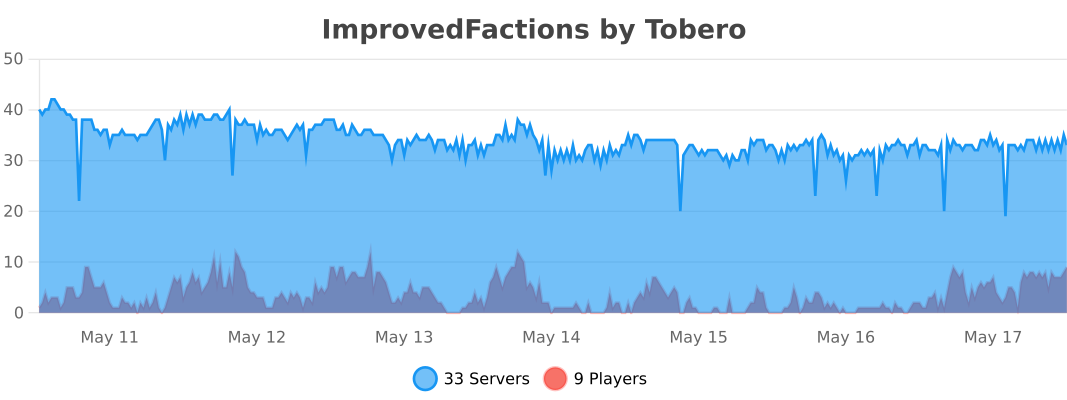
## BStats 📊
This plugin uses bstats to collect very minimalistic data about the plugin. Visit
the [plugin’s bstat](https://bstats.org/plugin/bukkit/ImprovedFactions/14810) site to view the metrics being collected
## The provided Modules 🧩
### Core
The core module is the main module of the plugin. It provides all the basic functionalities of the plugin. This includes the management of factions, claiming, inviting, and kicking players. The core module is required for the plugin to function properly, therefore it can’t be disabled.
The wilderness module is an optional module that allows players to teleport to the wilderness. This module is useful for players who want to explore the world or gather resources far away from faction claims. The wilderness module can be enabled or disabled in the config file.
The dynmap module is an optional module that integrates Improved Factions with the Dynmap plugin. This module allows players to view faction claims on the Dynmap, making it easier to see which areas are claimed by factions. The dynmap module can be enabled or disabled in the config file.
The home module is an optional module that allows players to set and teleport to their faction’s home location. This module is useful for players who want to quickly return to their faction’s base or other important locations. The home module can be enabled or disabled in the config file.
### Power & Raid
The power & raid module is an optional module that adds an advanced power system to factions. This module allows factions to gain or lose power based on various factors, such as player deaths, kills, and territory control. Factions with low power are vulnerable to raids, making it important for players to manage their power carefully. The power & raid module can be enabled or disabled in the config file.
#### Power Dynamics
Factions gain power through online members, used for claiming more chunks. Each claimed chunk consumes power over time. Faction power is influenced by member actions:
– **Member Addition:** Power increases based on a configurable base value, favoring smaller factions.
– **Online Member Accumulation:** Members contribute their full power potential, with a bonus for simultaneous faction activity.
– **Claiming Chunks:** Each claimed chunk consumes power, with costs increasing based on the faction’s total chunk count.
– **Ally Power Sharing:** Factions share a fraction of accumulated power with allies.
#### Overclaiming & Raiding
– **Unprotected Claims:** Claims become raidable when a faction can’t afford the base claim power cost.
– **Overclaiming Process:** Requires an enemy faction member to stay in the claimed chunk for a set time.
– **Allied Assistance:** Allies can offer help by sending power.
Refer to the attached screenshot for a visual reference, and see `power-raids.md` for detailed implementation information.
The chat module adds a faction chat into the game, where faction members can communicate witheach other only.
## Compatible Plugins
The following plugins might be of interest for you, when dealing with factions
– [Papi](https://www.spigotmc.org/resources/placeholderapi.6245/) allows for placeholders. View
the [placeholder list](https://github.com/ToberoCat/ImprovedFactions_new/blob/main/docs/placeholders.md) for more
infos about the existing placeholders
– [GuiEngine](https://modrinth.com/plugin/guiengine) This plugin is needed for the guis to work. It is a powerful gui
engine, that allows for easy gui creation
– [Command Aliases](https://www.spigotmc.org/resources/custom-command-aliases.105037/) Adds the ability to create custom
commands – This is a perfect fit for this plugin, if you plan to open guis via commands
## Support 📞
If you have any questions or need help with the plugin, feel free to join
the [Discord server](https://discord.com/invite/VmSbFNZejz). The community is friendly and helpful, and you’re sure to
find the support you need.
To get instant support, simply visit the chatbot through this link: [Factions Assistant](https://chatgpt.com/g/g-tvLQ5jbIz-improved-factions-assistant).
## Contributing 🤝
If you’re interested in contributing to the plugin, feel free to fork the repository and submit a pull request. The
plugin is open source, and contributions are always welcome. Whether you’re a developer looking to add new features or
fix bugs, or a player with suggestions for improving the plugin, your contributions are appreciated.
## Donations 💰
If you enjoy using the plugin and would like to support its development, consider making a donation. Your donations help
cover the costs of maintaining the plugin and allow me to continue adding new features and improvements. You can donate
via PayPal by clicking the button below.
[](https://www.paypal.com/donate/?hosted_button_id=QVJDUKN2VJ6BE)
> 🚨 **HuskChat has been discontinued** 🚨 and is no longer actively maintained. It may cease to function with newer versions of Spigot/Paper/Velocity/Waterfall. We no longer provide support for it. Thank you for your understanding.
**HuskChat** is a no-frills, simple and customisable chat system for Minecraft networks. It supports both running on BungeeCord and Velocity frontend servers for cross-server chat, or on a single-server Spigot setup.
It’s designed to be easy to configure with an **elegant out-of-box setup**, while also being **highly configurable**, suiting a variety of use cases by allowing you to define **channels** and manage who can **send and receive messages** within them.
### **⭐ Works great out of the box**
Install on your Spigot server or Velocity/BungeeCord-based proxy and use right away
### **⭐ Display user roles**
Hooks with LuckPerms to display user prefixes and suffixes
### **⭐ Private messaging**
Private messages—including group DMs&mdash and replying, admin spy features
### **⭐ Fine-tune channels**
Set channel send/receive permissions, send to a discord webhook, filter & more!
### **⭐ Quick and easy to use**
Super simple set of commands. Define channel shortcut commands, too!


