LatencyWatch
# 📶 LatencyWatch
**Know your ping. Track the lag. Keep your server responsive.**
LatencyWatch is a lightweight, precise plugin designed to monitor player latency in real time, display ping values with clarity, and help server admins spot connection issues before they become gameplay problems.
Whether you’re running an SMP, PvP arena, or a community hub, LatencyWatch gives you the tools to keep your server smooth and your players informed.
—
## ✨ Features
– 📊 View your ping and other players pings with precision
– 📋 List all online players with their current latency
– 🔄 Reload configuration instantly with `/latencywatchreload`
– 🧠 Smart command system: `/ping`, `/pinglist`, and more
– ⚙️ Clean YAML config with customizable options
– 🧰 No performance impact, no external dependencies
—
## 💡 Why use LatencyWatch?
Because lag ruins gameplay, and guessing isn’t good enough. LatencyWatch doesn’t flood your chat or clutter your screen. It quietly delivers accurate ping data when you need it, where you need it.
Whether you’re troubleshooting a lag spike, checking your own connection, or monitoring your players, LatencyWatch makes latency visible and manageable.
—
## ✅ Tested & Supported
– 🧩 Works with Paper, Spigot, Purpur, Bukkit, Folia, BugeeCord, Velocity and Waterfall
– 🧪 Fully tested on Minecraft `1.18+`
– ☕ Requires **Java 17 or higher**
– 🔁 Plug, reload, monitor, no restart required
—
## 📄 License & Support
This project is released under the [MIT License](https://github.com/RickPerix/latencywatch/blob/main/LICENSE)
Need help or want to report an issue? Reach out on Discord: `https://discord.gg/b4MFEa7tkP`
—
Crafted with care by **RickPerix** 🛠
Enjoy LatencyWatch!
**Simple. Smart. Stable.**
LanServers
# LanServers
This is a small plugin that runs on all major Minecraft Servers.
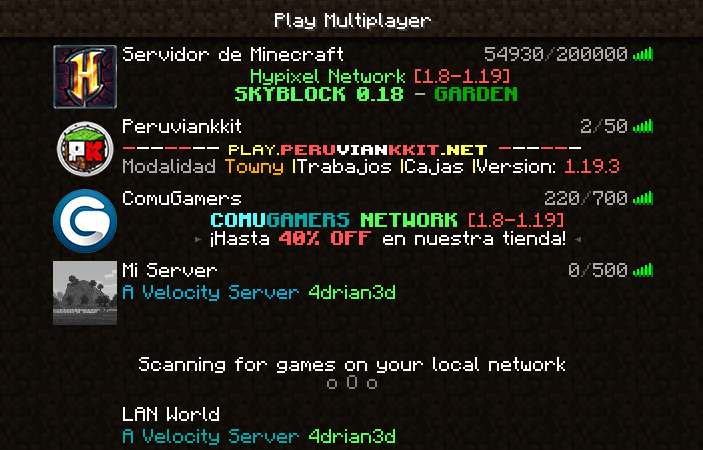
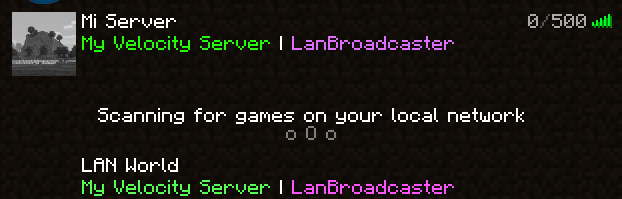
The only feature is listing the server as a LanServer in the Multiplayer-Menu of Minecraft.
# Supported Servers
– Bukkit/Spigot/Paper 1.8+ (and Folia)
– Bungeecord 1.16+
– Velocity 3.0.1+
# What does it do exactly?
The same as the Minecraft Client when you open your world to LAN.
It sends every 1.5 seconds a special message with the server port and MOTD to `224.0.2.60` on port 4445.
`224.0.2.60` is a Multicast Address which means that everyone in your local network that wants
to get messages sent to `224.0.2.60` will get them like your Minecraft Client when you’re in the Multiplayer Menu.
That’s all it does, so compatibility should not break when updating to newer Server versions.
# Config
To keep the plugin small and working on all servers, there is no config file.
Instead, Java System Properties are used, which you can set in your server startup script
using `-Ddev.redstones.lanservers.setting=value` before the `-jar` argument.
| Java System Property | Description | Default Behaviour |
|——————————————|—————————————————|———————————-|
| `dev.redstones.lanservers.bindAddresses` | Comma separated list of IP addresses to send from | All interface addresses are used |
LANBroadcaster
# LANBroadcaster
[](https://discord.gg/5NMMzK5mAn) 
LANBroadcaster, originally created by [Ruan](https://gitlab.com/ruany/) allows a Minecraft
server to be broadcasted over the local area network and appear in the LAN server list without actually adding it.
## Why this version?
The original LANBroadcaster, by Ruan has support for Spigot and BungeeCord, bhopahk make its own fork with support for [Sponge](https://spongepowered.org/) and [Velocity](https://velocitypowered.com/),
however this version modularize the project and improves performance and code quality, as well as being upgraded to new platform versions.
[](https://www.bisecthosting.com/4drian3d?r=ModLANBroadcaster)
## Getting Started
LANBroadcaster can be downloaded from the versions tab [here](https://modrinth.com/mod/lanbroadcaster/versions).
Once it is downloaded, simply place it in the relevant plugins folder and start your server. No configuration is required.
> Note: To use LANBroadcaster with BungeeCord or Velocity, you do not need to install it on the servers itself. Only the proxy.
## Limitations
– The description field, when displaying the server in LAN, does not support components, so it does not support RGB colors or gradients
LagOptimizer
# LagOptimizer
A comprehensive lag mitigation and analysis solution for Minecraft servers
## Features
– **Entity Management**
– **Configurable automated entity purging**
– **Whitelist/blacklist for entity types**
– **Maximum entities per chunk limit**
– **Entity age-based removal**
– Distance-based entity cleanup
– Manual purge command with entity type filtering**
– **Performance Monitoring**
– **Real-time TPS monitoring (requires Spark plugin)**
– **Memory usage tracking**
– **Entity and chunk counting**
– **Customizable scoreboard display**
– **Performance metric logging**
– **Configurable monitoring intervals**
## Requirements
– Minecraft Server 1.19+
– Java 8 or higher
– Spark (optional, for TPS monitoring)
## Installation
**Download the latest release from the releases page
Place the JAR file in your server’s plugins directory
(Optional) Install Spark plugin for TPS monitoring
Start or reload your server
Configure the plugin using the generated config.yml**
## Configuration
**Entity Purge Settings**
purge:
auto-purge-enabled: true
interval: 300 # Purge interval in seconds (5 minutes)
max-entities-per-chunk: 100
max-entity-age: 300 # Maximum age of entities in seconds (5 minutes)
max-distance-from-players: 32 # Maximum distance from players in blocks
whitelist:
– PLAYER
– VILLAGER
– IRON_GOLEM
– WOLF
– HORSE
blacklist:
– DROPPED_ITEM
– EXPERIENCE_ORB
– ARROW
– SPECTRAL_ARROW
– TRIDENT
– FALLING_BLOCK
**Performance Monitoring Settings**
monitoring:
enabled: true
interval: 60 # Monitoring interval in seconds (1 minute)
scoreboard:
enabled: true
title: “&6Server Performance”
lines:
– “&7TPS: &f{tps}”
– “&7Memory: &f{memory_used}/{memory_max} MB”
– “&7Entities: &f{entity_count}”
– “&7Chunks: &f{chunk_count}”
– “&7Players: &f{player_count}”
logging:
enabled: true
file-path: “plugins/LagOptimizer/logs/performance.log”
retention-days: 7
## Commands
“`
/lagoptimize purge [entityType] – Manually purge entities
Permission: lagoptimizer.purge
/lagoptimize reload – Reload the configuration
Permission: lagoptimizer.reload
/lagoptimize stats – Display performance statistics
Permission: lagoptimizer.stats
/lagoptimize toggle – Toggle automatic purging
Permission: lagoptimizer.toggle
“`
## Permissions
“`
lagoptimizer.* – Access to all commands
lagoptimizer.purge – Manual purging
lagoptimizer.reload – Configuration reload
lagoptimizer.stats – View stats
lagoptimizer.toggle – Toggle features
lagoptimizer.use – Basic command access
“`
## Performance Impact
**Heavy operations run asynchronously
Configurable intervals for monitoring and purging
Smart entity management to prevent server overload
Minimal memory footprint**
– Logging
– Performance metrics are logged to plugins/LagOptimizer/logs/performance.log with:
– Timestamp
– TPS (if Spark is installed)
– Memory usage
– Entity count
– Chunk count
– Player count
## Support
Join our Discord server for help and discussion.
Lag Protection
Are your players tired of dying because of they’re terrible ping? Introducing Lag Protection! Now your players don’t have to worry about dying when they’re Wi-Fi is complete dog water!
# This plugin will:
Track your players ping, and if they have very high ping then it will stop them from taking damage.
# Commands:
/getping Will return the current ping of any given player
# Currently working on:
– ~~Support for 1.21.5 on Paper family~~
– ~~Support for 1.21.5 on Fabric family~~
– Support for older versions for Fabric
– Support for Forge
– Support for NeoForge
LabyUtils
A simple plugin to utilize LabyMod’s server API without coding knowledge.
## General info
### Features
– Disallow LabyMod completely by kicking players as soon as they join with LabyMod
– Custom banner above the tablist
– An economy display (cash & bank) using [Vault](https://www.spigotmc.org/resources/vault.34315/)
– Country flags beside your name in the tablist
– Subtitles below player names based on their permissions
– Customizable interaction menu bullets
– Enabled/disabled permissions which allow or limit core/addon functions of LabyMod
– Partly customizable Discord rich presence (LabyMod does not allow fully customizable rpc)
– A command to see LabyMod specific information of a player
– The LabyMod subtitle
– The economy balances
– The LabyMod version
– The region code
– Put specific addons into on of 3 states (These are bypassable with permissions)
– Recommended (Shows the player a popup recommending these addons)
– Required (The player will get kicked if not installing all required addons from the popup)
– Disabled (Disables addons completely)
### Commands
– `/labyinfo` – Shows LabyMod specific info about a player.
– `/labyutils` – Reloads the config.
### Permissions
– `labyutils.bypass.*` – Ignores all recommended, required, or disallowed addons
– `labyutils.bypass.{namespace}` – Ignores a specific recommended, required, or disallowed addon
– `labyutils.info` – Grants base access to `/labyinfo`
– `labyutils.info.subtitle` – See player subtitles in `/labyutils`
– `labyutils.info.economy` – See economy balances in `/labyutils`
– `labyutils.info.version` – See LabyMod versions in `/labyutils`
– `labyutils.info.region` – See player regions in `/labyutils`
– `labyutils.reload` – Grants access to `/labyutils`
## Dependencies
Requires Java 11+
### Optional dependencies
– Vault – For economy displays
– PlaceholderAPI – For placeholders
## Supported PlaceholderAPI placeholders
– `%labyutils_playerflag%`* – The player’s country code
– `%labyutils_subtitle%`* – The player’s server subtitle
– `%labyutils_clientversion%`* – The player’s LabyMod version
– `%labyutils_cash%`* – The player’s cash balance
– `%labyutils_bank%`* – The player’s bank balance
– `%labyutils_banner%` – The server’s banner
* – Requires a player argument
Note: I’m not a LabyMod developer so this is an unofficial plugin.
KotlinMC
# KotlinMC
A SpigotMC, BungeeCord and Velocity Plugin with the Kotlin Runtime and Other Libraries that automatically updates upon a new Kotlin Version
KotKit
KotKit is a simple library plugin that adds a non-relocated version of the Kotlin stdlib to your server.
## What’s Kotlin?
Kotlin is a programming language compatible with Java that is gaining more and more traction among developers. The Kotlin stdlib, _standard library_, contains many additional features built on top of Java, allowing developers to write less to do more!
## Why do I need KotKit?
If a plugin is asking you to install KotKit, it’s because they have decided to write their plugin in Kotlin and don’t want to waste your server’s space by providing their own copy of Kotlin’s standard library.
Pronouns
# Rewrite in progress!
### The rewrite will improve code flow along side making NeoForge possible without annoying issues! However this means there will be no updates for a while
# Pronouns
PronounDB in Minecraft!
Just a silly little API for PronounDB
Supports Paper (and it’s forks), Sponge, Fabric, Velocity, BungeeCord and Minestom!
## FAQ
Forge support?
No, I’d rather eat a shoe. Feel free to make a mod to use the API to add Forge support, I’m not interested in Forge.
NeoForge support?
NeoForge caused me some issues, but there is a dev build which may or may not work, use at your own risk [NeoForge dev build link](https://github.com/CCSKore/Pronouns/files/15286323/Pronouns-NeoForge-DEVELOPMENT-BUILD.zip)
Why not support Bukkit/Spigot?
While I can, they are old. Let’s face it, Paper is faster and you probably don’t have reason to use Bukkit or Spigot. However feel free to fork the project to add support for this.
—
You can view the Wiki [here](https://github.com/CCSKore/Pronouns/wiki)
KillPoints
# 💻 Platforms
[](https://purpurmc.org/)
[](https://www.spigotmc.org/)
[ ](https://papermc.io/downloads/paper)
[](https://dev.bukkit.org/)
—
# 🩸 KillPoints
A simple Minecraft plugin where killing players earns you points that can be spent on powerful armor.
—
## ⚔️ Features
– Gain **points for each player kill**
– Check your points with `/points`
– Open a shop with `/shop`
– Buy **expensive diamond armor** using your points
– Simple and lightweight (no config needed)
—
## 💰 How it works
– Kill a player → earn **+10 points**
– Use `/points` to see your balance
– Use `/shop` to open the armor shop
– Spend your points on gear:
| Item | Price |
|——|——|
| Diamond Helmet | 100 |
| Diamond Chestplate | 200 |
| Diamond Leggings | 150 |
| Diamond Boots | 80 |
—
## 📦 Installation
1. Download the plugin `.jar`
2. Put it in your `/plugins` folder
3. Start your server
4. Done ✅
—
## 🖥️ Requirements
– Minecraft server: **Paper / Spigot**
– Version: **1.20.4+**
– Java: **17+**
—
## ⚠️ Important
– Points are **not saved** (they reset when the server restarts)
– This is a **simple plugin** made for small servers or testing
—
## 🚀 Future plans
– Save points to file
– Add enchanted armor
– Better GUI with item prices
– More items in the shop