modl
# modl – support & moderation reimagined
Streamline administrative duties with AI, dynamic punishments, and a slick web-interface.
### Description
modl is a modern solution to completely streamline moderation and support for your Minecraft server. The system is fully customizable, free to use, and open-sourced under the AGPL-3.0 license. Stay in control of your server from anywhere with our web-interface at https://modl.gg. Use AI to automatically handle chat reports. Simplify punishments through dynamic punishment types powered by points and severities.
**Free forever** and completely branded for your server – your players and staff will not see any modl.gg branding (assuming you enable custom domain).
modl can run natively on **Spigot, PaperSpigot, Folia, BungeeCord, and Velocity**, without feature degradation on any platform.
[Fully free & source repositories](http://github.com/modl-gg) | [Support Discord Server](https://modl.gg/discord) | [Locale File](https://github.com/modl-gg/minecraft/blob/main/core/src/main/resources/locale/en_US.yml) | [Config File](https://github.com/modl-gg/minecraft/blob/main/core/src/main/resources/config.yml)
## Features
#### 3rd Iteration Punishment System
Designed to fairly and consistently sanction players whilst maintaining moderator discretion.
– Fully customizable **point system** to designate low, medium, and habitual designations for both Gameplay and Social offenses
– Fully customizable punishment durations for each **severity** (lenient, normal, severe) and each **offender status** (low, medium, habitual)
– Issue punishments for bad usernames and skins that **automatically pardon** when a player changes his/her skin/username.
– Ability to make a ban “stat-wiping” that issues a command on the server upon _expiration_ to reset stats (not executed when pardoned or cancelled)
– Full modification system for **changing durations** and **pardoning** (remove points)
– Full evidence system for **uploading files** and linking to other sites (YouTube, Imgur, etc)
– 8-char alphanumeric ID system for streamlined appeal system, staff see all punishment details and can pardon/change duration without leaving the page. **Customize** the appeal page for each different punishment type
– Bans on offline players wait until a successful login to start the expiration countdown.
– Stack multiple bans/mute that execute **consecutively** (one after the other becomes inactive) – start time is when the player attempts to login unimpeded by other bans/mutes.
– Traditional, manual punishments also exist (ban, tempban, mute, tempmute, kick, blacklist)
– Import all bans, mutes, and player data (IPs) from **LiteBans** seamlessly

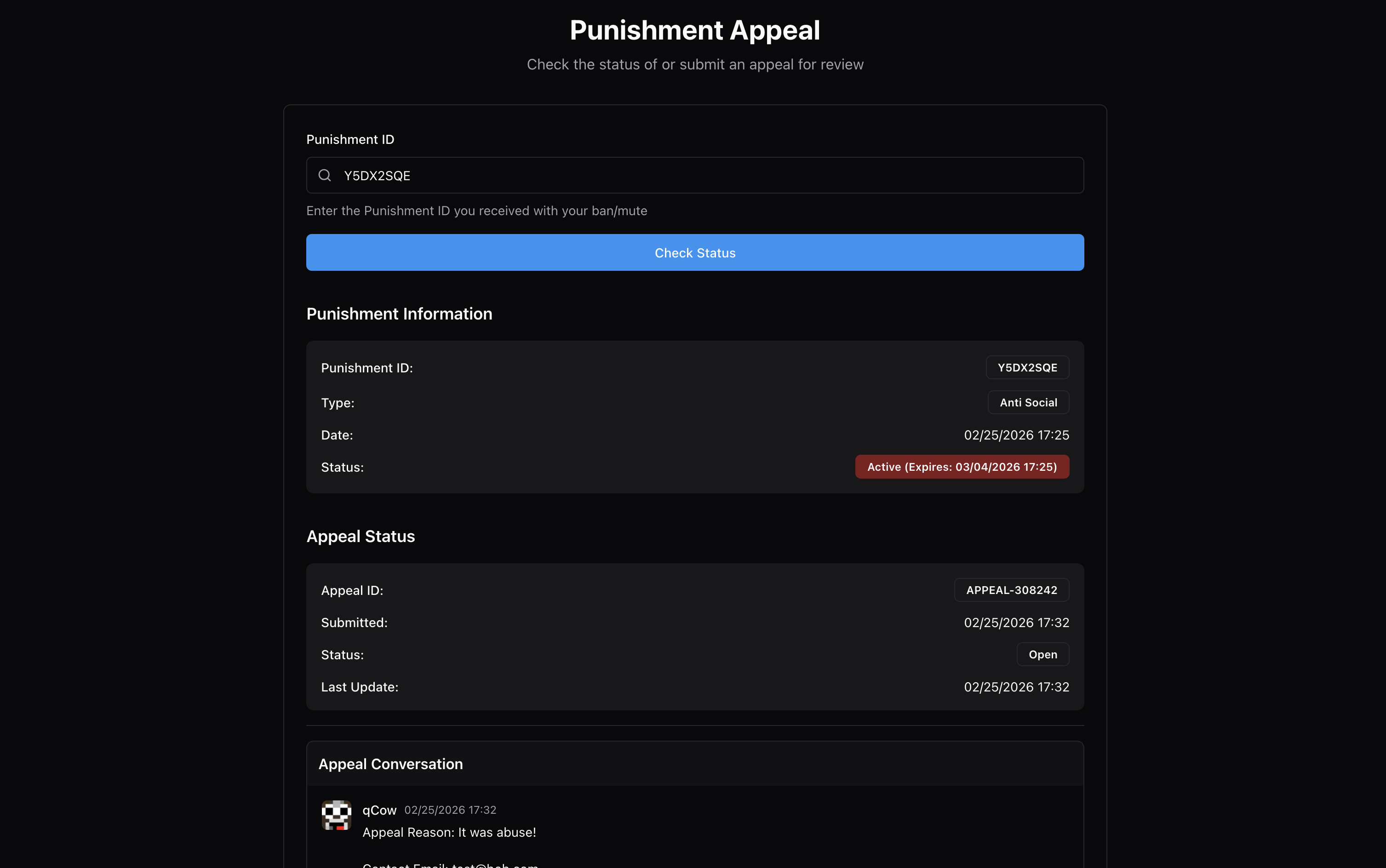
#### Full Player Profiles and Smart Alt-account Linking
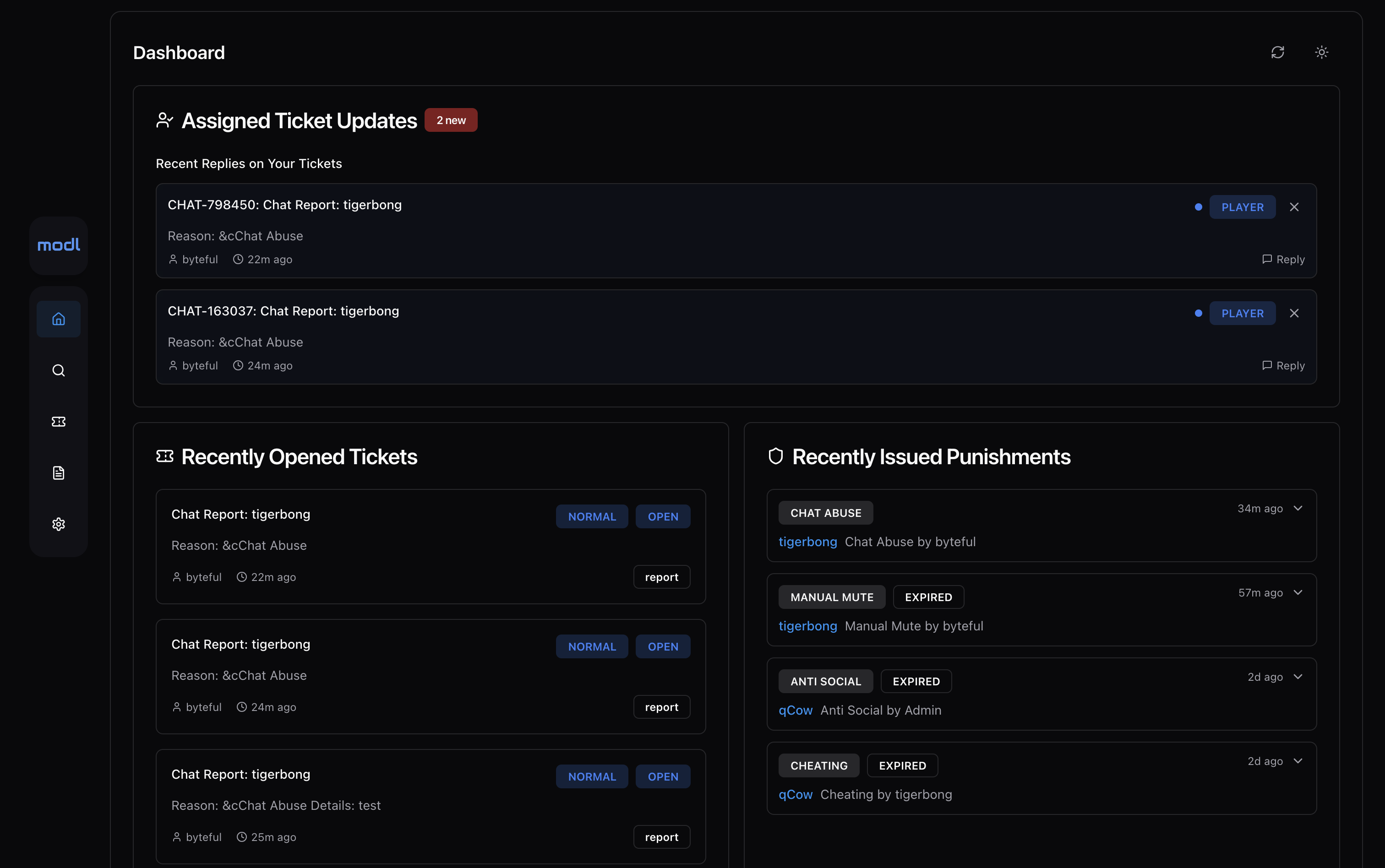
– See player info (playtime, session details, country), notes, history, alts, reports in sleek in-game and web UIs (windows for many open players on web).
– **Link accounts** that have the same non-proxy IP logins OR have the shared proxy logins within 2 hours of each other. This system tracks logins even if denied by a banned screen, allowing you to link accounts whenever a **bad actor** screws up and attempts to login on a banned account (to check) before logging into their ban evading account.
– Handle each linked ban **independently**- was there a mistake? Public internet or sibling? Easily handle the linked ban on a specific account without changing the initial ban.
– Linked bans expire when the original ban expire automatically.

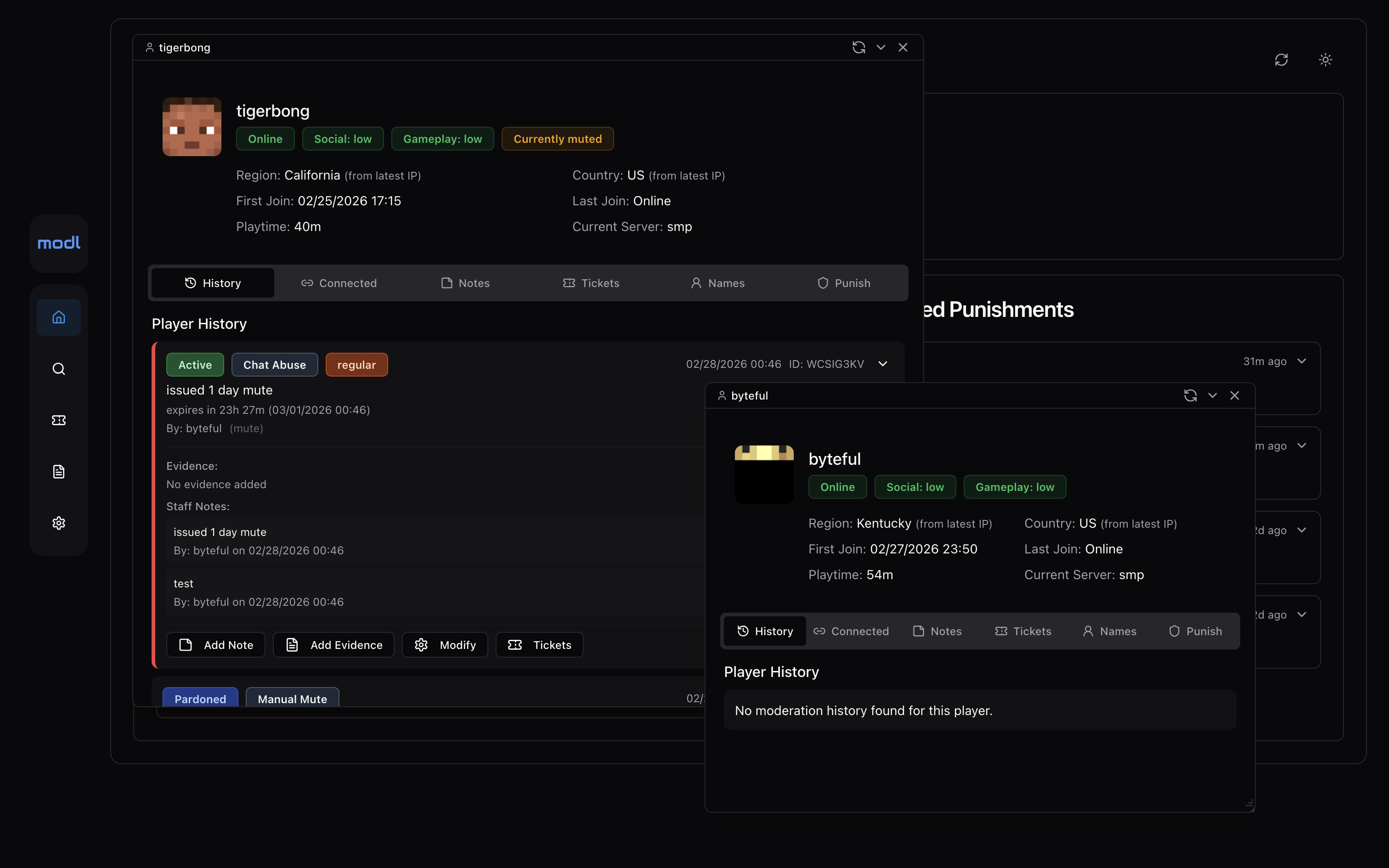
#### Elegant, Efficient Player Reporting
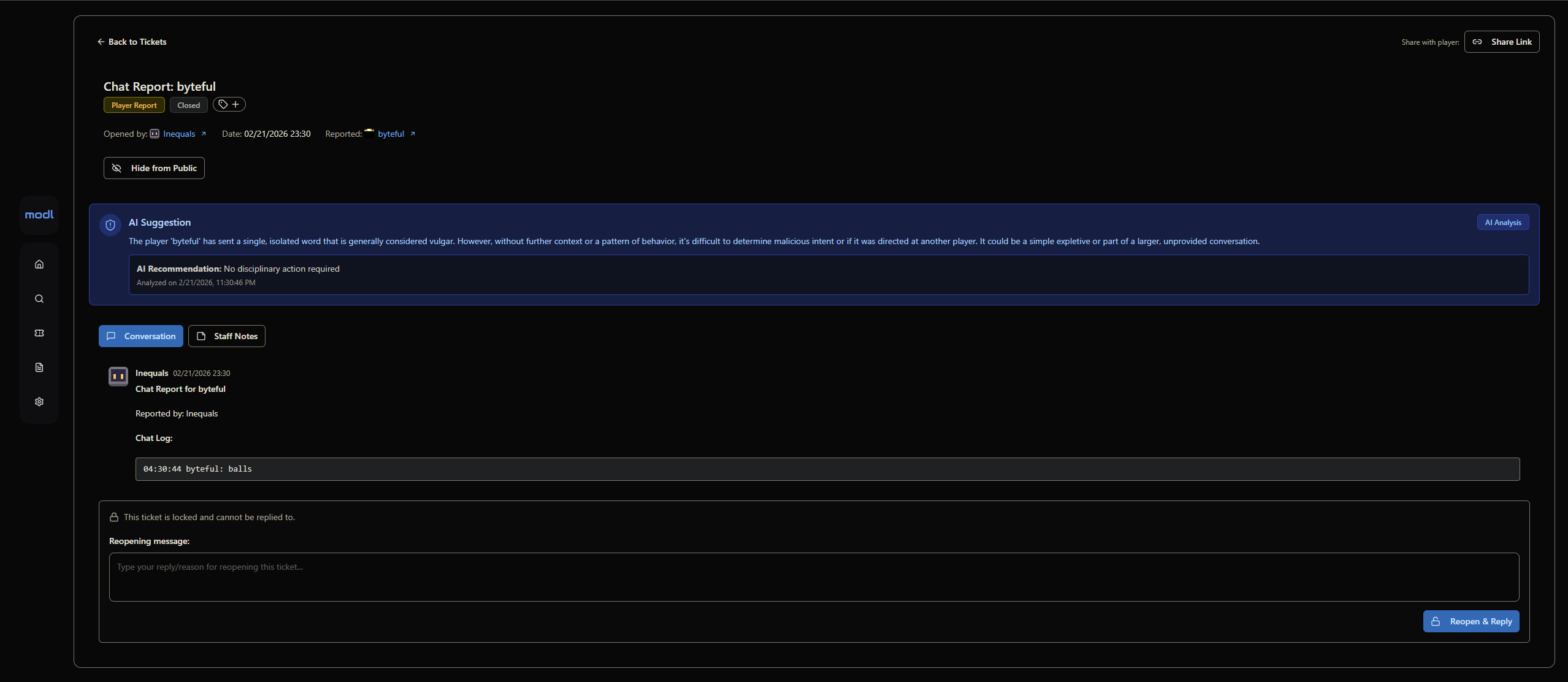
– Automatically **snapshot** full context chat-logs when someone is chat-reported.
– Allow players to **upload files** or link external evidence to all reports.
– Issue punishments from reports without leaving the ticket page.
– Link tickets to punishments that will auto-close the ticket and send a response letting the reporter know the offender was punished. Also can be used as evidence when hooked up to [modl-anticheat-bridge](https://github.com/modl-gg/minecraft-anticheat-bridge/releases) (Anti-cheat automatically creates reports based on flags)
– You can sort online players by number of reports to identify potential rule breakers across your network.

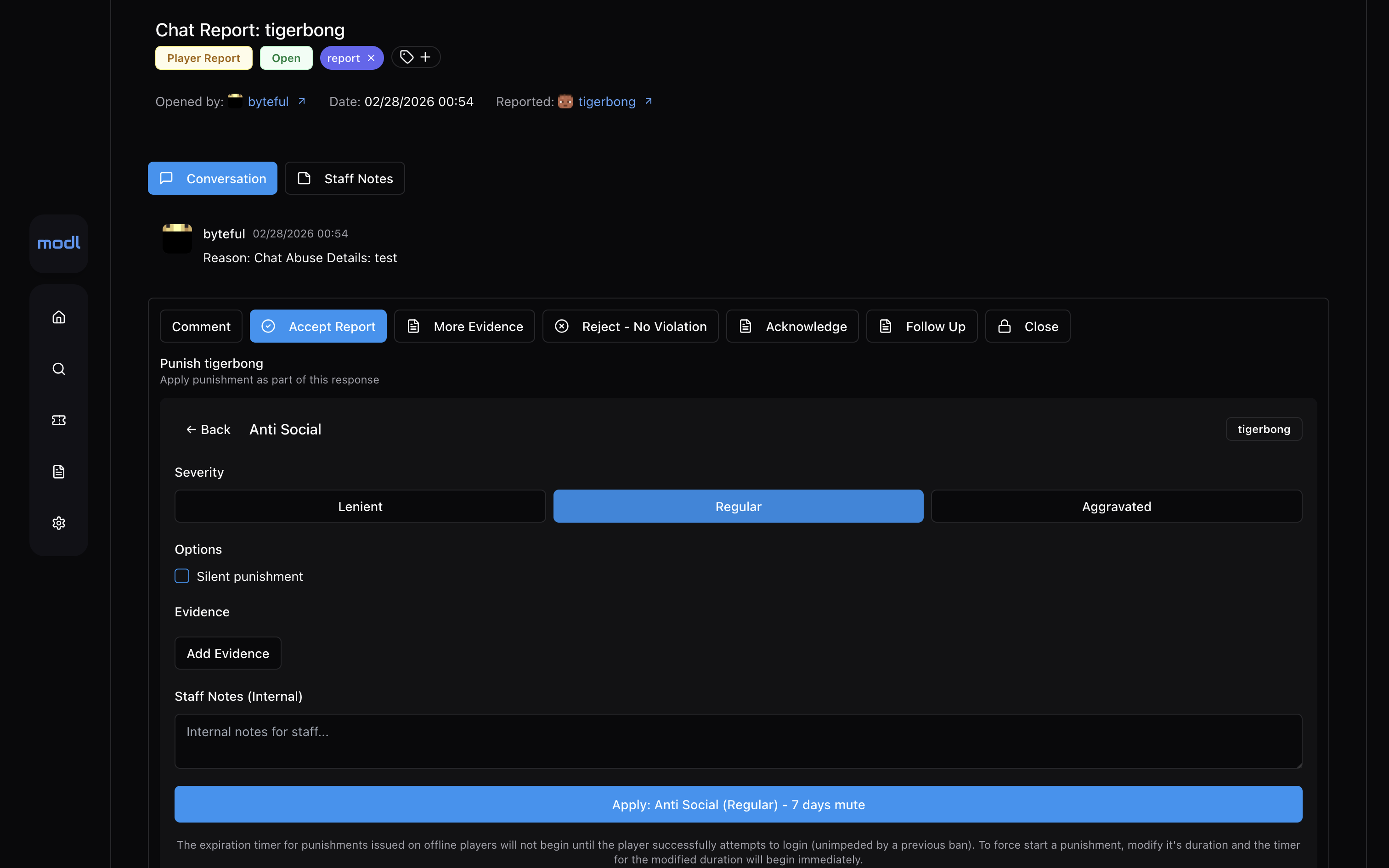
#### Full Audit and Analytics System
– Audit and **rollback** any staff punishment actions.
– See statistics on average ticket response times and **staff activity** (ticket responses, punishments issued, etc)
– See **trends** for different types of punishments and ticket data.
– Manage all files uploaded (evidence, ticket attachments): easily view, search, filter, delete, and download all files.

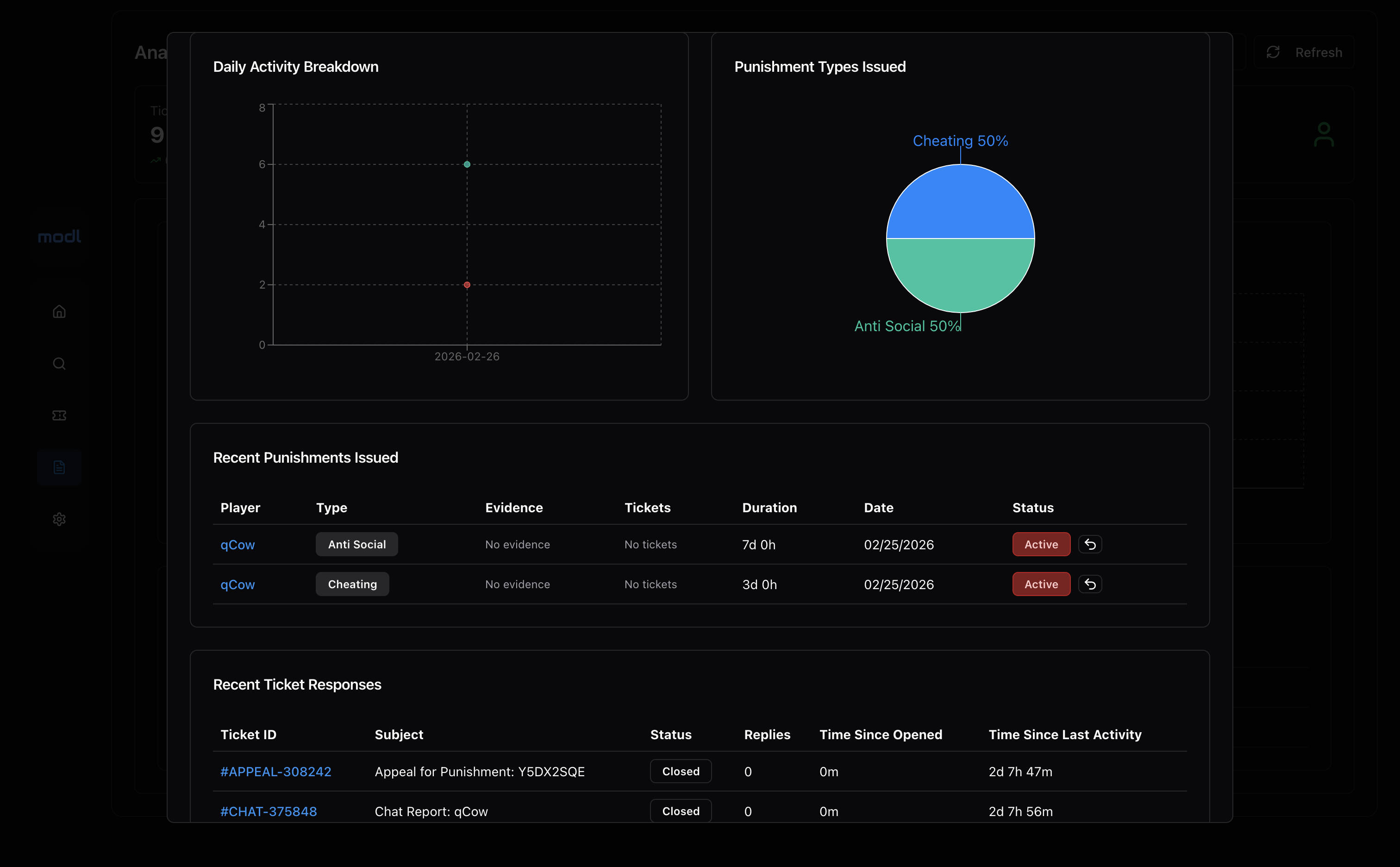
#### Smart AI Chat Moderation
– To not pester players and use excessive tokens, AI chat moderation **only scans messages that are chat-reported**. This is the most effective way of moderating chat as current systems that analyse all messages issuing auto-mutes are incredibly annoying for players and expensive.
– Constantly evolving system prompts to improve **accuracy** of AI auto-mod, is context-aware of Minecraft (e.g: “i’m going to kill you with a fireball” is a game term, not an IRL death threat).
– Configure AI to look for specific things and execute punishments **automatically** or make suggestions for staff approval.
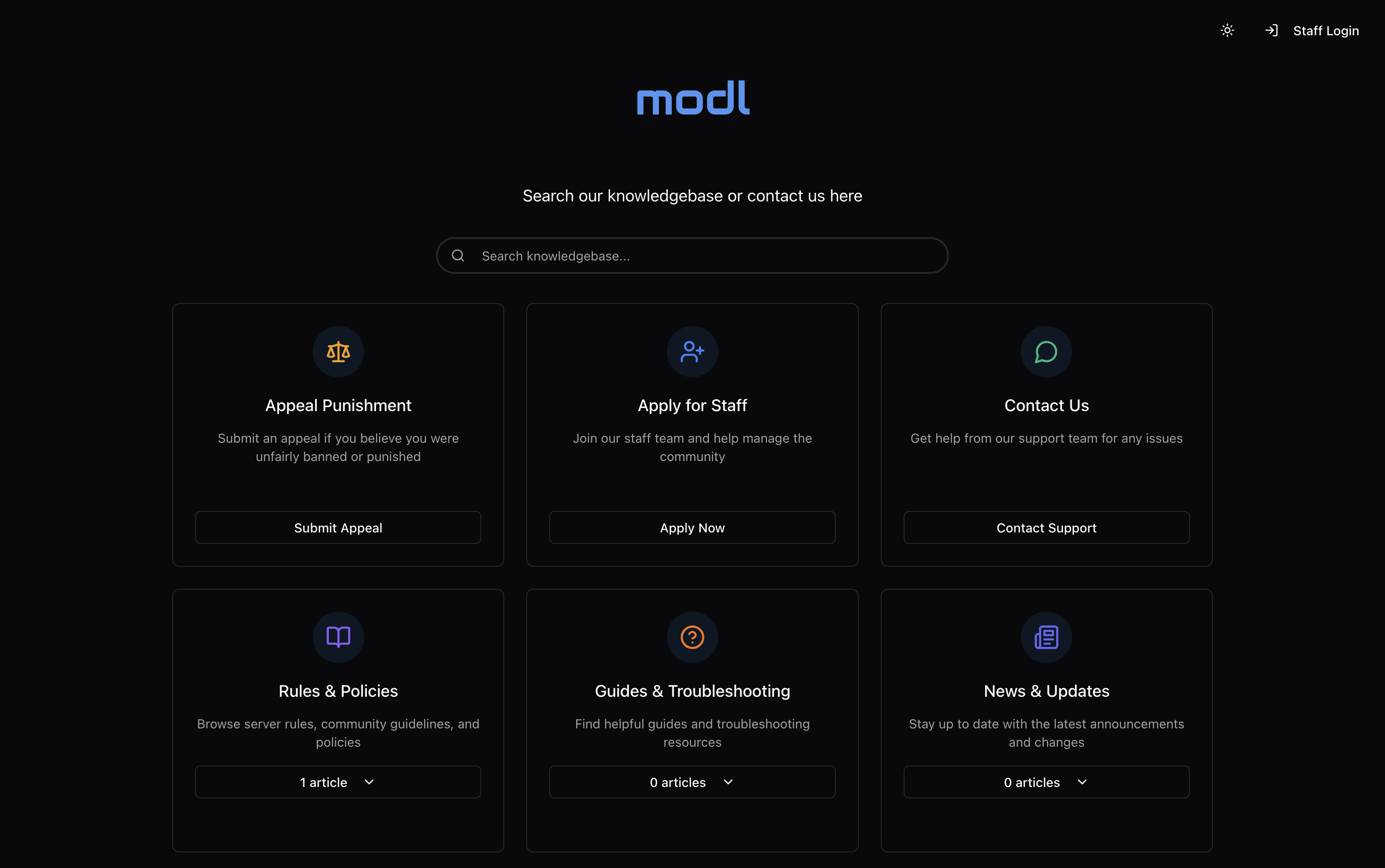
#### Support One-Stop-Shop: Use **your own domain** (recommended: support.yourserver.com)
– **Fully customizable** knowledgebase homepage with logo, external link, and sections
– Searchable markdown article support, write **your** rules, guidelines, and support articles with ease.
– Create fully **custom forms** for bug reports, support tickets, and staff applications: reveal hidden sections based on answer to multiple-choice questions.
– Customizable **quick-response buttons** to significantly streamline efficiency and keep responses consistent.
– Send in-game and email **notifications** for when staff respond to a player’s ticket.
– We use browser cookies to verify that responses in tickets are the same as the initial responder.
– Staff members are automatically **subscribed** to tickets they respond in and can easily track updates to those tickets in their home feed.
#### Professional Interface
– Invite your staff team and fully customize their **roles** and permissions (permission nodes for each punishment type)
– Set each staff member’s Minecraft account so that permissions and punishments are **synced** between panel and in-game.
– Make modl yours: upload a custom logo, favicon, homepage image, and set your custom domain.
– Everything is fully **customizable**, from Minecraft plugin locale to ticket forms and punishment types.
### Requirements
1. Java 8+
2. Working internet connection
3. Any version Spigot, PaperSpigot, Folia, BungeeCord, or Velocity
### Installation
1. Register your server at https://modl.gg
2. Go to your panel’s settings and find your API key under “Server & Billing” **>** “Server Config”.
3. Drop **modl-(version).jar** into your /plugins directory (Install on all Spigot servers and your proxy if you run a network. Run Spigot modl instances in bridge mode if so.)
4. Restart your server and wait for **/plugins/modl/config.yml** to generate, once it does input your API key and panel URL then restart
5. Done!
**Showcase & Installation Video (outdated – view docs installation guide):**
**Requirements & Installation Steps:**
https://docs.modl.gg/installation
**For support, please join our [discord server](https://modl.gg/discord) or open an [issue on GitHub](https://github.com/modl-gg/issue-tracker/issues). If you encounter any issues or bugs, please report them :)**
MiraiMC
MiraiMC
[](https://github.com/DreamVoid/MiraiMC/releases/latest)
[](https://www.codefactor.io/repository/github/dreamvoid/miraimc)
[](https://github.com/DreamVoid/MiraiMC/actions/workflows/maven.yml?query=is%3Asuccess)

—
MiraiMC is a [mirai](https://github.com/mamoe/mirai) bot for Minecraft servers
> Mirai is a high-performance multi-platform library, as well as a framework, providing protocol support for Tencent QQ.
> Mirai is designed to handle all sorts of messaging works that can be automatically done by bots in a perfect way.
> Tencent QQ: A modern messaging software used by all Chinese netizens.
## Features
* Support Bukkit/Sponge servers.
* Support BungeeCord/Velocity proxies.
* Optimized for GUI-less OS such as Linux
* Dynamically load dependent libraries to minimize file size.
## Getting Started (Server)
1. Download MiraiMC from “Featured versions” part. Then install it like installing other plugins.
2. Configure any plugins’ that depend on MiraiMC (if any) and login to your bot account
A more detailed tutorial can be found here: https://docs.miraimc.dreamvoid.me/
## Getting Started (Plugin Developer)
* It is simple to develop a new MiriMC-based plugin by using template:
– [Maven](https://github.com/MiraiMC/MiraiMC-Template)
– [Gradle KotlinDSL](https://github.com/MiraiMC/MiraiMC-Template-Gradle-KotlinDSL)
* MiraiMC javadoc here: https://jd.miraimc.dreamvoid.me
* Detailed development tutorial here: https://docs.miraimc.dreamvoid.me/
### Dependency
#### Maven
“`
io.github.dreamvoid
MiraiMC-Integration
1.9
provided
“`
#### Gradle
“`
implementation ‘io.github.dreamvoid:MiraiMC-Integration:1.9’
“`
## Commands and permissions
### Commands
| Command | Description | Permissions |
| —- | — | —- |
| /mirai | MiraiMC Robot Command | miraimc.command.mirai |
| /mirai login [protocol] | Log in to a robot (you can execute this command multiple times to log in to multiple robots) | miraimc.command.mirai.login |
| /mirai logout | Log out and close a bot | miraimc.command.mirai.logout |
| /mirai list | List currently online bots | miraimc.command.mirai.list |
| /mirai sendfriendmessage | Send a message to a specified friend | miraimc.command.mirai.sendfriendmessage |
| /mirai sendfriendnudge | Send a stamp to a specified friend | miraimc.command.mirai.sendfriendnudge |
| /mirai sendgroupmessage | Send a message to the specified group | miraimc.command.mirai.sendgroupmessage |
| /mirai checkonline | Check if the specified robot is online | miraimc.command.mirai.checkonline |
| /mirai autologin add [protocol] | Add an autologin robot account | miraimc.command.mirai.autologin |
| /mirai autologin remove | Remove an autologin bot account | miraimc.command.mirai.autologin |
| /mirai autologin list | View autologin robot account list | miraimc.command.mirai.autologin |
| /miraimc | MiraiMC Plugin Command | miraimc.command.miraimc |
| /miraimc bind add | Add binding for player and QQ number | miraimc.command.miraimc.bind |
| /miraimc bind getplayer | Get the QQ number bound to the specified player name | miraimc.command.miraimc.bind |
| /miraimc bind getqq | Get the player name bound to the specified QQ number | miraimc.command.miraimc.bind |
| /miraimc bind removeplayer | Removes a player’s bind | miraimc.command.miraimc.bind |
| /miraimc bind removeqq | Delete the binding of a QQ number | miraimc.command.miraimc.bind |
| /miraimc reload | Reload configuration file | miraimc.command.miraimc.reload |
### Permissions
| Permission Node | Description | Default |
| ——- | —- | —- |
| miraimc.command.mirai | Allow use of `/mirai` | OP |
| miraimc.command.mirai.* | Allow all subcommands of `/mirai` | OP |
| miraimc.command.mirai.login | Allow `/mirai login` | OP |
| miraimc.command.mirai.logout | Allow `/mirai logout` | OP |
| miraimc.command.mirai.list | Allow `/mirai list` | OP |
| miraimc.command.mirai.sendfriendmessage | Allow `/mirai sendfriendmessage` | OP |
| miraimc.command.mirai.sendfriendnudge | Allow `/mirai sendfriendnudge` | OP |
| miraimc.command.mirai.sendgroupmessage | Allow `/mirai sendgroupmessage` | OP |
| miraimc.command.mirai.checkonline | Allow `/mirai checkonline` | OP |
| miraimc.command.mirai.autologin | Allow `/mirai autologin` | OP |
| miraimc.command.miraimc | Allow use of `/miraimc` | OP |
| miraimc.command.miraimc.* | Allow all subcommands of `/miraimc` | OP |
| miraimc.command.miraimc.bind | Allow `/miraimc bind` and subcommands | OP |
| miraimc.command.miraimc.reload | Allow `/miraimc reload` | OP |
## LICENSE
[GNU Affero General Public License v3.0](https://github.com/DreamVoid/MiraiMC/blob/main/LICENSE)
## Acknowledgments
Thanks to the following people/teams/projects for their contributions to MiraiMC!
* [mamoe/mirai](https://github.com/mamoe/mirai): Powerful QQ robot support library, the core and foundation of MiraiMC.
* [lucko/helper](https://github.com/lucko/helper): Provide MiraiMC with a solution to dynamically load the mirai core.
* [brettwooldridge/HikariCP](https://github.com/brettwooldridge/HikariCP): An efficient SQL connection pool, providing database connection solutions for MiraiMC.
* [LT_Name](https://github.com/lt-name): Optimized a lot of Nukkit code for MiraiMC, also provided a lot of help for MiraiMC.
* You.
[DreamVoid](https://github.com/DreamVoid) and [MiraiMC](https://github.com/MiraiMC), made with ❤.
This file is a translated version of the [original file](https://github.com/DreamVoid/MiraiMC/blob/main/README.md), and some semantics may differ from the original file.
Minecraft Server Management Protocol Legacy Support
# Minecraft Server Management Protocol Legacy Support
Adds a Minecraft Server Management Protocol endpoint to server software that does not provide Mojang’s native implementation.
The Minecraft Server Management Protocol is the newer management API for Minecraft servers. It exposes server information and management actions through JSON-RPC over WebSocket, instead of relying on older mechanisms such as server-list ping or RCON. This plugin brings that protocol shape to older server versions and proxy environments so external tools can speak one management protocol across mixed infrastructure.
## What it provides
– A WebSocket endpoint for Minecraft Server Management Protocol clients.
– JSON-RPC request and response handling compatible with the protocol model documented on the Minecraft Wiki.
– Discovery through `rpc.discover`, so clients can inspect which methods are available.
– Server/proxy status support, including online player list and version information.
– Management operations for Bukkit-based servers, including players, allowlist, bans, operators, selected server settings, gamerules, save, stop, and system messages.
– Proxy management operations for Velocity and BungeeCord, including players, kick, status, stop, and system messages.
– Authentication by shared secret, with browser-origin checks for WebSocket subprotocol authentication.
– Optional TLS using a PKCS12 keystore.
Reference: https://minecraft.wiki/w/Minecraft_Server_Management_Protocol
## Platform Status
| Platform | Status |
| — | — |
| Spigot / Paper | Main supported runtime. Built against the Spigot 1.8.8 API for legacy compatibility. |
| Velocity | Proxy runtime support for discovery, players, kick, proxy status, proxy stop, system messages, and proxy/player notifications. |
| BungeeCord | Proxy runtime support for discovery, players, kick, proxy status, proxy stop, system messages, and proxy/player notifications. |
For legacy SpaceChunks usage, install the Spigot/Paper build on the backend server when you need live server status and online player counts from old Minecraft versions.
## Supported Methods
| Method group | Spigot / Paper | Velocity | BungeeCord |
| — | — | — | — |
| `rpc.discover` | yes | yes | yes |
| `minecraft:players` | yes | yes | yes |
| `minecraft:players/kick` | yes | yes | yes |
| `minecraft:server/status` | yes | yes, proxy status | yes, proxy status |
| `minecraft:server/stop` | yes | yes, stops proxy | yes, stops proxy |
| `minecraft:server/system_message` | yes | yes, proxy players | yes, proxy players |
| `minecraft:server/save` | yes | no | no |
| `minecraft:allowlist/*` | yes | no | no |
| `minecraft:bans/*` | yes | no | no |
| `minecraft:ip_bans/*` | yes | no | no |
| `minecraft:operators/*` | yes | no | no |
| `minecraft:serversettings/*` | partial | no | no |
| `minecraft:gamerules/*` | yes | no | no |
Spigot/Paper server settings are limited to APIs available through the Spigot 1.8.8 API. Implemented settings are `autosave`, `difficulty`, `use_allowlist`, `player_idle_timeout`, `allow_flight` read-only, `motd` read-only, `spawn_protection_radius`, `game_mode`, and `view_distance` read-only.
## Supported Notifications
| Notification group | Spigot / Paper | Velocity | BungeeCord |
| — | — | — | — |
| `minecraft:notification/server/started` | yes | yes | yes |
| `minecraft:notification/server/stopping` | yes | yes | yes |
| `minecraft:notification/server/status` | yes | yes | yes |
| `minecraft:notification/server/activity` | yes | yes | yes |
| `minecraft:notification/players/joined` | yes | yes | yes |
| `minecraft:notification/players/left` | yes | yes | yes |
| `minecraft:notification/server/saving` | yes | no | no |
| `minecraft:notification/server/saved` | yes | no | no |
| `minecraft:notification/allowlist/*` | management API changes only | no | no |
| `minecraft:notification/bans/*` | management API changes only | no | no |
| `minecraft:notification/ip_bans/*` | management API changes only | no | no |
| `minecraft:notification/operators/*` | management API changes only | no | no |
| `minecraft:notification/gamerules/*` | management API changes only | no | no |
## Configuration
The service is disabled by default. Enable it only after setting a secret and deciding where it should listen.
Spigot/Paper uses `plugins/MinecraftServerManagementProtocolLegacySupport/config.yml`:
“`yaml
management-server-enabled: true
management-server-host: localhost
management-server-port: 25585
management-server-secret: ‘replaceWithExactly40AlphaNumericCharacters’
management-server-allowed-origins: ”
management-server-tls-enabled: false
management-server-tls-keystore: ”
management-server-tls-keystore-password: ”
“`
Velocity and BungeeCord create `management-server.properties` in the plugin data folder with the same setting names.
### Settings
– `management-server-enabled`: Starts or disables the management endpoint.
– `management-server-host`: Interface to bind. Use `localhost` when only local tooling or a reverse proxy should connect.
– `management-server-port`: Port for the WebSocket server. Use a fixed port for production.
– `management-server-secret`: Required shared secret. It must be exactly 40 alphanumeric characters.
– `management-server-allowed-origins`: Comma-separated list of allowed browser origins when authenticating through `Sec-WebSocket-Protocol`.
– `management-server-tls-enabled`: Enables `wss://`. Requires a valid keystore.
– `management-server-tls-keystore`: Path to a PKCS12 keystore.
– `management-server-tls-keystore-password`: Keystore password. It can also be supplied through `MINECRAFT_MANAGEMENT_TLS_KEYSTORE_PASSWORD` or the JVM property `management.tls.keystore.password`.
## License
Licensed under the Apache License, Version 2.0. See [LICENSE](LICENSE).
MineCord Link
# MineCord Link
MineCord Link is a Minecraft plugin that links your Minecraft server to Discord, enabling seamless communication between the two platforms.
## Features
– Connect your Minecraft server chat with a Discord channel
– Send Minecraft server events to Discord:
– Player join/leave notifications
– Player death messages
– Player advancement achievements
– Execute Minecraft commands from Discord
– Share player coordinates between Minecraft and Discord
– Automatic plugin updates
– Cross-chat toggle to enable/disable chat synchronization
– Display online players list in Discord
– Server start/stop notifications in Discord
– Customizable bot activity status
– Link Minecraft and Discord accounts
## Commands
### Minecraft Commands
– `/mcl reload` – Reloads the plugin configuration (requires `minecordlink.reload` permission)
– `/mclcoords [location name]` – Share your current coordinates in the game and Discord
– `/mcllinkdiscord [code]` – Generate or enter a code to link your Minecraft account to Discord
– `/mcltogglelistener ` – Toggle individual listeners on or off (requires `minecordlink.togglelistener` permission)
### Discord Commands
– `/ping` – Responds with “Pong!” to check if the bot is active
– `/admin ` – Executes a Minecraft server command (only for authorized users)
– `/setup` – Sets up the bot for the current server and channel (requires Discord Administrator permission)
– `/players` – Displays a list of online players
– `/crosschat` – Toggles the crosschat feature on or off (only for authorized users)
– `/linkminecraft [code]` – Link your Discord account to your Minecraft account or generate a link code
MineAds Monitor
# MineAds Monitor Plugin
We at MineAds provide this plugin to help Minecraft server owners integrate their servers with our analytics platform. It automatically tracks server activity like player joins, leaves, chat, and commands, then sends this data to us for analysis.
## What We Use It For
As a server analytics platform, we collect data from servers that sign up their networks with us. We use this information to provide detailed analytics to server owners, helping them understand player behavior, optimize their servers, and improve their community’s experience. This data also helps us enhance our platform’s insights.
## Setup Instructions
1. Download the plugin JAR file that matches your server type (Bukkit/Spigot/Paper, BungeeCord, or Velocity).
2. Place the JAR in your server’s plugins folder.
3. Restart your server to generate the config file.
4. Open the `config.yml` file in your plugins/MineAdsMonitor folder.
5. Add your unique plugin key from the MineAds dashboard (it starts with “pluginkey_”).
6. Set a server ID like “survival-main” to identify this server.
7. Save the file and restart the server again.
## Configuration Options
The plugin uses a simple YAML format for its settings. Here’s what each option does:
– **pluginKey**: Your special key from MineAds that links your server to their system. You get this from their website.
– **serverId**: A name for your server, like “creative-hub” or “pvp-arena”, using only letters, numbers, and dashes.
– **enabledEvents**: Choose which types of player activities to track. By default, it tracks everything: purchases, chat, commands, joins, and leaves.
– **disableChatContent**: Turn this on if you don’t want the actual words players type in chat to be sent (only that they chatted).
– **defaultMaxCommandArgs**: How many parts of a command to record. For example, “/warp home” would save 1 part (just “warp”) by default.
– **commandArgLimits**: Set different limits for specific commands, like allowing more details for “/warp” commands.
– **debug**: Turn this on to see extra messages in the server console for troubleshooting.
## Commands
The plugin includes commands for server admins (you need the “mineadsmonitor.admin” permission):
– **/mineadsmonitor help**: Shows all available commands.
– **/mineadsmonitor version**: Tells you what version of the plugin you’re running.
– **/mineadsmonitor reload**: Reloads the config file without restarting the server.
– **/mineadsmonitor initial/expiry/renewal/chargeback/refund** [details]: Manually record purchase-related events (like when someone buys or loses a rank).
## Performance and Lag Prevention
To keep your server running smoothly, the plugin is designed to be very lightweight:
– It collects data in the background without slowing down gameplay.
– Instead of sending data immediately, it groups events together and sends them in batches every 10 seconds.
– All network requests happen on separate threads, so they never interrupt your server’s main operations.
– Data is compressed before sending to use less bandwidth.
– If there are connection problems, it automatically retries with smart delays to avoid overwhelming your server.
Mine-Net

**Welcome to Mine-net Beta!**
A new service offering PWA enabled free website builder/hosting that links ingame with your server easy and fast! Including Full ban management News stafflisting worldmap embedding and much more!
Start building with the custom build CMS building your website in minutes instead of days!
With a ever growing list of functionality extending from discord to minecraft to bungeecord.
Intergrating everything together!
(plugin works on 1.16 and up)
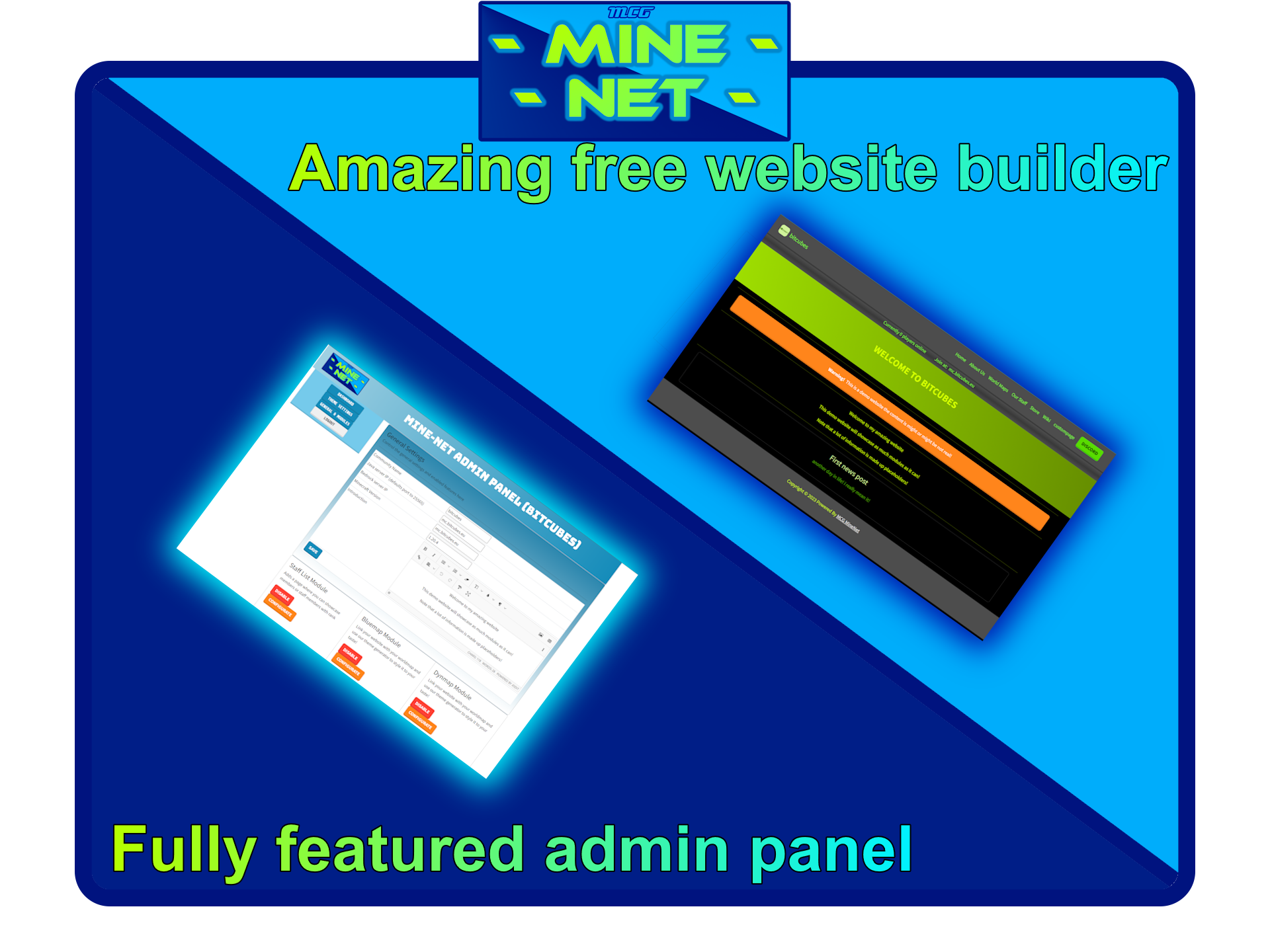
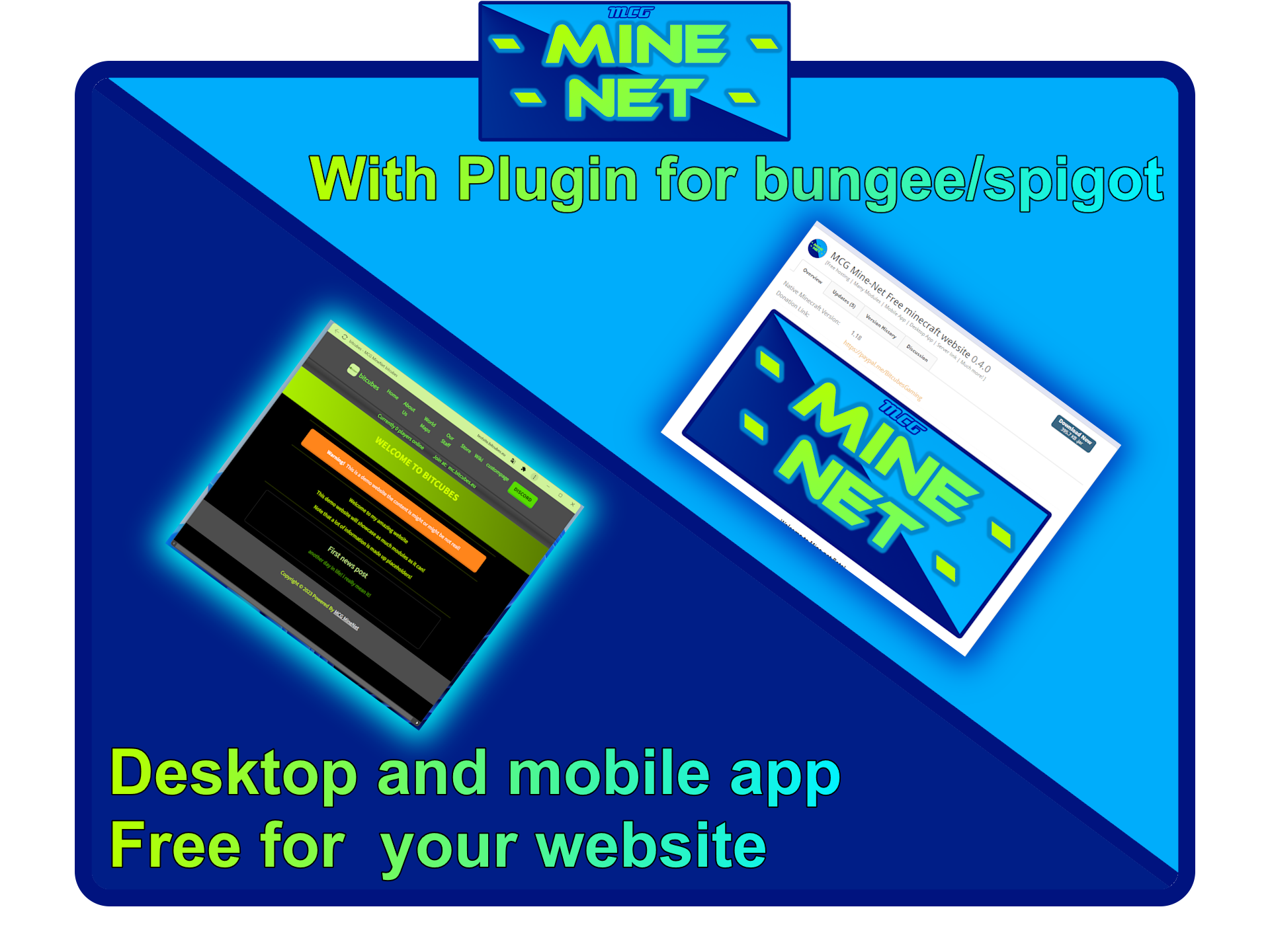
Demo: https://minecraft.bitcubes.eu/
website: https://mine-net.eu
Features: https://mine-net.eu/features.php
Start right away: https://mine-net.eu/login.php
Discord support and feedback: https://mine-net.eu/discord.php
MHDF-Tools
# MHDF-Tools | 梦之工具 | V3重制版
不只是一个基础插件 | 懂你更懂玩家
理论支持: **1.17-1.21.4**
支持服务端: **Paper**及分支、**Folia**及分支

重写全部代码 推倒重来 重新起航
开源免费 使用**MIT**开源协议 决不付费圈钱
全部提示均可修改 全部命令均可修改 这才是”我”的世界
高度自定义配置文件 每行均有中文注释
高度兼容跨服 绝不出现 跨服顿挫感(例如跨服不生效等问题)
支持**mysql、h2存储 redis、hashmap缓存** 单端群组都能用
可不破坏玩家体验情况下
最大程度修复 1.13+复制三叉戟漏洞
**梦之工具 给你不一样的开服体验**
[Github](https://github.com/ChengZhiMeow/MHDF-Tools)
[Minebbs](https://www.minebbs.com/resources/mhdf-tools.7397/)
English:
# **MHDF-Tools | Dreamtools | V3 Remastered** #
More than just a basic plugin | Knows you better than you know the player
Theoretical support: **1.17-1.21.4**
Server support:**Paper** and branches, **Folia** and branches
Rewrite all the code, start over, start over.
Open source is free and uses the **MIT** open source protocol, and is not paid for.
All prompts are modifiable, all commands are modifiable, this is my world.
Highly customizable configuration files with Chinese comments on every line.
Highly cross-service compatible, no cross-service frustration (e.g. cross-service not working).
Support **mysql, h2 storage, redis, hashmap cache** single-end group can use it
Can be used without destroying the player experience
Maximum fix for 1.13+ replicated trident vulnerability
**MHDF-Tools gives you a different open-service experience**
[Github](https://github.com/ChengZhiMeow/MHDF-Tools)
[Minebbs](https://www.minebbs.com/resources/mhdf-tools.7397/)
MeSudo
# MeSudo
MeSudo is a universal sudo plugin that works across Spigot, BungeeCord, and Velocity. It allows administrators to run commands as any player or the console from anywhere in the network.
## Features
– Native support for Bukkit/Spigot (Paper, Folia), BungeeCord/Waterfall, and Velocity.
– Cross-server command execution through the proxy.
– Ability to sudo as online players or the server console.
– Supports all Minecraft versions from 1.8.8 to the latest.
– Lightweight with no heavy dependencies.
## Commands
### Proxy (BungeeCord / Velocity)
Usage: `/sudo [name] `
– Use `*` to dispatch a command to all connected servers.
– `MeSudo.use` permission required.
### Server (Bukkit / Spigot)
Usage: `/sudo [name] `
– `MeSudo.use` permission required.
## Installation
1. Copy MeSudo.jar into your proxy’s plugins folder.
2. Copy the same JAR into the plugins folder of all back-end servers.
3. Restart your instances.
The plugin requires being on both the proxy and the servers to handle cross-server communication.
## Permissions
– `MeSudo.use`: Allows access to the /sudo command.
—
Author: Alex
License: All rights reserved
mclo.gs

Server Plugin/Mod
A mod/plugin to easily share and analyse your server logs with mclo.gs
## About mclo.gs
mclo.gs allows you to quickly share and analyze logs for Minecraft servers and clients. It highlights different log levels, removes sensitive information like IP-Addresses and detects common problems as well as version information.
## Features
– Upload server logs with a single command
– Share logs with a short url
– Automatic on-device removal of sensitive information like IP addresses and system usernames
– Uploading other logs and reports
– Deleting uploaded logs
## Commands
The Plugin/Mod contains the following commands:
| Command | Arguments | Description | Permission Level | Permission Node |
|————–|————-|—————————————————————|——————|—————–|
| mclogs | | Share the current server log | 2 | mclogs |
| mclogs list | | List server logs, crash- and network protocol error reports | 2 | mclogs.list |
| mclogs share | | Share a specific log, crash- or network protocol error report | 2 | mclogs.share |
| mclogs delete | | Delete a log that was shared from the server | 2 | mclogs.delete |
For special cases, the following commands are available:
| Scenario | Command | Behavior |
|—————————————-|—————————|——————–|
| Mod installed client-side | `/mclogsc` | Handle client logs |
| Plugin installed on a Velocity proxy | `/mclogsp` and `/mclogsv` | Handle proxy logs |
| Plugin installed on a BungeeCord proxy | `/mclogsp` and `/mclogsb` | Handle proxy logs |
### Permissions
Commands are not available to players by default. You can give players access to the commands by giving them the
required permissions. Plugin servers permissions use permission nodes for fine-grained access control. The `mclogs`
permission node is required for all other commands as well.
Modded servers use the Vanilla permission level system instead.
## Configuration
If you use a self-hosted instance of mclo.gs or want to use an alternative front-end, you can configure the plugin/mod to use your instance.
The config file is located in `plugins/mclogs/config.toml` for plugin servers and `config/mclogs.toml` for modded servers.
### Default configuration
“`toml
# Base URL for the API used to upload logs
apiBaseUrl = “https://api.mclo.gs”
“`
## Requirements
This project requires Java 11 or higher to run, even on Minecraft versions that run on Java 8.
MCLocalAuth
# 🛡️ MCLocalAuth
**Minecraft Authentication Plugin with Integrated Discord Bot**
[](LICENSE)
[]()
[]()
[](CHANGELOG.md)
—
## 🎯 Description
MCLocalAuth is a security plugin for Minecraft servers that uses Discord as an authentication system. Protect your server by limiting access to only members of your Discord community.
Works on **Spigot/Paper** and **BungeeCord** — the Discord bot runs on both platforms with all features.
### 🎮 How It Works
1. **Player Connects** → Immediately disconnected with a unique code
2. **On Discord** → Type `/mclogin ` (on server or in DMs with the bot)
3. **Bot Verifies** → Is the player a Discord member?
4. **If Yes** → IP registered, reconnection authorized ✅
5. **If No** → Blocked ❌
---
## ✨ Features
### 🔐 Triple Layer Security
- ✅ **Discord Required**: Only members of your Discord can play
- ✅ **Temporary Code**: Each connection generates a unique code that expires
- ✅ **IP Protection**: One username = One IP → Impossible to steal identities
### 🤖 Integrated Discord Bot
- Starts automatically with the server
- No external bot to host
- No network ports to open
- Native Discord slash commands
- **Works on Spigot/Paper and BungeeCord**
- **Commands available in DMs** (globally registered)
- Automatic bot status verification at startup
### 📋 Discord Commands
| Command | Description | Access |
|---------|-------------|--------|
| `/mclogin ` | Authenticate with the code received in-game | Everyone |
| `/mctest` | Test bot ↔ plugin connection | Everyone |
| `/status` | Check your authentication status | Everyone |
| `/unlink ` | Unlink an account | Admin |
| `/mcadmin showips ` | View authorized IPs | Admin |
| `/mcadmin addip ` | Add an authorized IP | Admin |
| `/mcadmin removeip ` | Remove an authorized IP | Admin |
| `/mcadmin resetip ` | Reset all IPs | Admin |
| `/mcadmin setip ` | Set primary IP | Admin |
> Admin commands are restricted to the Discord ID set in `admin.discord_id` in `config.yml`.
### ⚙️ Admin Commands (in-game)
| Command | Spigot/Paper | BungeeCord |
|---------|--------------|------------|
| `/auth showips ` | ✅ | ✅ |
| `/auth addip ` | ✅ | ✅ |
| `/auth removeip ` | ✅ | ✅ |
| `/auth resetip ` | ✅ | ✅ |
| `/auth setip ` | ✅ | ✅ |
---
## 📦 Installation
### Prerequisites
- Minecraft Server **1.8.9 to 26.1.1** (Spigot, Paper, Purpur) or **BungeeCord** (Build 2068)
- Java **8** minimum
- Discord Bot configured on [Discord Developer Portal](https://discord.com/developers/applications)
### Spigot / Paper
1. **Download** `MCLocalAuth-Spigot-v1.4.0.jar`
2. **Place** the file in your server's `plugins/` folder
3. **Start** the server to generate configuration
4. **Configure** the Discord bot in `plugins/MCLocalAuth/config.yml`:
```yaml
discord:
enabled: true
bot_token: "YOUR_DISCORD_BOT_TOKEN"
guild_id: "YOUR_DISCORD_SERVER_ID"
admin:
discord_id: "YOUR_DISCORD_ID"
```
5. **Restart** the server
6. **Test** with `/mctest` on Discord
### BungeeCord
1. **Download** `MCLocalAuth-Bungee-v1.4.0.jar`
2. **Place** the file in your proxy's `plugins/` folder
3. **Start** the proxy to generate configuration
4. **Configure** `config.yml` (same options as Spigot)
5. **Restart** the proxy
6. **Test** with `/mctest` on Discord
---
## 🔧 Configuration
### Discord Bot Setup
1. Go to [Discord Developer Portal](https://discord.com/developers/applications)
2. Create a new application
3. **Bot** tab → Create a bot
4. **Copy the token** (never share it!)
5. Enable these **Privileged Gateway Intents**:
- ✅ Server Members Intent
- ✅ Message Content Intent (optional)
6. **OAuth2 → URL Generator** tab:
- Check `bot` and `applications.commands`
- Permissions: `Administrator` (or custom)
7. **Invite** the bot to your server with the generated URL
### Get Discord Server ID
1. Enable **Developer Mode** in Discord:
- Settings → Advanced → Developer Mode
2. Right-click on your server → **Copy Server ID**
3. Paste in `guild_id` in `config.yml`
---
## 📊 Compatibility
| Platform | Versions |
|----------|----------|
| **Paper** | 1.8.9 → 26.1.1 ✅ |
| **Spigot** | 1.8.9 → 1.21.x ✅ |
| **Purpur** | 1.8.9 → 1.21.x ✅ |
| **Pufferfish** | 1.8.9 → 1.21.x ✅ |
| **BungeeCord** | Build 2068 ✅ |
**Java:** 8+ (compiled with Java 8 for maximum compatibility)
**Note:** The plugin automatically detects your Minecraft version at startup.
---
## 🐛 Report a Bug
If you encounter a problem:
1. Verify you're using the latest version
2. Check [existing Issues](https://github.com/UNGEUR/MCLocalAuth/issues)
3. If the problem persists, [open a new issue](https://github.com/UNGEUR/MCLocalAuth/issues) with:
- Plugin version
- Minecraft version
- Server logs
- Detailed problem description
---
## 💡 Suggest a Feature
Have an idea? [Open an issue](https://github.com/UNGEUR/MCLocalAuth/issues) with the `enhancement` tag!
---
## 📜 License
This project is under **proprietary license**. See the [LICENSE](https://github.com/UNGEUR/MCLocalAuth/blob/main/LICENSE) file for more details.
**TL;DR:**
- ✅ Free use on Minecraft servers
- ✅ View code to learn
- ❌ No modification/redistribution
- ❌ No commercial use
---
## 🙏 Credits
**Developer:** UNGEUR
**Libraries used:**
- [JDA](https://github.com/discord-jda/JDA) - Java Discord API
- [Spigot API](https://www.spigotmc.org/) - Minecraft Server API
- [BungeeCord API](https://www.spigotmc.org/wiki/bungeecord/) - Proxy API
---
## 📞 Support
- **Discord:** [Discord Server](https://discord.gg/hPUhadNQXn)
- **Issues:** [GitHub Issues](https://github.com/UNGEUR/MCLocalAuth/issues)
---
**⭐ If this plugin is useful to you, don't hesitate to star it!**
Made with ❤️ for the Minecraft community