ProxyPlayerNotify
## ProxyPlayerNotify
**More info & guide:** [GitHub – ProxyPlayerNotify](https://github.com/NewAmazingPVP/ProxyPlayerNotify)
**Latest builds (features + bug fixes)**: [GitHub Actions – ProxyPlayerNotify](https://github.com/NewAmazingPVP/ProxyPlayerNotify/actions)
**What it does**
Network-wide **join/leave/switch** messages with per-player toggles, vanish support, LuckPerms/PAPI placeholders, and optional webhook ping.
> **Note:** This is a **proxy** plugin — install on **BungeeCord/Waterfall** or **Velocity** (not on Spigot/Paper).
**Works on**: BungeeCord/Waterfall, Velocity
**How to use**
1. Install on your **proxy** and restart to generate the config.
2. Customize messages/placeholders and (optionally) webhook settings.
3. Grant the view/toggle permissions as needed.
**Config (YAML)**
“`yaml
# ProxyPlayerNotify Config
# This config file contains settings for the ProxyPlayerNotify plugin.
# Use this file to customize the join/leave messages and permissions.
# Use n to create multiple lines/messages to players.
# Set message to “” to not send any message/empty.
# Network Join Message
# This message is displayed when a player joins the network.
# Placeholders available: %player%, %lp_prefix%, %lp_suffix%, %server%, %time%.
join_message: “%player% has joined the network (Logged in server: %server%) at %time%”
# Network Private Join Message
# This message is displayed only to the player who joins the network.
# It has a higher priority than the public join message.
# Placeholders available: %player%, %lp_prefix%, %lp_suffix%, %server%, %time%.
join_private_message:
– “&aWelcome, %player%!”
– “&bYou have joined the server %server% at %time%.”
– “Enjoy your stay!”
# First Join Message
# This message is displayed when a player joins the network for the first time.
# Placeholders available: %player%, %lp_prefix%, %lp_suffix%, %server%, %time%.
first_join_message: “%player% has joined the network for the first time on %server% at %time%”
# First Join Private Message
# This message is displayed only to the player joining for the first time.
# Placeholders available: %player%, %lp_prefix%, %lp_suffix%, %server%, %time%.
first_join_private_message: “&aWelcome for the first time, %player%!”
# Servers Switch Message
# This message is displayed when a player switches to a different server.
# Placeholders available: %player%, %last_server%, %server%, %time%, %lp_prefix%, %lp_suffix%.
switch_message: “%player% has switched from %last_server% and joined to the %server% server at %time%”
# Network Leave Message
# This message is displayed when a player leaves the network.
# Placeholders available: %player%, %lp_prefix%, %lp_suffix%, %last_server%, %time%.
leave_message: “%player% has left the network (Last server: %last_server%) at %time%”
# Delay for Join Messages
# This option sets the delay before sending the join message after a player connects.
# For example, join_message_delay: 49 will send the message after 49 ticks.
# Warning: Setting this value too low may cause messages not to be sent or be blank placeholder if the server name is not yet available.
join_message_delay: 45
# Delay for First Join Messages
# This option sets the delay before sending the first join message after a player connects.
first_join_message_delay: 10
# Delay for Private Join Messages
# This option sets the delay before sending the private join message to the joining player.
# For example, join_private_message_delay: 50 will send the message after 50 ticks.
# Warning: Setting this value too low may cause messages not to be sent or be blank placeholder if the server name is not yet available.
join_private_message_delay: 50
# Delay for First Join Private Messages
# This option sets the delay before sending the first join private message to the joining player.
first_join_private_message_delay: 10
# Delay for Switch Messages
# This option sets the delay before sending the switch message after a player switches servers.
# For example, switch_message_delay: 0 will send the message after 0 ticks.
switch_message_delay: 0
# Disable messages for vanished players (Currently supports PremiumVanish and SuperVanish)
disable_vanish_notifications: false
# Option to let players rejoin the server they were on before they left the network.
# If this is enabled, the player will be sent to the last server on join in which they were on before they left the network.
# If enabled, the message delay options would need to be increased so that the messages can get the server
join_last_server: false
# Enable MiniMessage format parsing for all messages
use_minimessage: false
# Permissions
# Use these settings to control who can see the join/leave messages.
# Enable permissions if you want to use permissions and want to use next two options.
# If permissions enabled Then if notify_message is true and the player doesn’t have ppn.notify permission, then their join/leave/message will not be sent.
# If permissions enabled Then if hide_message is true and the player doesn’t have ppn.view permission, then they won’t see the others’ join/switch/leave messages.
permission:
# Enable this if you want to use permissions and want to use next two options.
permissions: false
# Notify Messages
# If this is true and the player doesn’t have ppn.notify permission, then their join/leave/message will not be sent.
notify_message: false
# Hide Messages
# If this is true and the player doesn’t have ppn.view permission, then they won’t see the others’ join/switch/leave messages.
hide_message: false
# Server Names
# Define custom server names here. Players can join/leave/switch to the server using the custom names specified below.
ServerNames:
example: “example-1”
lobby: “Hub”
# Disabled Servers
# Define the backend servers (lowercase) where the join/switch/leave messages should not be sent.
# In simple words, no messages of this plugin will be sent to players on that server
# In short: No activity notifications are sent to players on these servers.
DisabledServers:
– “example-1”
– “other-backend-server”
# Private Servers
# Specify the private servers (lowercase) where if player joins, leaves, and switches from and to, notifications should not be sent.
# Think about them like admin servers
# When someone joins it, the whole proxy should not be notified about that because you kind of want to keep that server private/secret and not let the players know.
# In short: Activity notifications related to these servers are not broadcasted across the entire network.
PrivateServers:
– “example”
– “private-server”
# Limbo Servers
# Specify the limbo servers (lowercase) where player join, leave, and switch notifications should be managed differently.
# These servers act as pass-throughs most of the time and can be configured to adjust notification behavior accordingly.
# When a player joins a limbo server, no network-wide join notification is sent.
# When a player switches from a limbo server to a game server, it should send a join notification as if the player is joining the network for the first time.
# Conversely, when a player switches from a game server to a limbo server, it should send a leave notification as if the player is leaving the network.
# This configuration helps avoid unnecessary notifications and prevents stealthy movements between public and private parts of the network.
# In short: Join and leave notifications are sent based on transitions to and from these servers to manage network-wide notifications effectively.
LimboServers:
– “limbo-afk”
# Disabled Players
# Specify the players (lowercase) that should not send any notification messages.
# They will also will not recieve join_private_message.
# It is not recommended to use this feature and instead use permissions for each group/player
DisabledPlayers:
– “player1”
– “player2”
# Webhook
# Configure a webhook notification sent when a player joins the network.
# Placeholders available: %player%, %server%, %time%.
webhook:
enabled: false
url: “”
message: “%player% joined %server% at %time%”
# Send webhook as Discord embed (recommended). If true, the message above is used as the embed description.
use_embed: true
# Embed color as decimal RGB (e.g., 3447003 is Discord “blurple”).
embed_color: 3447003
“`
**Support**
GitHub Issues: https://github.com/NewAmazingPVP/ProxyPlayerNotify/issues
Discord: https://discord.gg/u3u45vaV6G
—
ProxyOnlineLinker
# 🔀 ProxyOnlineLinker
## 🌐 Overview
**ProxyOnlineLinker** is a plugin designed to link online player counts between proxies and servers in
Minecraft. It supports multiple server types
including [Spigot](https://www.spigotmc.org/), [BungeeCord](https://www.spigotmc.org/wiki/bungeecord/), [Velocity](https://papermc.io/software/velocity),
[TransferProxy](https://github.com/YvanMazy/TransferProxy), making it a versatile solution
for server administrators looking to manage player counts effectively across different platforms.
## ✨ Features
– **Multi-Platform Support**: Compatible with Spigot, BungeeCord, Velocity and TransferProxy servers.
– **Highly configurable**: Configure sources, cache, update intervals, and more.
– **Performant**: Lightweight and optimized for performance.
📚 Consult the [wiki](https://github.com/YvanMazy/ProxyOnlineLinker/wiki) for more information.
## 📥️ Installation
1. Download the latest version of ProxyOnlineLinker from the Releases page.
2. Place the downloaded `.jar` file into the `plugins` folder of your server.
3. Start or restart your server to generate the configuration files.
4. Modify the `config.yml` file to suit your server’s needs.
## ❓ Use cases
Linking the number of connected users can be useful in cases where you have multiple servers that are not directly
hosted by the same proxy. In a multi-proxy environment, or simply for independent projects hosted by the same
organization.
Finally, the project was initially designed for [TransferProxy](https://github.com/YvanMazy/TransferProxy), a project
that uses packet transfers to redirect players
without holding the connection. ProxyOnlineLinker can therefore also be used for projects that use packet transfers.
## 🔌 Contributing
Contributions are welcome! Please submit pull requests or open issues on GitHub.
⭐ If you’re interested in the project, please leave a star to show your support. It’s through contributions like these
that the project is able to exist and thrive.
## 📄 License – MIT
This project is licensed under the MIT License. See the [LICENSE](https://github.com/YvanMazy/ProxyOnlineLinker/blob/master/LICENSE) file for more details.
ProxyCore


[](https://github.com/YesithTK/ProxyCore)
[](https://github.com/YesithTK/ProxyCore)
[](https://adoptium.net/)
[](https://maven.apache.org/)
[](./LICENSE)
[](https://github.com/YesithTK)
> **ProxyCore** is a powerful, lightweight, all-in-one proxy utilities plugin built for **BungeeCord** and **Velocity** networks.
> 20 essential commands, automatic announcements, maintenance mode, private messaging, staff tools — all in a single plugin with **zero external dependencies**.
—
## 📋 Table of Contents
– [Features](#-features)
– [Requirements](#-requirements)
– [Installation](#-installation)
– [Commands](#-commands)
– [Permissions](#-permissions)
– [Configuration](#-configuration)
– [API](#-api)
– [Roadmap](#-roadmap)
– [Credits](#-credits)
– [License](#-license)
—
## ✨ Features
| 🔍 Network Info | 📢 Communication | 🚀 Player Management | ⚙️ Administration |
|:—:|:—:|:—:|:—:|
| Find players | Global announcements | Send players across servers | Maintenance mode |
| Server list | Staff chat | Move all players at once | Network-wide alerts |
| Network stats | Private messages | Kick from proxy | Config hot-reload |
| Ping checker | Reply system | Staff list | Uptime display |
| IP lookup | Broadcast with prefix | Force commands (sudo) | Per-server player list |
– ✅ **Dual platform** — One codebase, two JARs: BungeeCord & Velocity
– ✅ **Zero dependencies** — No external libraries required at runtime
– ✅ **Hot reload** — Apply config changes without restarting the proxy
– ✅ **Auto announcements** — Rotating messages with a configurable interval
– ✅ **Maintenance mode** — Kicks non-staff players and blocks new joins
– ✅ **Developer API** — Clean `proxycore-api` module for building addons
– ✅ **Multi-module Maven** — `proxycore-api`, `proxycore-bungeecord`, `proxycore-velocity`
—
## 📦 Requirements
| Requirement | Version |
|————-|———|
| Java | 17 or higher |
| BungeeCord | 1.20+ |
| Velocity | 3.x |
| Maven | 3.8+ *(for building from source)* |
—
## 🚀 Installation
### Pre-built JAR *(recommended)*
1. Download the correct JAR from [Releases](https://github.com/YesithTK/ProxyCore/releases):
– `ProxyCore-BungeeCord-1.0.0.jar` → for BungeeCord
– `ProxyCore-Velocity-1.0.0.jar` → for Velocity
2. Drop it into your proxy’s `plugins/` folder.
3. Start or restart the proxy.
4. Edit the generated `plugins/ProxyCore/config.yml` and `messages.yml`.
5. Run `/proxyreload` to apply changes without restarting.
### Build from Source
“`bash
# Clone the repository
git clone https://github.com/YesithTK/ProxyCore.git
cd ProxyCore
# Build BungeeCord JAR
mvn clean package -pl proxycore-bungeecord -am
# Build Velocity JAR
mvn clean package -pl proxycore-velocity -am
“`
Output JARs:
– `proxycore-bungeecord/target/ProxyCore-BungeeCord-1.0.0.jar`
– `proxycore-velocity/target/ProxyCore-Velocity-1.0.0.jar`
—
## 💬 Commands
> **Note:** Velocity command names are prefixed with `v` — e.g. `/glist` → `/vglist`, `/send` → `/vsend`.
### 🔍 Network Information
| Command | Description | Permission |
|———|————-|————|
| `/find ` | Show which server a player is on | `proxycore.find` |
| `/glist` | List all servers with their player counts | `proxycore.glist` |
| `/network` | Display global network stats | `proxycore.network` |
| `/pping [player]` | Check your own or another player’s ping | `proxycore.ping` |
| `/pip ` | Retrieve a player’s IP address *(admin)* | `proxycore.ip` |
### 📢 Communication
| Command | Description | Permission |
|———|————-|————|
| `/announce ` | Broadcast a global announcement | `proxycore.announce` |
| `/staffchat ` | Send a message visible only to staff | `proxycore.staffchat` |
| `/pmsg ` | Send a private message across servers | `proxycore.msg` |
| `/reply ` | Reply to your last private message | `proxycore.msg` |
| `/pbroadcast ` | Network-wide broadcast with custom prefix | `proxycore.broadcast` |
### 🚀 Player Management
| Command | Description | Permission |
|———|————-|————|
| `/psend ` | Move a player to another server | `proxycore.send` |
| `/sendall ` | Move all online players to a server | `proxycore.sendall` |
| `/pkick [reason]` | Kick a player from the entire network | `proxycore.kick` |
| `/stafflist` | List all currently online staff members | `proxycore.stafflist` |
| `/psudo ` | Force a player to execute a command | `proxycore.sudo` |
### ⚙️ Administration
| Command | Description | Permission |
|———|————-|————|
| `/maintenance ` | Toggle maintenance mode on the network | `proxycore.maintenance` |
| `/alert ` | Send a highlighted alert box to all players | `proxycore.alert` |
| `/plist ` | List all players on a specific server | `proxycore.plist` |
| `/proxyreload` | Reload ProxyCore config without restarting | `proxycore.reload` |
| `/uptime` | Show how long the network has been running | `proxycore.uptime` |
—
## 🔐 Permissions
| Permission | Description | Default |
|————|————-|———|
| `proxycore.find` | Use `/find` | `true` |
| `proxycore.glist` | Use `/glist` | `true` |
| `proxycore.network` | Use `/network` | `true` |
| `proxycore.ping` | Check own ping | `true` |
| `proxycore.ping.others` | Check other players’ ping | `op` |
| `proxycore.ip` | View a player’s IP address | `op` |
| `proxycore.announce` | Send global announcements | `op` |
| `proxycore.broadcast` | Send network-wide broadcasts | `op` |
| `proxycore.staffchat` | Access and read staff chat | `op` |
| `proxycore.msg` | Send and receive private messages | `true` |
| `proxycore.send` | Move players between servers | `op` |
| `proxycore.sendall` | Move all players to a server | `op` |
| `proxycore.kick` | Kick players from the network | `op` |
| `proxycore.stafflist` | View the online staff list | `true` |
| `proxycore.staff` | Appear in `/stafflist` | `op` |
| `proxycore.sudo` | Force players to run commands | `op` |
| `proxycore.maintenance` | Toggle maintenance mode | `op` |
| `proxycore.maintenance.bypass` | Join the network during maintenance | `op` |
| `proxycore.alert` | Send network-wide alert messages | `op` |
| `proxycore.plist` | List players on a specific server | `true` |
| `proxycore.reload` | Reload the plugin configuration | `op` |
| `proxycore.uptime` | Check network uptime | `true` |
—
## ⚙️ Configuration
### `config.yml`
“`yaml
# ProxyCore Configuration — by YesithTK
maintenance:
enabled: false # Set true to enable maintenance on startup
announcements:
enabled: true
interval: 60 # Seconds between each auto-announcement
messages:
– “&6Welcome to the network! Enjoy your stay.”
– “&bJoin our Discord for news and updates!”
– “&aReport bugs with /report in-game.”
– “&dFollow us on social media for events and giveaways!”
“`
### `messages.yml`
“`yaml
# ProxyCore Messages — use & for color codes
prefix: “&8[&6ProxyCore&8] &r”
no-permission: “&cYou don’t have permission to do that.”
player-not-found: “&cPlayer &e%player% &cnot found or offline.”
default-kick-reason: “&cYou have been kicked from the network.”
maintenance-kick: |-
&c&lServer Maintenance
&7The network is currently under maintenance.
&7Please try again later.
find-result: “&a%player% &7is connected to &e%server%&7.”
announce-prefix: “&8[&6Announce&8] &r”
broadcast-prefix: “&8[&4Broadcast&8] &r”
“`
—
## 🧩 API
ProxyCore exposes a clean `proxycore-api` module so developers can build addons or integrate with the plugin without touching platform-specific code.
### Project Structure
“`
ProxyCore/
├── proxycore-api/ ← Shared interfaces & events
│ └── dev.yesithx.proxycore.api
│ ├── IProxyCorePlugin.java
│ ├── ProxyCoreAPI.java
│ ├── manager/
│ │ ├── IMessageManager.java
│ │ ├── IMaintenanceManager.java
│ │ └── IAnnounceManager.java
│ ├── command/
│ │ ├── ProxyCoreCommandSender.java
│ │ └── NetworkPlayer.java
│ └── event/
│ ├── ProxyCoreEvent.java
│ ├── MaintenanceToggleEvent.java
│ └── NetworkAnnounceEvent.java
├── proxycore-bungeecord/ ← BungeeCord implementation
└── proxycore-velocity/ ← Velocity implementation
“`
### Maven Dependency
“`xml
dev.yesithx
proxycore-api
1.0.0
provided
“`
### Usage Example
“`java
import dev.yesithx.proxycore.api.ProxyCoreAPI;
import dev.yesithx.proxycore.api.IProxyCorePlugin;
// Safe check before using
if (ProxyCoreAPI.isAvailable()) {
IProxyCorePlugin api = ProxyCoreAPI.get();
// Check maintenance mode
boolean maintenance = api.getMaintenanceManager().isEnabled();
// Toggle maintenance
api.getMaintenanceManager().setEnabled(true);
// Reload all managers
api.reload();
// Check announce scheduler
int interval = api.getAnnounceManager().getIntervalSeconds();
}
“`
### Available Interfaces
| Interface | Package | Description |
|———–|———|————-|
| `IProxyCorePlugin` | `api` | Base plugin interface — access all managers |
| `ProxyCoreAPI` | `api` | Static entry point for addons |
| `IMessageManager` | `api.manager` | Private messaging between players |
| `IMaintenanceManager` | `api.manager` | Maintenance mode control |
| `IAnnounceManager` | `api.manager` | Auto-announcement scheduler control |
| `ProxyCoreCommandSender` | `api.command` | Platform-agnostic command sender |
| `NetworkPlayer` | `api.command` | Platform-agnostic player abstraction |
| `ProxyCoreEvent` | `api.event` | Base class for all ProxyCore events |
| `MaintenanceToggleEvent` | `api.event` | Fired when maintenance is toggled |
| `NetworkAnnounceEvent` | `api.event` | Fired before each auto-announcement |
—
## 🗺️ Roadmap
| Version | Feature |
|———|———|
| `v1.1.0` | LuckPerms integration for permission-based staff detection |
| `v1.1.0` | `/report` command with staff notification system |
| `v1.2.0` | Configurable join/leave messages per server |
| `v1.2.0` | BossBar announcements as alternative to chat |
| `v1.3.0` | MySQL support for cross-restart data persistence |
| `v1.3.0` | REST API for external network monitoring |
| `v2.0.0` | Full PlaceholderAPI support |
| `v2.0.0` | Plugin Messaging Channel support for backend servers |
—
## 👤 Credits
| Role | Name |
|——|——|
| 🧑💻 Developer & Maintainer | **YesithTK** |
| 🏗️ Architecture & Design | **YesithTK** |
| 📖 Documentation | **YesithTK** |
*Built with ❤️ for the Minecraft network community.*
—
## 📄 License
“`
Copyright (c) 2026 YesithTK. All Rights Reserved.
This software and its source code are the exclusive property of YesithTK.
No part of this software may be reproduced, distributed, modified, or used
in any form without the prior written permission of the author.
Unauthorized copying, forking, or redistribution of this repository,
via any medium, is strictly prohibited.
“`
—

*© 2026 YesithTK — ProxyCore. All Rights Reserved.*
ProxyCommandBridge
# General
With this plugin, commands can be sent from the proxy server to a sub-server and executed there. The player name (for server selection) and the command to be executed on the sub-server are specified as parameters.
# Installation
1. Download the plugin
2. Put the .jar file into the plugin folder (proxy and all sub-servers)
3. Start your server
(Note: No configuration folder is created as no configurations are necessary)
# Commands
/pcb
### Example 1
“/pcb morelaid say Hello World!”
This executes the command “/say Hello World!” on the sub-server on which the player “Morelaid” is currently located.
### Example 2
“/pcb morelaid give morelaid diamaond 1”
This executes the command “/give morelaid diamond 1” on the sub-server on which the player “Morelaid” is currently located.
# Permissions
– pcb.admin.pcb
# Functionality
– The selected player must be active on the server
– The commands are executed as a console, so the player does not need any permission for this
# Supported Software
– Velocity
– BungeeCord
– Spigot (with all forks (incl. Paper, Purpur))
# Support
Questions or requests can be made via the [Discord Support](https://discord.gg/5zuC36R)
ProxyChat

# ProxyChat
A chat plugin for Minecraft proxies providing proxy-wide private messaging, chat channels and more!
ProxyChat is part of my proxy plugin suite. You can find all my proxy plugins below:
– [ProxyChat](https://modrinth.com/plugin/proxychat)
– [ProxyUtils](https://modrinth.com/plugin/proxyutils)
Installation instructions and other documentation can be found in the [Wiki](https://github.com/fabianmakila/ProxyChat/wiki).
## Features
– MiniPlaceholders support
– Private messaging
– Chat channels
– Automated messages
– Welcome message
– Broadcast command
ProxyChat also supports hooking into most popular Friends and Vanish plugins to further extend the functionality.
See the [wiki page](https://github.com/fabianmakila/ProxyChat/wiki/plugin-hooks) for more information.
## Supported proxies
– Bungeecord / Waterfall
– Velocity
## Discord
Can’t find what you’re looking for in the wiki?
Join the [Discord server](https://discord.gg/hNMvqruCuK) where you can get support or just hangout with the community.
## Metrics
[bStats](https://bstats.org) is used to collect anonymous usage data which is used to make decisions concerning the future of the plugin.
The collected data is publicly available and can be viewed here:
– [Bungeecord](https://bstats.org/plugin/bungeecord/ProxyChatBungee/18435)
– [Velocity](https://bstats.org/plugin/velocity/ProxyChat/15557)
Proxy Essentials
# Proxy Essentials Plugin
![Banner][banner]
[![Modrinth][badge-modrinth]][modrinth]
[![License][badge-license]][license]
[![Discord][badge-discord]][social-discord]
[![Follow @simplecloudapp][badge-x]][social-x]
[![Follow @simplecloudapp][badge-bluesky]][social-bluesky]
[![Follow @simplecloudapp][badge-youtube]][social-youtube]
[Report a Bug][issue-bug-report]
·
[Request a Feature][issue-feature-request]
🌟 Give us a star — your support means the world to us!
> All information about this project can be found in our detailed [documentation][docs-thisproject].
The Proxy Plugin enhances your server network with customizable MOTD (Server Info) and Tablist features, offering extensive customization options through simple configuration files. All settings are synchronized across all proxies.
## Features
– [x] **Mutliple MOTD Layouts**: Create multiple MOTD Layouts for different states!
– [x] **Custom Tablist**: Send your Players custom Tablist Header and Footer!
– [x] **Joinstates**: Create different joinstates so your players can only join with certain permissions (you can call it advanced maintenance feature)
## Contributing
Contributions to SimpleCloud are welcome and highly appreciated. However, before you jump right into it, we would like you to read our [Contribution Guide][docs-contribute].
## License
This repository is licensed under [Apache 2.0][license].
[banner]: https://raw.githubusercontent.com/simplecloudapp/branding/refs/heads/main/readme/banner/plugin/proxy-essentials.png
[issue-bug-report]: https://github.com/theSimpleCloud/proxy-essentials-plugin/issues/new?labels=bug&projects=template=01_BUG-REPORT.yml&title=%5BBUG%5D+%3Ctitle%3E
[issue-feature-request]: https://github.com/theSimpleCloud/proxy-essentials-plugin/discussions/new?category=ideas
[docs-thisproject]: https://docs.simplecloud.app/plugin/proxy-essentials
[docs-contribute]: https://docs.simplecloud.app/contribute
[modrinth]: https://modrinth.com/plugin/proxy-essentials-plugin
[maven-central]: https://central.sonatype.com/artifact/app.simplecloud.controller/controller-api
[dev]: https://repo.simplecloud.app/#/snapshots/app/simplecloud/controller/controller-api
[artifacts]: https://repo.simplecloud.app/#/snapshots/app/simplecloud/controller/controller-api
[dev-artifacts]: https://repo.simplecloud.app/#/snapshots/app/simplecloud/controller/controller-api
[badge-maven-central]: https://img.shields.io/maven-central/v/app.simplecloud.controller/controller-api?labelColor=18181b&style=flat-square&color=65a30d&label=Release
[badge-dev]: https://repo.simplecloud.app/api/badge/latest/snapshots/app/simplecloud/controller/controller-api?name=Dev&style=flat-square&color=0ea5e9
[license]: https://opensource.org/licenses/Apache-2.0
[snapshots]: https://repo.simplecloud.app/#/snapshots
[social-x]: https://x.com/simplecloudapp
[social-bluesky]: https://bsky.app/profile/simplecloud.app
[social-youtube]: https://www.youtube.com/@thesimplecloud9075
[social-discord]: https://discord.simplecloud.app
[badge-modrinth]: https://img.shields.io/badge/modrinth-18181b.svg?style=flat-square&logo=modrinth
[badge-license]: https://img.shields.io/badge/apache%202.0-blue.svg?style=flat-square&label=license&labelColor=18181b&style=flat-square&color=e11d48
[badge-discord]: https://img.shields.io/badge/Community_Discord-d95652.svg?style=flat-square&logo=discord&color=27272a
[badge-x]: https://img.shields.io/badge/[email protected]?style=flat-square&logo=x&color=27272a
[badge-bluesky]: https://img.shields.io/badge/[email protected]?style=flat-square&logo=bluesky&color=27272a
[badge-youtube]: https://img.shields.io/badge/youtube-d95652.svg?style=flat-square&logo=youtube&color=27272a
Proxy Announcer
A simple and configurable proxy announcement plugin for Bungeecord and Velocity win customizable messages and much more coming soon…
### Commands:
– /announce – Announce a message globally to all servers.
– /announceserver – Announce a message to a specific server.
### Coming Soon
– Auto Broadcaster
PronounsAdvanced
# Pronouns
Pronouns is a plugin that lets players set their pronouns. This was created for the Pride event in ClassiCraft, but is now open to the public for use.
Originally forked from an unmaintained plugin, now fully rebuilt, reworked, recoded, and remaintained for modern Minecraft to fit your server’s needs as its own brand new project, worked from the ground up!
To set multiple pronouns, use one of two formats: “She/her;They/Them” or “She/They”
**Supports Minecraft 1.21.6+ (Paper).**
### Features
– **Individual Pronouns:** Players can set their pronouns to personalize their experience.
– **Multiple Pronoun Sets:** Players can define and use multiple sets of pronouns (e.g., she/her and they/them).
– **Custom Pronouns/Neopronouns:** Full support for player-defined custom pronouns with correct grammatical conjugation.
– **PlaceholderAPI Support:** Extensive PlaceholderAPI integration, allowing for grammatically correct sentence construction using player pronouns, including support for multiple and custom sets with indexed access.
– **Flexible Data Storage:** Options to store pronoun data, including MySQL for network-wide compatibility.
– **Developer API:** Extensible API for other plugins to interact with pronoun data.
– **Platform Support:** Currently supports Paper and Velocity. Sponge and BungeeCord support is planned.
### Paper
Download the Paper jar file and place it into your `plugins` folder. Restart your server.
### Placeholders
%pronouns_subjective_1%
%pronouns_all%
%pronouns_pronouns%
# Data collection
Pronouns anonymously collects some data with bStats. You are able to opt out of this in the configuration if you prefer.
ProAntiTab
##### ****
One of the simplest plugin & command hider!
Decide what plugins and commands your players should see! ^^
**placeholderapi support – free – no dependencies required**
___________________________________
**
**********
# **A**BOUT
ProAntiTab is an advanced **plugin hider** with **many features** and a very simple to understand system. It prevents your server from **plugin spoofers** used by hack clients, manipulates the **tab-completion**, blocks unwanted **suggestions** and much more!
#####
#####
# **I**N ACTION
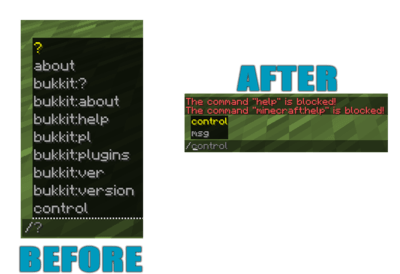
######
# **C**USTOM SERVER BRAND (F3)
Create your own animated custom server brand on your Spigot, Bungeecord and Velocity server!
*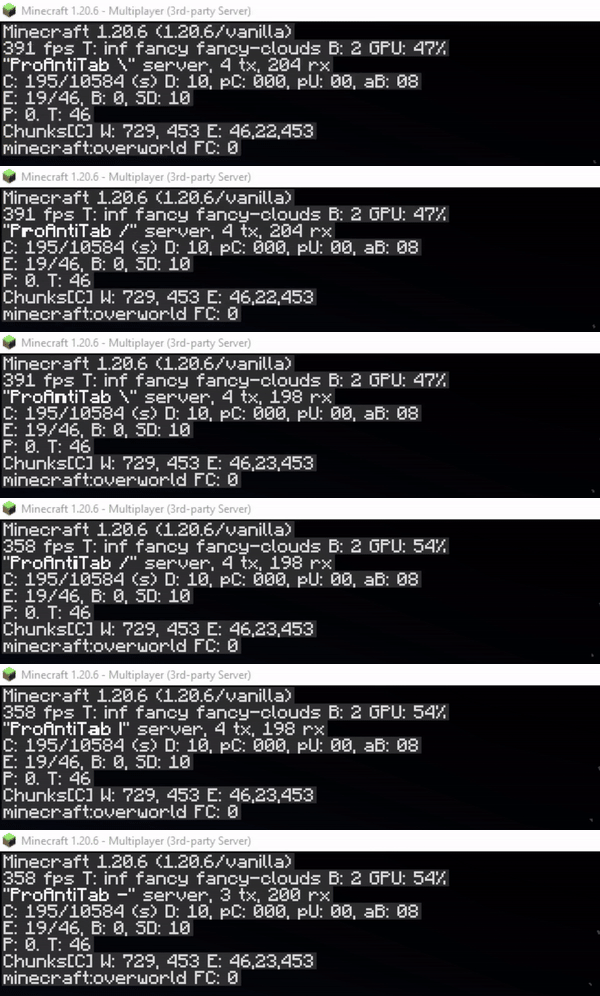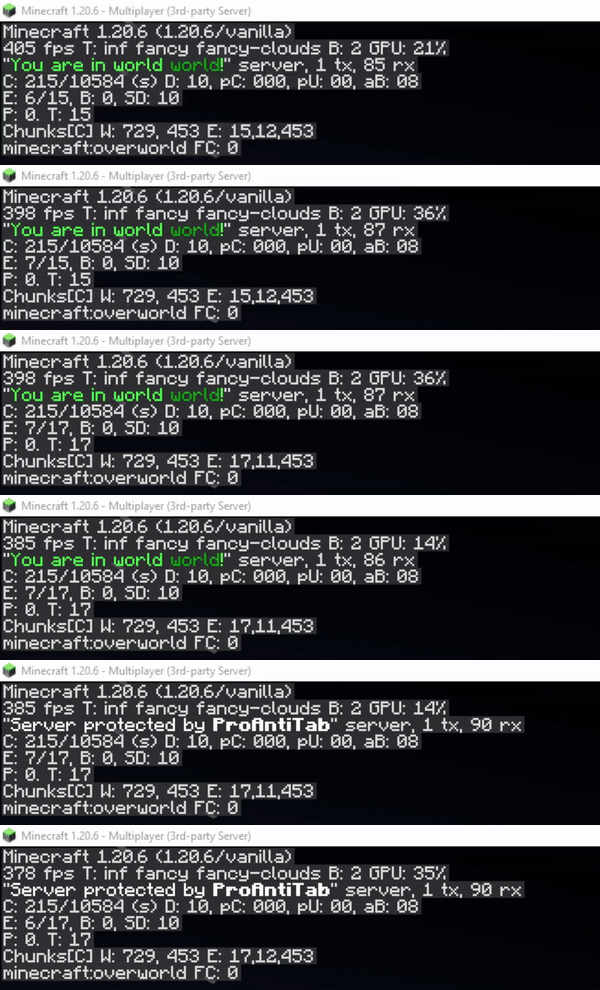*
open config.yml section
“`yaml
# This feature allows you to customize your server-brand you see when you press F3.
# Normally there stands something like ‘Purpur’, or ‘Spigot’.
# With this feature you are able to change and even animate it! ^^
custom-server-brand:
enabled: false
# Determines the speed in that the animation goes
repeat-delay: 3
# This here is the list of the animation
# Possible placeholders:
# %player% – name of the player
# %displayname% – displayname of the player
# %world% – name of world where the player is
# and the other placeholders from PlaceholderAPI
brands:
– ‘&f&lP&froAntiTab |’
– ‘&fP&lr&foAntiTab /’
– ‘&fPr&lo&fAntiTab -‘
– ‘&fPro&lA&fntiTab |’
– ‘&fProA&ln&ftiTab ‘
– ‘&fProAn<&fiTab |’
– ‘&fProAnt&li&fTab /’
– ‘&fProAnti&lT&fab -‘
– ‘&fProAnti&lT&fab ‘
– ‘&fProAntiT&la&fb |’
– ‘&fProAntiTa&lb&f /’
– ‘&fProAntiTab -‘
– ‘&fProAntiTab ‘
“`
######
# **U**SE BLACKLIST AS WHITELIST
You have way too many commands to block? Don’t worry.
There’s a section in the config.yml located pretty much high that allows you to turn the blacklist into a whitelist instead. This will block every command on your server except for those that are listed.
section in config.yml
“`yaml
# This is a very necessary feature if you have way too many commands to block and instead decide
# to whitelist specific commands.
# Enabling this will disable ALL commands except for those that are in the (group-)list.
turn-blacklist-to-whitelist: false
“`
######
# **A**NTI PLUGIN SPOOFING
##### ProAntiTab is able to detect and block plugin spoofing attempts used by hack clients.
**
######
# **B**LOCK SUB ARGUMENTS
We all know the problem when players should be able to use some of the commands but should not see literally EVERY sub-argument in a command. Well, then just blend them out? ProAntiTab can do this for you and it’s very easy to setup as well! (See some examples below)

example
“`yaml
# Let’s say you just want to allow “/help Minecraft” only and not “/help apple”.
# It will also automatically allow everything after “/help Minecraft …”
– help Minecraft
# [CMD] = Allow the execution of the command
# [TAB] = Allow the tab-completion of the command
– “[CMD]cmi tpa” # Only executable. Not tab-completable
– tpa # Executable & Tab-Completable
# %hidden_online_players% = Online players (Removed from tab-completion)
# %online_players% = Online players
# %hidden_players% = Registered players (Removed from tab-completion)
# %players% = Registered players
# %numbers% = Numbers, such as 1000 or 1.000
# _- = Block everything after
– “tpa %online_players%”
– “sell %numbers%”
# Using the operator _- at the end cancels every argument afterwards and blocks it.
# This will allow the player to use “/help Minecraft” but not “/help Minecraft xyz”
– help Minecraft _-
“`
######
# **B**LOCK COLON COMMANDS
Blocking each and every colon command like essentials:spawn by hand is not an easy task. But with this simple feature, you can easily block all colon commands automatically! Only people with the proantitab.namespace permission can see and use these commands again.
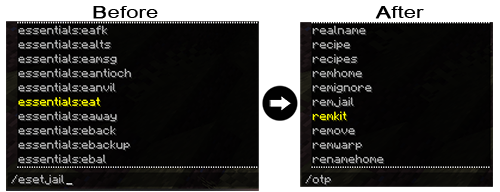
open config.yml section
“`yaml
#>> HTP (Overwritten)
# Here you can disable all namespace commands.
# Namespace commands are commands like plugin:command (e.g: essentials:warp)
# You can bypass this restriction with the proantitab.namespace permission.
block-namespace-commands:
enabled: false
“`
######
# **C**USTOM PLUGINS LIST
Just blocking the /plugins command is pretty boring. This feature here allows you to make it more interesting by displaying for example fake plugins.

open config.yml section
“`yaml
#>> HTP (Overwritten)
# Here you can customize your own fake ‘/plugins’ command.
custom-plugins:
enabled: true
commands:
– pl
– plugins
– bukkit:pl
– bukkit:plugins
message:
– ‘&fPlugins (0):’
“`
######
# **C**USTOM VERSION COMMAND
Who wouldn’t like to pretend to own a custom server-jar? Have fun customizing your very own /version command to your personal liking.

open config.yml section
“`yaml
#>> HTP (Overwritten)
# Here you can customize your own fake ‘/version’ command.
custom-version:
enabled: true
commands:
– version
– ver
– icanhasbukkit
– bukkit:ver
– bukkit:version
message:
– ‘&fThis server is running CraftBukkit version git-NasaSpigot-294 (MC: X)’
“`
######
# **C**USTOM UNKNOWN COMMAND MESSAGE
The Bukkit/Spigot version of ProAntiTab gives your the possibility to create your own unknown-command message to align it with the blocked-command message for example.

open config.yml section
“`yaml
# Now there we come to the good stuff! ^^
# If ProAntiTab is loaded on a Spigot server, you will see this option right here.
# With that you can also customize your own “Unknown Command”-message.
custom-unknown-command:
enabled: true
message:
– ‘&cThis command does not exist!’
“`
######
# **C**USTOM PROTOCOL PING
Do you know the red text message at the players count when you ping a server with the wrong version? Exactly this holds the information of what kind of server your proxy server is running at. This feature hides the version of the proxy with a custom made one. It’s enabled by default but doesn’t show the text. The text can be seen when someone pings the server with the wrong version or uses a resolver. This picture shows you what someone with the wrong version would see, unless the “always-show” is enabled. If this option is enabled, this text will always appear.

open config.yml section
“`yaml
# Change the protocol for the version name when the server is being pinged
# (!) Warning: It’s required to use Paper or Purpur to use this feature!
# (!) Supported server versions: 1.12.2 – latest
custom-protocol-ping:
enabled: false
# Normally it would only display when someone pings the server with the wrong version.
# Enabling this will always display the protocol and replace it with the normal player count.
always-show: false
# This number here determines the outcome for the %online_extended% placeholder.
# It’s the current amount of players increased by this number.
# For example: 5/20 becomes 6/20
extend-online-count: 1
# true: Use new calculated online-count (%online_extended%) as max-players count.
# false: Use the default max-players count.
use-as-maxplayers: false
# Enabling this option hides the list of players on your server,
# when you hover over the player count.
hide-players: true
# The displayed protocol message
# Available placeholders:
# %online% – current online player count
# %online_extended% – manipulated online player count
# %max% – max player count
protocol: ‘&f&lProAntiTab &7(&a%online%&7/&c%max%&7)’
“`
######
# **C**USTOM RESPONSE ACTIONS
For some, it’s important to determine how the response message should be or what should happen. You can customize that factor to your personal liking and use different actions to have full control over your blocked commands.


Bukkit/Spigot examples
“`yaml
# ____ ___ __ _ ______ __
# / __ _________ / | ____ / /_(_)_ __/___ _/ /_
# / /_/ / ___/ __ / /| | / __ / __/ / / / / __ `/ __
# / ____/ / / /_/ / ___ |/ / / / /_/ / / / / /_/ / /_/ /
# /_/ /_/ ____/_/ |_/_/ /_/__/_/ /_/ __,_/_.___/
# custom-responses.yml
#
# Here you can configure a few of the blocked commands a bit further.
# But what exactly is this here? Every command that would normally respond with the typical “command is blocked” message, can be configured in here!
# And how does it work? It’s simple. You just provide the a trigger of the command that would be normally blocked.
# Commands that would normally work won’t send the messages you have set here.
# This way PAT can offer you full control over certain commands and their normal responses.
# What are these action section at each block?
# This is an additional feature to make your responses much more alive.
# Example actions that can be used are the following:
# Execute console command:
# Syntax: console::command
# Example: console::say %player% is an evil player
# Execute player command:
# Syntax: execute::command
# Example: execute::help
# Send actionbar:
# Syntax: actionbar::text
# Example: actionbar::&cThis is not cool %player%!
# Send title:
# Syntax: title::title::subtitle::5::20::5
# Example: title::&aTest title::&cHello %player%!
# Play sound:
# Syntax: sound::soundName::volume::pitch
# Example: sound::ENTITY_ENDER_DRAGON_GROWL::1.0::1.0
# Give potion effect:
# Syntax: effect::potionEffect::duration::amplifier
# Example: effect::BLINDNESS::45::1
# Here are a few examples:
# Example with kits.
# In here we only trigger the given message, if the player would type “/kit …”.
# If this command would work through sub-arguments, then the player would only able to execute the command with the
# listed sub-arguments assigned to it. Everything else will result with the set message in there.
# —
#example-with-kits:
# triggers:
# – “kit *”
# message:
# – “&cThis kit does not exist!”
# actions:
# – “actionbar::&cSorry %player%, but this kit does not exist!”
# Here another example with an auctionhouse plugin.
# In here we only trigger the given message, if the player would type “/ah plugin”.
# Normally it would print out the “command is blocked” message, because PAT would have blocked it in our case.
# Therefore, we can also assign a custom response message to it.
# —
#example-with-auctionhouse:
# triggers:
# – “ah plugin”
# message:
# – “&cThis sub-command does not exist. Please type: &e/ah help”
# actions:
# – “console::say That’s not nice %player%!”
# – “effect::BLINDNESS::45::1”
# – “sound::ENTITY_ENDER_DRAGON_GROWL::1.0::1.0”
# – “title::&cHey!::&cYou can’t do that %player%!::5::20::5”
# – “actionbar::&cNop, sorry %player%”
“`
Proxy examples
“`yaml
# ____ ___ __ _ ______ __
# / __ _________ / | ____ / /_(_)_ __/___ _/ /_
# / /_/ / ___/ __ / /| | / __ / __/ / / / / __ `/ __
# / ____/ / / /_/ / ___ |/ / / / /_/ / / / / /_/ / /_/ /
# /_/ /_/ ____/_/ |_/_/ /_/__/_/ /_/ __,_/_.___/
# custom-responses.yml
#
# Here you can configure a few of the blocked commands a bit further.
# But what exactly is this here? Every command that would normally respond with the typical “command is blocked” message, can be configured in here!
# And how does it work? It’s simple. You just provide the a trigger of the command that would be normally blocked.
# Commands that would normally work won’t send the messages you have set here.
# This way PAT can offer you full control over certain commands and their normal responses.
# What are these action section at each block?
# This is an additional feature to make your responses much more alive.
# Example actions that can be used are the following:
# Execute console command:
# Syntax: console::command
# Example: console::send %player% fallback
# Execute player command:
# Syntax: execute::command
# Example: execute::help
# Send actionbar:
# Syntax: actionbar::text
# Example: actionbar::&cThis is not cool %player%!
# Send title:
# Syntax: title::title::subtitle::5::20::5
# Example: title::&aTest title::&cHello %player%!
# Here are a few examples:
# Example with kits.
# In here we only trigger the given message, if the player would type “/kit …”.
# If this command would work through sub-arguments, then the player would only able to execute the command with the
# listed sub-arguments assigned to it. Everything else will result with the set message in there.
# —
#example-with-kits:
# triggers:
# – “kit *”
# message:
# – “&cThis kit does not exist!”
# actions:
# – “actionbar::&cSorry %player%, but this kit does not exist!”
# Here another example with an auctionhouse plugin.
# In here we only trigger the given message, if the player would type “/ah plugin”.
# Normally it would print out the “command is blocked” message, because PAT would have blocked it in our case.
# Therefore, we can also assign a custom response message to it.
# —
#example-with-auctionhouse:
# triggers:
# – “ah plugin”
# message:
# – “&cThis sub-command does not exist. Please type: &e/ah help”
# actions:
# – “console::say That’s not nice %player%!”
# – “title::Hey!::You can’t do that %player%!::30::3000::30”
# – “actionbar::Nop, sorry %player%”
“`
#####
# **N**EGATE COMMANDS
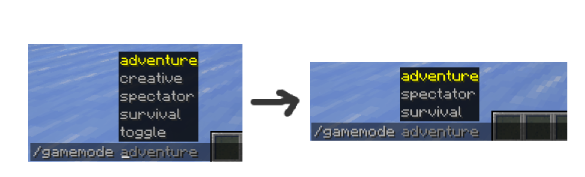
It’s not a must to write each and every possible sub-argument by hand. The same goes for commands in general.
You can negate them with the help of the negation operator (“!“).
**
example
“`yaml
# Allows /gamemode and all of its sub-arguments
# except “/gamemode creative”
– “gamemode”
– “!gamemode creative”
– ‘!gamemode toggle’
“`
“`yaml
# Allows all commands, except /anvil
– “*”
– “!anvil”
“`
#####
# **A**UTO-ADD ALL PLUGIN COMMANDS
Sometimes it’s so annoying to add all commands from a certain plugin by hand. That’s why ProAntiTab offers the possebility to simply add all commands from a certain plugin with a simple shortcut.
You can simply add “plugin=“ to add all commands from a plugin automatically.
**Only works for standalone Spigot (+Forks) servers**
example
“`yaml
# Allows all Essentials commands except /anvil.
# /gamemode is limited to only two sub-arguments
– “plugin=essentials”
– “!anvil”
– “gamemode creative”
– “gamemode survival”
“`
######
# **B**LOCK ON SPECIFIC SERVERS
If you use ProAntiTab on a network, you can pretty easily manage on what servers what commands should exist. Everything can be handled via the proxy and does not require additional maintenance on the backend servers.
For this, just follow the official [setup](https://github.com/RayzsYT/ProAntiTab/wiki/How-to-setup#proxy–spigot-eg-bungeecord–spigot) and [how-to](https://github.com/RayzsYT/ProAntiTab/wiki/How-to#introduction) guide, which can be both found on the [Github wiki](https://github.com/RayzsYT/ProAntiTab/wiki).
######
# **G**ROUP SYSYTEM
The PAT group system allows you to allow certain commands only for a certain group of people. PAT group commands are mainly for **whitelisting** commands, can merge with other groups, and so on.
They can also be used to blacklist commands by negating the commands inside there. But for this to work, the option `allow-group-overruling` inside the `config.yml` needs to be enabled.
How to use the PAT group system in general can be seen on the [Github wiki](https://github.com/RayzsYT/ProAntiTab/wiki/How-to#use-the-group-system).
######
# **P**LACEHOLDERAPI & PAPIPROXYBRIDGE SUPPORT
Customization and uniqueness is an important factor for many server owners. That’s why PAT offers you the possebility to edit and use many of its placeholders with the widely spreaded plugin [PlaceholderAPI](https://www.spigotmc.org/resources/6245/). Accessing those placeholders on the proxy isn’t a problem either. With the support of the addtional plugin [PAPIProxyBridge](https://www.spigotmc.org/resources/108415/), PAT’s placeholders are even accessable on your proxy server.
Available placeholders
“`yaml
# Some general Placeholders to work with:
# %pat_general_user% = Get the name of the user who receives this message.
# %pat_general_version_current% = Get current version name of PAT.
# %pat_general_version_newest% = Get newest version name of PAT.
# Placeholders of some of the messages in the config.yml:
# %pat_message_unknowncommand% = Get the “unknown command”-message from the config.yml of PAT. [cancel-blocked-command]
# %pat_message_blocked% = Get the “command blocked”-message from the config.yml of PAT. [custom-unknown-command]
# Placeholders to list all commands:
# %pat_list_size_commands% = Get the amount of all listed commands.
# %pat_list_commands% = Get all listed commands.
# %pat_list_sorted_commands% = Get all listed commands in alphabetic order. (A-Z)
# %pat_list_reversed_groups% = Get all listed commands in reversed alphabetic order. (Z-A)
# Placeholders to list all commands of a group: (replace ‘xxx’ with the group-name)
# %pat_list_size_commands_group_xxx% = Get the amount of all commands of a group.
# %pat_list_commands_group_xxx% = Get all commands of a group.
# %pat_list_sorted_commands_group_xxx% = Get all commands of a group in alphabetic order. (A-Z)
# %pat_list_reversed_commands_group_xxx% = Get all commands of a group in reversed alphabetic order. (Z-A)
# Placeholders to list all groups:
# %pat_list_size_groups% = Get the amount of all available groups.
# %pat_list_groups% = Get all groups.
# %pat_list_sorted_groups% = Get all groups in alphabetic order. (A-Z)
# %pat_list_reversed_groups% = Get all groups in reversed alphabetic order. (Z-A)
“`
###
# **M**INIMESSAGE SUPPORT
## 
##### You want to design your messages more unique? We got you covered! *(works on 1.17 server and above)*
*([Click here to see the documentation for the format](https://docs.advntr.dev/minimessage/format.html#)*)
Look at those few examples to see what kind of possibilities awaits you:
example 1
“`yaml
cancel-blocked-commands:
enabled: true
message: ‘&cThis command is &4&lBLOCKED&c!’
“`

example 2
“`yaml
cancel-blocked-commands:
enabled: true
message: ‘&cThis command is blocked! &7Click here to get a view of all available commands instead.’
“`

######
# **H**OW TO SETUP?
Despite of the fact that ProAntiTab is pretty easy to use, the setup is slidely different for each server engine.
It normally is already enough to simply load ProAntiTab on the certain server you wanna use it, but in order to use ProAntiTab with all its features, its recommended to follow the [official setup guide on the Github wiki](https://github.com/RayzsYT/ProAntiTab/wiki/How-to-setup).
**Please feel free to join the [Discord](https://www.rayzs.de/discord) server to request for help if the instruction is unclear or too complicated. ^^**
#
# **H**OW TO ALLOW COMMANDS?
[Please check out the wiki to get an idea on how PAT works and can be used.](https://github.com/RayzsYT/ProAntiTab/wiki/How-to)
If you want to bypass all blocked commands, simply give yourself the following permission: **proantitab.bypass**
Following permission is required to execute all listed commands within a certain group: **proantitab.group.**
######
# **C**OMMANDS & PERMISSIONS
All commands and their permissions are listed on the [documentation](https://www.spigotmc.org/resources/113172/field?field=documentation) page at the very buttom.
######
# **C**ONFIGURATION FILE
Bukkit/Spigot
[config.yml](https://github.com/RayzsYT/ProAntiTab/blob/v2.0.1/src/main/resources/files/bukkit-config.yml)
[storage.yml](https://github.com/RayzsYT/ProAntiTab/blob/v2.0.1/src/main/resources/files/bukkit-storage.yml)
Proxy (Bungeecord/Velocity)
[config.yml](https://github.com/RayzsYT/ProAntiTab/blob/v2.0.1/src/main/resources/files/proxy-config.yml)
[storage.yml](https://github.com/RayzsYT/ProAntiTab/blob/v2.0.1/src/main/resources/files/proxy-storage.yml)
######
## **bStats**
[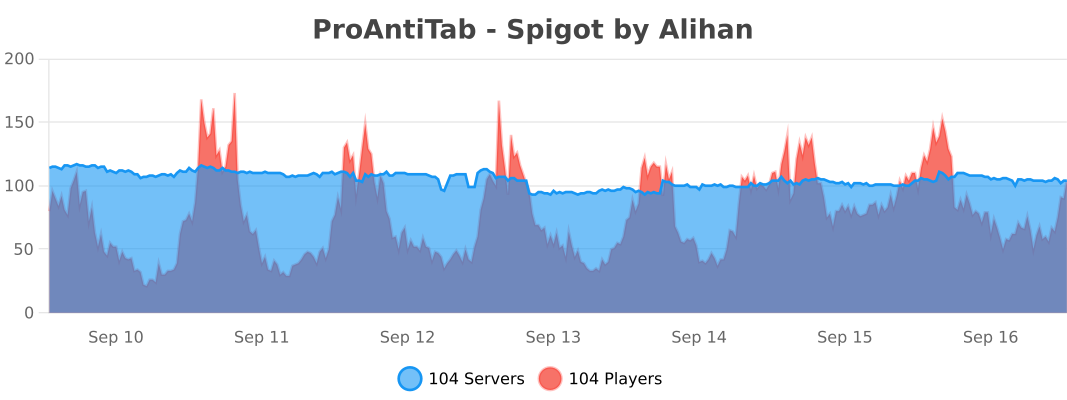](https://bstats.org/plugin/bukkit/proantitab%20-%20spigot/20089)
[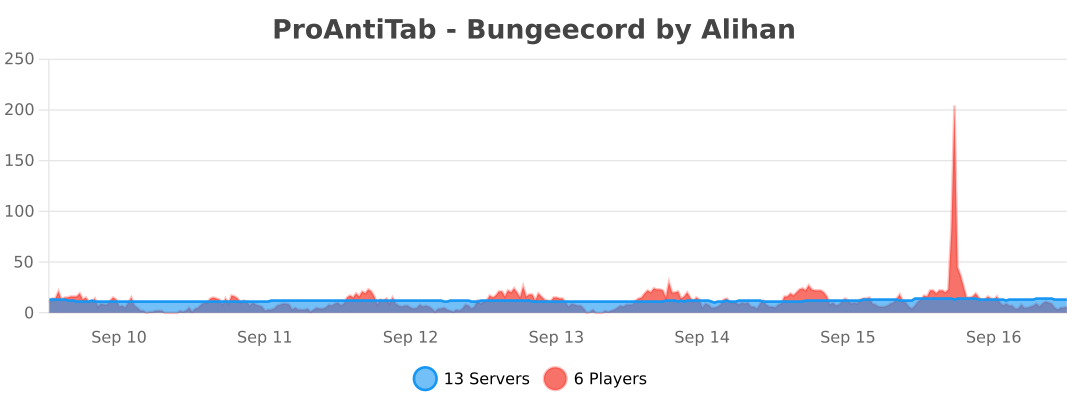](https://bstats.org/plugin/bungeecord/proantitab%20-%20bungeecord/20090)
[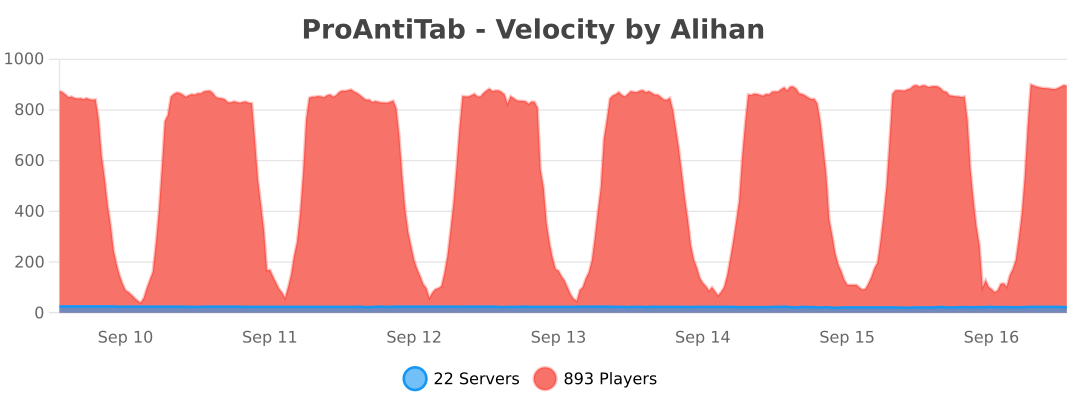](https://bstats.org/plugin/velocity/proantitab%20-%20velocity/21638)
[](https://www.rayzs.de/discord)
PrefiX
[Discord Server]: https://discord.gg/2RHYvNy “Join the Discord Server”
[Discord Logo]: https://icons.iconarchive.com/icons/papirus-team/papirus-apps/256/discord-icon.png “Join the Discord Server”
[LuckPerms]: https://luckperms.net “LuckPerms Homepage”
[DeluxeMenus]: https://www.spigotmc.org/resources/deluxemenus.11734/ “DeluxeMenus”
[bStats]: https://bstats.org/plugin/bukkit/PrefiX/10920 “bStats PrefiX”
[bStats-picture]: https://bstats.org/signatures/bukkit/PrefiX.svg “bStats PrefiX”
[SpigotMC]: https://www.spigotmc.org/resources/prefix.70359/ “SpigotMC PrefiX”
[plugin-downloads]: https://img.shields.io/spiget/downloads/70359?label=Downloads
[plugin-version]: https://img.shields.io/spiget/version/70359?label=Version
[plugin-rating]: https://img.shields.io/spiget/stars/70359?label=Rating
[plugin-supported]: https://img.shields.io/spiget/tested-versions/70359?label=Supported%20Versions
[bStats-players]: https://img.shields.io/bstats/players/10920?label=Online-players
[bStats-servers]: https://img.shields.io/bstats/servers/10920?label=Online-servers
[discord-online]: https://img.shields.io/discord/755734170709524557?logo=discord&logoColor=235865F2
# [PrefiX](https://gitlab.com/martijnpu/prefix/-/wikis/Home)
[Commands](https://gitlab.com/martijnpu/prefix/-/wikis/Commands) –
[Permissions](https://gitlab.com/martijnpu/prefix/-/wikis/Permissions) –
[Config](https://gitlab.com/martijnpu/prefix/-/wikis/Config) –
[Languages](https://gitlab.com/martijnpu/prefix/-/wikis/Languages) –
[Placeholders](https://gitlab.com/martijnpu/prefix/-/wikis/Placeholders)
[![plugin-downloads]][SpigotMC] [![plugin-version]][SpigotMC] [![plugin-rating]][spigotMC] [![plugin-supported]][SpigotMC] [![bStats-players]][bStats] [![bStats-servers]][bStats] [![discord-online]][Discord Server]
—
## **Description**
PrefiX is an easy and clean plugin to support in editing the Prefixes and Suffixes on your server.
Players can adapt their Prefix and/or Suffix based on their given permissions. Easy to configure and even easier to use!
PrefiX is build against [LuckPerms].
For quick support ask your questions in our [Discord server]!

## Wiki
This plugin is very well documented on our own wiki: [PrefiX Wiki](https://gitlab.com/martijnpu/prefix/-/wikis/Home)
## **Features**
– Uses ***only*** LuckPerms for handling and saving
– Colors of the ***prefix***, ***name***, ***bracket*** and ***suffix*** are separated
– ***Blacklist*** specific words
– ***Whitelist*** character groups and custom characters
– Fully ***customizable*** colors and formatting
– Different permission for each color
– Formatting toggles
– All colors available
– All formatting available
– ***Hexadecimal*** support
– Hexadecimal names support
– Custom hexadecimal format
– Gradient support
– ***Moderating*** for staff
– You can change others prefix/colors/suffix
– ***Configurable*** characters before and after the prefix
– ***Auto-checker*** for new updates
– ***Overviewlist*** with all available colors for the player
– ***Interactive*** color list
– ***Suffix*** support
– ***BungeeCord*** support
– Define your own **custom messages** *(Or other **languages**)*
– Ability to respect **context** from LuckPerms
– Support for ***spaces*** in the Prefix/Suffix by adding “”
– ***Placeholder*** support via ***PAPI***
– ***DeluxeMenus*** support
*Prefix has [DeluxeMenus] support, this means that it’s possible to let players choose from a Deluxe Menu a presetted prefix. This will ensure you as admin that only predefined prefixes are chosen. For more information about DeluxeMenus support visit out [Discord Server].*
* Clickable overview of available colors:

## **Setup Spigot/Paper/Folia & BungeeCord**
Please be aware it requires [LuckPerms v5][LuckPerms] to work.
This plugin works out of the box by simply downloading and dropping in your plugins folder.
## **Statics**
This Plugin uses bStats! This submits anonymous stats about your server (player count, plugin/server version, etc.) to the public statistic website [bStats] which will provide developers with usage statistics of this plugin. If you don’t want this feature and wish to opt-out, you can add *’bstats: false’* to the config.
It would mean a lot to me though if you could leave it enabled, its part of what keeps me motivated 🙂
## **Trusted by many people**
PrefiX in stable, easy to use and simple to setup. Therefore it’s used and trusted in many servers with great success.
[![bStats-picture]][bStats]
## ***Want to display custom prefixes…***
*…in your chat? You need a chat formatting plugin.*
*…in the tab list? You need a tab plugin.*
*…somewhere else? You need a specific plugin for that.*
## **Looking for support?**
> Visit our [Discord server] for quick support for all your questions!
> [![Discord Logo]][Discord Server]
**Thanks.**