Silk Spawner
# RU
Данный плагин позволяет добывать спавнера любыми кирками с шелковым касанием, сохраняя моба внутри. Вы так же можете менять текст спавнера в конфиге
# EN
This plugin allows you to mine the spawner with any silk touch pickaxe while keeping the mob inside. You can also change the spawner text in the config
ElytraSwap
# EN
This plugin will allow you to use the mechanics for elytra from new versions. What is often missing on 1.16.5 servers for crystal pvp, or something else
# RU
Данный плагин позволит вам использовать механику для элитр с новых версий. То, чего часто не хватает на 1.16.5 серверах для кристал пвп, или чего-то ещё
Yeth’s TPA
**Yeth’s TPA is a Teletransportation Accept mod for Minecraft designed to be compatible, stable, and sufficient.**
## Commands
– **/tpa ** Sends a TPA request to a user
– **/tpa accept ** Accepts a TPA request from a user
– **/tpa here** Sends a TPA Here request to a user
– **/tpa cancel** Cancels an outgoing TPA request
– **/tpa ignore ** Ignores a player from making TPA requests
– **/tpa help** Sends a list of all commands
– **/tpa disable** Disables TPA requests from being sent to you
– **/tpa enable** Enables TPA requests to be sent to you
– **/tpa setting ** Configures settings in TPA
## Features
– Automatic expiry of TPA requests
– TP delay w/ countdown
– Multiple request handling
– Permissions for server owners
– Anti-TPA-traps
## Support
Yeth’s TPA supports the following mod loaders:
– Fabric
– Neoforge
– Forge
– Quilt
– Legacy Fabric
– Babric
– Ornithe
– BTA
– LiteLoader
For Minecraft versions 1.7.2 – 26.1.2
YeeeesMOTD
Customized server motd and random icon, it can use player’s head as server icon,like this:
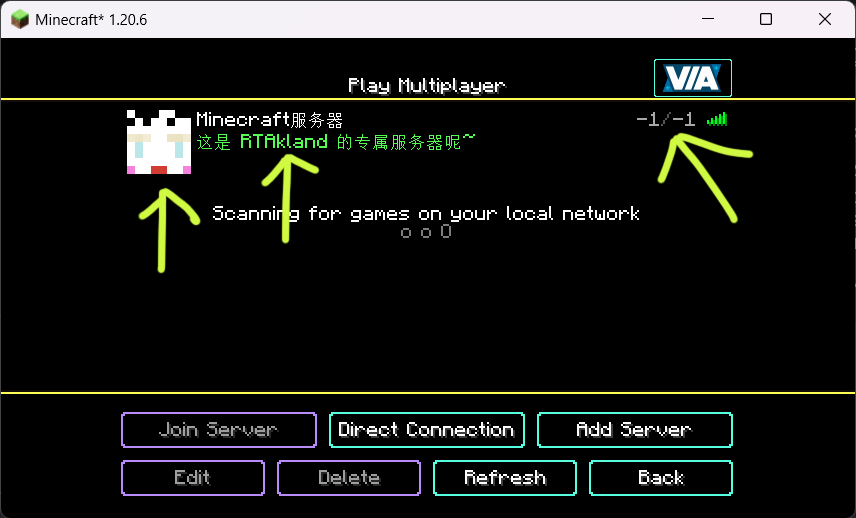)
also use player’s name as motd description, and random icon
everything is up to you
for more information please go to github: https://github.com/RTAkland/YeeeesMOTD
X-SetSpawn
[](https://www.spigotmc.org/resources/132280/) [](https://wiki-x-proyects.vercel.app/) [](https://discord.com/invite/Yb6GsfGWmd)
# **X-SetSpawn**
### *Manage your server’s spawn point professionally*
### 📝 **Description**
X-SetSpawn is a lightweight, feature-rich plugin designed to manage spawn points on your server. From simple global spawns to premium visual effects, economy integration, and proxy network support — all packed into one plugin. Compatible with Minecraft 1.8.8 to 26.1+.
### ✨ **Features**
– **Fireworks on arrival:** Launch a firework when a player teleports to spawn. Color and power configurable.
– **Combat & Falling checks:** Block `/spawn` while in combat or falling. Supports CombatLogX, PvPManager, DeluxeCombat.
– **Multi-database storage:** Save spawns to YAML (local), MySQL, MariaDB, H2 or MongoDB for cross-server sync.
– **Custom command aliases:** Define `/hub`, `/lobby` or any alias directly from `config.yml` — no need to edit `plugin.yml`.
– **Economy Integration (Vault):** Charge players to use `/spawn`. Money only deducted if the teleport completes.
– **First-Join Spawn:** Set a unique spawn point for newly joining players with `/setspawn firstjoin`.
– **Smart Respawn:** On death, respects the player’s Bed or Respawn Anchor before falling back to spawn.
– **Void-Teleport:** Automatically teleport players who fall below a configurable Y-level.
– **Post-Teleport Protection:** Temporary invulnerability after teleporting while chunks load.
– **Advanced Proxy Sync:** Dedicated lightweight plugins for Velocity and BungeeCord. Use `/setlobby` to sync your lobby server automatically.
– **Intelligent Proxy Teleport:** Automatically detects if a player is already on the target server and performs a local teleport.
– **Visual Countdown:** ActionBar, BossBar, Titles and particle effects during the delay — each individually toggleable.
– **Countdown sounds:** “Tic-Tac” click sounds each second during the teleport delay.
– **PlaceholderAPI:** Full PAPI support. Exposes `%xsetspawn_cooldown%`, `%xsetspawn_delay%`, `%xsetspawn_is_pending%`, `%xsetspawn_spawn_set%`.
– **Config auto-updater:** Detects outdated configs, creates a backup and rebuilds automatically.
– **100% Customizable:** 6 language files (EN, ES, JA, PT, RU, CUSTOM), per-world spawns, and full config control.
### 🖥️ **Compatibility**
| Software | Supported |
|—|—|
| Bukkit / Spigot / Paper / Purpur | ✅ |
| Folia | ✅ |
| BungeeCord / Velocity | ✅ |
| Minecraft | 1.8.8 → 26.1+ |
### 🛠️ **Main Commands**
**`/spawn`**
Teleports the player to the established spawn point.
**`/setspawn [x y z] [world] [yaw pitch]`**
Sets the spawn point. Use without arguments for your location, or specify coordinates (supports `~`). Console compatible.
**`/delspawn `**
Deletes a specific named spawn point if named spawns are enabled.
**`/back`**
Teleports the player back to their last location before using a spawn command.
**`/setlobby`**
Sets the lobby coordinates for the proxy network and syncs the configuration with BungeeCord/Velocity.
**`/xss [subcommand]`**
– **`help`** – Shows the help menu.
– **`reload`** – Reloads the plugin configuration.
– **`version`** – Shows the current version info.
– **`update`** – Manually check for updates.
– **`setspawn`** – Sets the spawn point (alias for /setspawn).
– **`delspawn`** – Deletes a spawn (alias for /delspawn).
### 🛡️ **Permissions**
– **`xsetspawn.spawn`** – Use `/spawn`. *(default: everyone)*
– **`xsetspawn.setspawn`** – Use `/setspawn`. *(default: op)*
– **`xsetspawn.admin`** – Admin commands and update notifications. *(default: op)*
– **`xsetspawn.reload`** – Reload the configuration. *(default: op)*
– **`xsetspawn.update`** – Check for updates. *(default: op)*
– **`xsetspawn.bypass.cooldown`** – Skip the teleport cooldown. *(default: op)*
– **`xsetspawn.bypass.delay`** – Skip the teleport delay. *(default: op)*
– **`xsetspawn.bypass.economy`** – Teleport for free. *(default: op)*
> **Tip:** Explicitly denying a node (`-xsetspawn.spawn`) will block the player even if they are OP.
Need help? Join our [Discord](https://discord.com/invite/Yb6GsfGWmd) or report issues in the discussion section.
xLogin
# 🛡️ xLogin – Simple, Lightweight & Powerful Authentication

**xLogin** is an all-in-one authentication system designed for servers that want maximum security without the bloat. Forget about complex external database setups; xLogin is optimized to work locally, fast, and secure out of the box, whether you run a standalone server or a massive Proxy network.
> Note: /premium is only available for networks and proxies. Compatible with Bungeecord, Velocity, Waterfall, and others.
How do I activate proxy mode?
Go to config.yml and enable proxy mode, then download and install the add-on for your proxy, and you’re all set!
—
## 🚀 Key Features
* **🌐 Smart Network & Proxy Ready:** Fully compatible with **BungeeCord** and **Velocity**. Features auto-detection to enable secure UUID verification and includes an automatic Auth-Lobby redirect system to send players to a specific server upon successful login.
* **📦 Local-First Storage & Backups:** High-performance, thread-safe H2 database system (`data.mv.db`). No need for MySQL to get professional network-level performance. Easily create instant database backups via in-game commands!
* **💎 Smart Premium System:** Using an official Minecraft account? Players can use `/premium` to enable auto-login. The plugin uses real Mojang validation (via your Proxy) to ensure nobody can steal a premium identity.
* **🧠 Industrial-Grade Security:**
* **BCrypt Hashing:** Passwords are encrypted with the industry standard, making them virtually impossible to crack.
* **Premium Name Impersonation Protection:** Automatically kicks non-premium players trying to join with the username of an official purchased account.
* **Anti-Bot Captcha:** A visual verification system during registration to stop bot attacks in their tracks.
* **Total Protection:** Blindness, immobilization, and block/damage protection until the user is authenticated.
* **Asynchronous Logging:** Keeps a silent, detailed history of logins, registrations, and admin actions.
* **🖼️ Ultimate Admin Control:** Manage everything from the console or in-game. Features an intuitive visual GUI menu with player heads, plus a massive arsenal of commands to purge inactive users, force logins, change UUIDs, and more.
* **📱 Bedrock Support (Geyser):** Fully compatible with console and mobile players via Floodgate integration. Bedrock players authenticated via Xbox Live can automatically bypass the login screen (100% configurable).
* **⚡ Performance Optimized:** Fully asynchronous database operations ensure your TPS stays at 20.0, no matter how many players are joining.
—
## 🛠️ Commands & Permissions
### Player Commands
| Command | Description | Permission |
| :— | :— | :— |
| `/login ` | Log in to your account. | None |
| `/register ` | Create a new account with captcha. | None |
| `/premium [confirm]` | Toggle Auto-login (Premium Mode). | None |
| `/changepassword ` | Securely change your current password. | None |
| `/captcha ` | Solve the registration captcha. | None |
### Admin Commands (`xlogin.admin`)
| Command | Description |
| :--- | :--- |
| `/xlogin gui` | Open the visual administration menu. |
| `/xlogin backup` | Create an instant backup of the database. |
| `/xlogin purge ` | Delete all accounts inactive for ``. |
| `/xlogin verify ` | View a player's UUID, IP, Premium status, & last login. |
| `/xlogin forcelogin ` | Forcefully log a player into the server. |
| `/xlogin setspawn` / `spawn` | Set or teleport to the login spawn location. |
| `/xlogin changepass ` | Forcefully change a player's password. |
| `/xlogin changeuuid ` | Manually update a player's registered UUID. |
| `/xlogin unpremium ` | Remove the premium auto-login status from an account. |
| `/xlogin unban ` | Remove an IP from the registration blacklist. |
| `/xlogin unregister ` | Completely delete a player's account. |
| `/xlogin reload` | Reload the plugin configuration and messages. |
---
## ⚙️ Simplified Configuration
We've stripped the config down to the essentials so you don't waste time, while giving you absolute control over your network.
### `config.yml`
```yaml
# -------------------------------------------------------
# __ _
# __ __ / / ___ __ _(_)_ __
# / // / / _ / _` | | '_ Made by xPlugins
# > '
before-register:
title: '&#FAD7A0Register!'
subtitle: '&fUse /register '
after-login:
title: '&#A9DFBFSuccess!'
subtitle: '&fEnjoy your stay'
incorrect-password:
title: '&#F1948AIncorrect Password!'
subtitle: '&7Please try again'
logging:
enabled: true
log-successful-logins: true
log-registrations: true
log-failed-attempts: true
log-admin-actions: true
XD’s Library
### XD’s Library
#### XDPXI’s library for numerous tasks.
—
### Features
> Please view the [Documentation](https://xdlib.xdpxi.dev/) for the correct features for your version
—
### Building from Source
#### To build the mod from source follow the steps below:
– Clone the [Git repository](https://github.com/XDPXI/XDLib)
– Run `gradlew build` or `build.ps1` in your terminal in the cloned repository
#### The compiled mod will be in `build/libs`
XConfig
# ⚙️ | XConfig
XConfig is a simple library Free and Open-Source that allows create multiple files rapidly and do some action with that files as the developer want, or simply get values from the files. The library has a good code-quality, you can see the library code and contribute to it.
You can create various configuration files, by the moment the library only has support for YAML files.
Features:
* Support for Bukkit and BungeeCord platforms.
* Make multiple files easy.
* Control about the files.
* Get multiple values from files.
* Write values into the files.
* Reload or save the files.
* Colorize the texts with normal colors and HEX colors.
[](https://jitpack.io/#InitSync/XConfig)
[](https://www.codacy.com/gh/InitSync/XConfig/dashboard?utm_source=github.com&utm_medium=referral&utm_content=InitSync/XConfig&utm_campaign=Badge_Grade)
# 🛠️ | Installation
XTools installation is very easy, you can import the library using a dependency manager such as Maven or Gradle. Or just add the jar to BuildPath of your project.
To get the jar, either download it from [GitHub](https://github.com/InitSync/XConfig/releases) or [Spigot](https://www.spigotmc.org/resources/xconfig.105977/). Or just [Build it locally](https://github.com/InitSync/XConfig#–build)
You can see examples about how to import the library at the [Wiki](https://github.com/InitSync/XConfig/wiki/Installation).
# ➕ | Contribute
Do you want contribute with the library?
* [Make a Pull Request](https://github.com/InitSync/XConfig/compare)
* [Issues](https://github.com/InitSync/XConfig/issues/new)
# ✅ | Build
If you want build the project locally, download it, you must be had Gradle and Java 8+ for this.
Now for build the project
“`
git clone https://github.com/InitSync/XConfig
cd XConfig
./gradlew shadowJar
“`
The files will be at the `XConfig/bin` folder.
# 🎫 | License
This project is licensed under the GNU General Public License v3.0 license, for more details see the file [License](LICENSE)
WorldEditSync
# WorldEditSync
WorldEditSync is a Minecraft plugin that synchronizes WorldEdit (FastAsyncWorldEdit) clipboards across multiple servers. This plugin is designed to work with Paper, BungeeCord, and Velocity servers, ensuring that players’ WorldEdit clipboards are consistent no matter which server they are on.
## Features
– Synchronize WorldEdit and FastAsyncWorldEdit clipboards across multiple servers.
– Automatically upload and download clipboards when players switch servers.
– Efficient chunk-based data transfer to handle large clipboards.
– Permissions support to control which players can use the synchronization feature.
– Support for Paper, BungeeCord, and Velocity servers.
## Requirements
– Minecraft server running Paper.
– **BungeeCord** or **Velocity** proxy server.
– **WorldEdit** or **FastAsyncWorldEdit** plugin installed on the Paper server.
## Installation
1. **Download the Plugin:**
– Download the latest version of the WorldEditSync plugin from the [releases page](https://github.com/TWME-TW/WorldEditSync/releases).
2. **Install on Paper Server:**
– Place the `WorldEditSync.jar` file in the `plugins` directory of your Paper server.
– Ensure that the WorldEdit or FastAsyncWorldEdit plugin is also installed on the Paper server.
3. **Install on BungeeCord or Velocity Proxy:**
– Place the `WorldEditSync.jar` file in the `plugins` directory of your BungeeCord or Velocity proxy server.
4. **Configuration:**
– No additional configuration is required. The plugin will automatically register the necessary channels and start synchronizing clipboards.
## Usage
– **Permissions:**
– The plugin uses the `worldeditsync.sync` permission to control which players can use the synchronization feature. By default, this permission is granted to all players.
– **Commands:**
– There are no commands required to use this plugin. Clipboard synchronization happens automatically when players copy or cut using WorldEdit or FastAsyncWorldEdit and switch servers.
## Development
### Building from Source
1. **Clone the Repository:**
“`sh
git clone https://github.com/TWME-TW/WorldEditSync.git
cd WorldEditSync
“`
2. **Build the Plugin:**
“`sh
mvn clean package
“`
3. **Find the JAR:**
– The built JAR file will be located in the `target` directory.
### Contributing
Contributions are welcome! Please open an issue or submit a pull request on GitHub.
## License
This project is licensed under the Apache License 2.0. See the [LICENSE](LICENSE) file for details.
## Contact
For support or inquiries, please open an issue on GitHub or contact the authors.
###### Tags: FastAsyncWorldEdit WorldEdit Clipboard Plugin Copy WorldEditGlobalizer
WorldChatter

# Security Features
### Anti-Swear
This helps to prevent any sensitive or inappropriate words from your chat to help keep it clean.
It has the ability to customize words (BlackList / WhiteList).
### Anti-Repeat
This prevents players from repeating the same words or letters over and over again.
### Anti-ADs
It will block any type of IPs or URLs from the player.
### Anti-Caps
This helps to prevent the player from sending large uppercased messages in the chat!
# Configurations!
### Detection Messages!
If anyone triggers one of the security settings, you will be alerted, and they will be alerted as well.
“`yaml
DetectedMessage: “&c%player_name%’s message got detected by the following flags &e[%flags%] n———-> &6%message%” # Change how the detection message is sent
DetectedPlayerMessage: “&cYou have been detected by the following flags &e[%flags%]” # Changes how the message is sent to the player (set it to “” if you don’t want to send it)
“`
### Switch Messages (For Proxies)
This will notify everyone in the server or the previous and current server when a player switches from one server to another!
“`yaml
# This switch message is only available for both BungeeCord & Velocity
SwitchSettings:
enabled: true
global: true # false is just the current server & previous server / true all the servers
premessage: “&a%player_name% &ehas switched from &6%previous_server% &eto &f%current_server%”
comessage: “&a%player_name% &ehas arrived from &6%previous_server%”
“`
### Others
“`yaml
SpamMessage: “&cYour message is blocked by the &eAnti-Spamn&7Remaining time: %duration% seconds” # Changes how the anti-spam message is sent (set it to “” if you don’t want to send it)
ChatClearMessage: “&eThe Chat has been cleared by &a%sender%” # Changes how the cleared chat message gets sent
NoPermissionMessage: “&eYou’re not allowed to use this command!”
“`
# Utilities Features!
### Aliases
This feature enhances WorldChatter’s placeholders by allowing customization of player and place names using two new placeholders: `{player_name}` and `{player_place}`.
“`yaml
aliases:
enabled: true
place:
world: “&aOverworld&r”
player:
OmarOmar93: “OmarOmar93 &o&eTest Omar Yes”
“`
### Chat Locking
This allows staff or console to lock or unlock the chat using `wc lock`!
“`yaml
ChatLockMessage:
enabled: true
public: true # TRUE | Shows the message to everyone or FALSE | just the sender
locked: “&eThe Chat is now &cLOCKED &eby &a%sender%”
unlocked: “&eThe Chat is now &aUNLOCKED &eby &a%sender%”
currently: “&eThe Chat is Currently &clocked”
“`
### Clear Chat!
Clear the chat with `wc clear`!
### Custom Join and Quit Messages!
Customize join and quit messages with special permissions for certain players.
“`yaml
Join:
enabled: true
level: 1 # 1 is just current place / 2 the whole server
place: “world” # place to send the message
message: “&a%player_name% &fhas joined the game!”
permmode: true # Checks to use the permissions mode to send messages / disabled will use default message
permissions:
“admin”:
permissions: [ “worldchatter.control”, “*” ]
message: “&a%player_name% &fhas joined the gamen&e[Teleport to %player_name%]”
Quit:
enabled: true
level: 1 # 1 is just current place / 2 the whole server
place: “world” # place to send the message – type %place% to make it the last player’s place
message: “&a%player_name% &fhas left the game!”
permmode: false # Checks to use the permissions below to show a different message or no!
permissions:
“admin”:
permissions: [ “worldchatter.control”, “*” ]
message: “&a%player_name% &fhas left the game &8You have nothing to do to that player :P”
“`
### Notifications
Customize notification sounds for detections.
“`yaml
notification:
enabled: true
staff: # notification detection for staff
sound: “BLOCK_NOTE_BLOCK_PLING” # the sound to play as the notification you can find it here by https://helpch.at/docs/SERVER_VERSION_GOES_HERE/index.html?org/bukkit/Sound.html
volume: 1 # volume of the sound
pitch: 1 # pitch of the sound
player: # notification detection to the player
sound: “BLOCK_NOTE_BLOCK_PLING”
volume: 1
pitch: 1
“`
### Channels
Introducing the new **Channels** Feature!
Add Places or Players **or both if you would like!** Into each other and priortize them from top to bottom according to the importance of each channel!
“`yml
GlobalSending: true
channels:
admin:
players:
– “OmarOmar93”
– “HoneySalted”
– “Notch”
places:
– “World”
– “Lobby”
main:
places:
– “world”
– “world_nether”
– “world_the_end”
“`
### Debug Mode – (Implemented in Channels only Currently)
The New Debug mode is what prints out more information about WorldChatter! like, Warnings, Errors and infos for each action happening inside the plugin!
“`yml
debug:
enabled: true
info: “&7[&9WorldChatter Debugger &r| Info&7]&r ”
warning: “&7[&9WorldChatter Debugger &r| &eWarning&7]&e ”
error: “&7[&9WorldChatter Debugger &r| &4Error&7]&4 ”
“`

# WorldChatterAPI
Learn more about the API and its capabilities by [Clicking here!](https://github.com/OmarOmar93/WorldChatterAddonChecker)
# Donate!
If you’d like to support the development of WorldChatter and other projects, consider donating!
[Buy me a Coffee!](https://www.paypal.com/paypalme/omaomar93)
# Other Projects!
[WorldCaster](https://modrinth.com/plugin/worldcaster)
Standalone Broadcast Add-on
# Supported Plugins!
– PlaceholderAPI
– Multiverse-Core
– ItemsAdder (With PlaceholderAPI)
– Luckperms
– And other plug-ins that have PlaceholderAPI’s placeholder!
# Massive thank you to:
– **Abdelaziz189356** – For the help with 2.0, 2.1, and 3.0 being possible, 3.0 Tester!
– **yousife_7aloly** – The tester for 2.0!
– **FastEverlast** – The Tester for 2.4!
– **Fabrizio Santana, 4zy** – 3.0 Testers
There are lots of additional features to explore!
Thank you for taking the time to read this and use the plugin!