YTSpawn
This is a simple plugin which makes it easier to setup a spawn and also go to that spawn by using these following commands.
Commands:
/setspawn – Can only be ran by operators and it sets the spawn of the server to where the executor is standing at.
/spawn – Takes you to the spawn if spawn is actually set. If not it will display a message saying that spawn is not set using /setspawn command.
yTrain
# 🎯 yTrain – Train Against Custom Zombies with Ease
## 📖 Description
A lightweight Bukkit/Spigot plugin designed to enhance PvE training by allowing players to spawn customizable zombies. Features a user-friendly GUI for managing zombie armor and totem counts, with full admin control over configurations.
—
## ⚙️ Features
– ✅ **Customizable zombie spawning** with adjustable health, absorption, and enchantments
– ✅ **GUI for toggling armor** and setting totem counts
– ✅ **Totem auto-equip** for zombies (simulated in 1.12, native in 1.16+)
– ✅ **Configurable zombie settings** (name, visibility, glowing, etc.)
– ✅ **Cooldown system** for spawning zombies
– ✅ **Blacklisted worlds support**
– ✅ **Admin configuration reload command**
—
## 🔨 Commands
📜 Command List
– **`/train`** – Open the training GUI to spawn a zombie
– **`/yTrain reload`** – Reload the plugin configuration (admin only)
—
## 🔑 Permissions
🔐 Permissions List
– **`ytrain.train`** – Use `/train` to open the GUI and spawn zombies
– **`ytrain.reload`** – Use `/yTrain reload` to reload the configuration
—
## 📦 Dependencies
**None**
—
## 🌐 Join Our Discord!
[)](https://discord.gg/HxHcyBWU3V)
### 🔗 [Click Here to Join!](https://discord.gg/HxHcyBWU3V)
YTEntityMoney
A plugin that rewards players with money based on the amount of damage they dealt to an entity. The reward is calculated by multiplying the entity’s dropped XP by the damage the player inflicted with their final hit, and then by a configurable multiplication rate.
Requirements:EssentialsX
Built For:EssentialsX
Commands: /multiplyamount
Usage Example: /multiplyamount 1 Also 1 is the default multiply ammount. Or you can config this ammount from the Config.yml that it will generate.
YouTube Chat
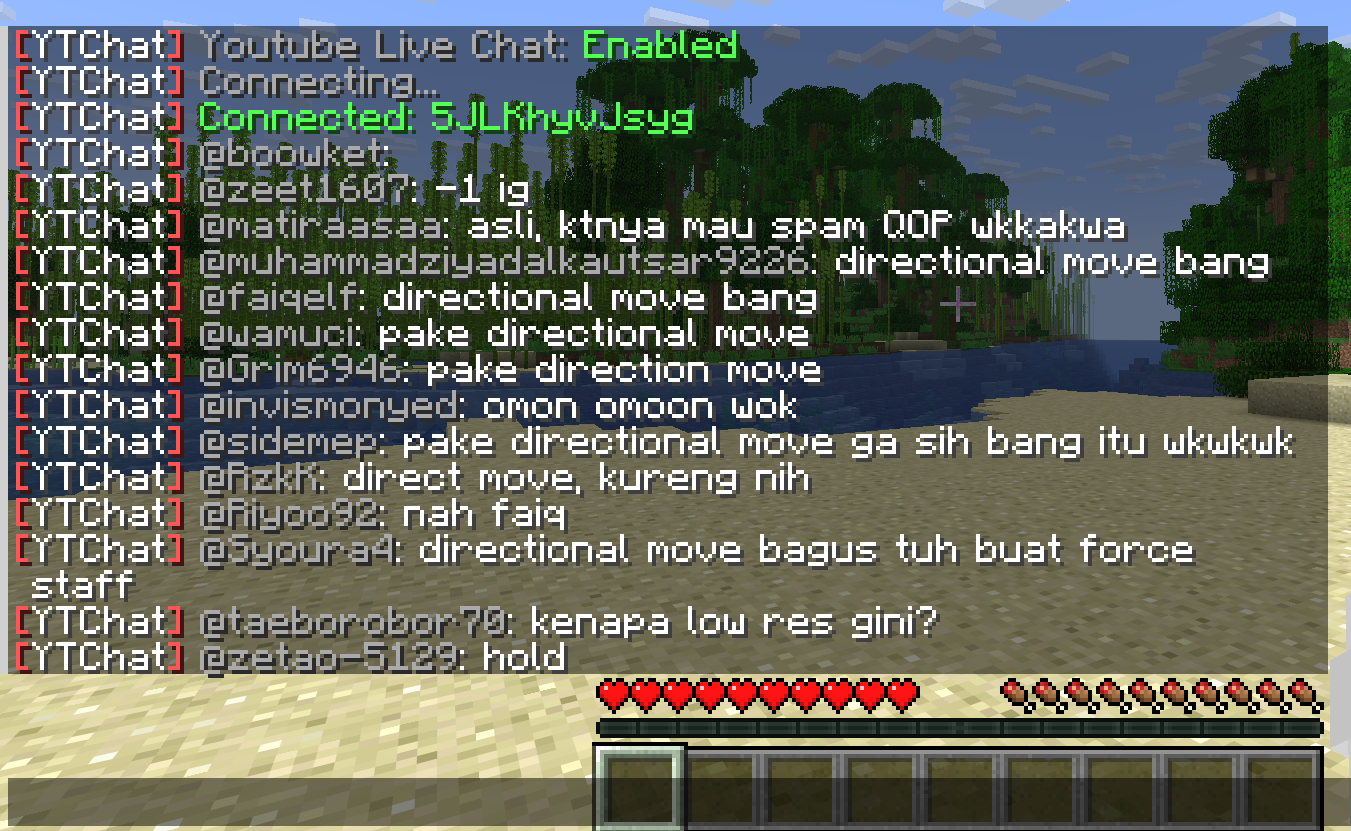
## 📺 YouTube Live Chat Integration
A Minecraft plugin for Spigot/Paper servers that seamlessly integrates YouTube Live Chat into your server. Messages sent during a live stream are displayed in real-time directly in the in-game chat, allowing players to interact with live audiences effortlessly.
### ✨ Features
– Real-time YouTube Live Chat integration
– Displays live stream messages in Minecraft chat
– Easy configuration and setup
### 🎮 Use Cases
Perfect for streamers who want to connect their in-game players with their YouTube audience, creating a more interactive and engaging experience.
### ⚙️ Compatibility
– Bukkit / Purpur / Paper / Spigot servers
– Modern Minecraft versions
YouCantHaveThat
Prevents obtaining/breaking any item of your choice.
Great for protecting your server or spicing up survival.
## Supports
– 26.1.2
– 1.0.2 supports 1.16 – 1.21.x
## Features
– Prevents obtaining / breaking / placing.
– Scans inventory/containers when opened.(Can be toggled off for survival fun now.)
– Detects offhand.
– Lightweight. Operates completely through player actions.
YönetimPaneli
YonetimPaneli is plugin to use to manage your server from desktop
Also this plugin provide to use some plugin from desktop
Compatible Plugins
– Authme
– DiscordSRV
– Vault
– NuVotifier
These plugins are for Integration Menu
You can restart plugin with “/frame-start” command
And plugin has in-game features
For more information, Look Gallery
YETIsUtils
(Note check github for most up to date version, updates will be posted here just not as soon as github)
# YETIsUtils
## Features
– **Admin Mode Inventory Switch**: Toggle between your regular player inventory and a separate admin inventory.
– **Player Warnings**: Issue warnings to players, store and view warnings, and clear specific warnings.
– **Player Reports**: Players can report issues, which are stored and viewable by admins in a GUI.
– **Configuration Reload**: Reload the plugin’s configuration without restarting the server.
– **Auto IP Ban**: Automatically ban a player’s IP after a configurable number of warnings.
– **Permissions**: Configurable permissions for commands to ensure only authorized users can perform certain actions.
– **Discord Integration**: Notifications about new reports and warnings are sent to specified Discord channels.
## Commands
– `/adminmode` – Toggle between player inventory and admin inventory.
– `/warn ` – Issue a warning to a player.
– `/warnings ` – View the number of warnings a player has.
– `/warnmenu` – Open a GUI to view all player warnings.
– `/warnclear ` – Clear a specific warning from a player.
– `/mywarns` – View your own warnings (if enabled in config).
– `/report ` – Report an issue to the admins.
– `/reportmenu` – Open a GUI to view all player reports.
– `/yetisutils reload` – Reload the plugin’s configuration.
## Permissions
– `yetisutils.adminmode` – Permission to toggle admin mode.
– `yetisutils.warn` – Permission to issue warnings.
– `yetisutils.warnings` – Permission to view player warnings.
– `yetisutils.warnmenu` – Permission to open the warnings GUI.
– `yetisutils.warnclear` – Permission to clear player warnings.
– `yetisutils.mywarns` – Permission for players to view their own warnings.
– `yetisutils.report` – Permission to report issues.
– `yetisutils.reportmenu` – Permission to open the reports GUI.
– `yetisutils.reload` – Permission to reload the plugin configuration.
# License
This project is licensed under the MIT License. See the LICENSE file for details.
# Contact
For support or inquiries, please open an issue on the GitHub repository.
Yeth’s TPA
**Yeth’s TPA is a Teletransportation Accept mod for Minecraft designed to be compatible, stable, and sufficient.**
## Commands
– **/tpa ** Sends a TPA request to a user
– **/tpa accept ** Accepts a TPA request from a user
– **/tpa here** Sends a TPA Here request to a user
– **/tpa cancel** Cancels an outgoing TPA request
– **/tpa ignore ** Ignores a player from making TPA requests
– **/tpa help** Sends a list of all commands
– **/tpa disable** Disables TPA requests from being sent to you
– **/tpa enable** Enables TPA requests to be sent to you
– **/tpa setting ** Configures settings in TPA
## Features
– Automatic expiry of TPA requests
– TP delay w/ countdown
– Multiple request handling
– Permissions for server owners
– Anti-TPA-traps
## Support
Yeth’s TPA supports the following mod loaders:
– Fabric
– Neoforge
– Forge
– Quilt
– Legacy Fabric
– Babric
– Ornithe
– BTA
– LiteLoader
For Minecraft versions 1.7.2 – 26.1.2
YeeeesMOTD
Customized server motd and random icon, it can use player’s head as server icon,like this:
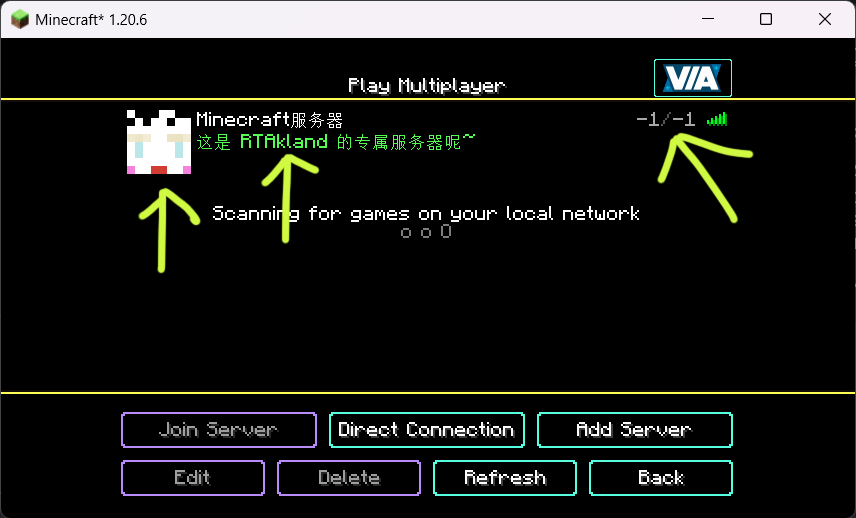)
also use player’s name as motd description, and random icon
everything is up to you
for more information please go to github: https://github.com/RTAkland/YeeeesMOTD
YearCalendar
### ⚠️ This plugin is no longer being updated.
# YearCalendar
**Original Calendar plugin.**
*Let your players check the date!*
—
## Features
– GUI: Keep it simple with only `/calendar` command
– Edit: Edit months, days, colors in config.yml
—
## Commands & Permissions
| Command | Alias | Description | Permission |
|—————|——-|———————|——————–|
| `/calendar` | – | Opens main gui | `calendar365.use` |
—
## Images / Screenshots
Section “**Gallery**”
—
## Files
config.yml
“`yaml
messages:
no-permission: “§cYou don’t have permission to use this command!”
player-only: “§cThis command can only be used by players!”
gui:
month-selector-title: “§7§lCalendar 365”
back-button-name: “§c« Back to Months”
months:
– name: January
days: 31
title: “§7Days: §f31”
– name: February
days: 28
title: “§7Days: §f28”
– name: March
days: 31
title: “§7Days: §f31”
– name: April
days: 30
title: “§7Days: §f30”
– name: May
days: 31
title: “§7Days: §f31”
– name: June
days: 30
title: “§7Days: §f30”
– name: July
days: 31
title: “§7Days: §f31”
– name: August
days: 31
title: “§7Days: §f31”
– name: September
days: 30
title: “§7Days: §f30”
– name: October
days: 31
title: “§7Days: §f31”
– name: November
days: 30
title: “§7Days: §f30”
– name: December
days: 31
title: “§7Days: §f31”
date-display:
today-status: “§f§lTODAY”
past-status: “§a§lPast”
future-status: “§c§lFuture”
day-format: “§e{month} {day}, {year}”
status-prefix: “§7Status: ”
click-to-view: “§7Click to view!”
“`
[Documents](https://github.com/Primly-Project/Documentation)