WorldPluginManager is the filter that determines which commands work in which world.
You can set a mode for each world: “Whitelist” means only approved commands work, while “Blacklist” means all commands work except for the blocked ones. If a player attempts to execute a prohibited command, the command is intercepted directly in the event and a configurable message is displayed—meaning the command is never actually passed on to the respective plugin. All management is handled via a GUI with world selection, a mode toggle, and lists for allowed and prohibited commands. Players with the bypass permission ignore all rules, so admins can always get through. Changes are saved in rules.yml and can be reloaded at runtime with /wpm reload.
Commands:
/wpm gui – opens the GUI management
/wpm allow – allow command
/wpm deny – block command
/wpm list – display all rules for a world
/wpm mode – switch mode
/wpm reload – reload configuration
/wpm stats – overview of all configured worlds
WorldMaster
WorldMaster
Prefixes for players: [Player] + [Owner] (If enabled chat message won’t be signed and can’t be reported)
New welcome text and join, leave message and chat style
Player counter bossbar
Elevators [/elevator]
Enable flying on server, if used in survival
Chest Shops: See documentation
Chunk loader [/chunk_loader]
May produce lag, if you have to many chunk loaders
Inventory Managment System [/inventory]
Mulitple Worlds [/world]
May produce lag, if world is created or regenerated
Every world has always loaded spawn chunks which may produce lag
Level-Name in server.properties has to be “world”
Permission for all commands of the plugin + shop owner permission
Installation
Copy the .jar file into your plugins directory of your server. Start the server. If the server was already started, type “/reload” in the server console.

Please join the Streamline Hub Discord in order to get updates and for me to fully assist you with bugs, questions, or suggestions.

Block players from entering or teleporting to specified worlds — All configurable with commands.

This offers a very simple configuration and setup all while remaining very light-weight.

1. Download and install BukkitOfUtils. Found here: [BukkitOfUtils](https://modrinth.com/plugin/bukkitofutils)
2. Download the correct version of this plugin for you server version.
3. Place in your `plugins` folder.
4. Stop server.
5. Start server.
6. Use to your liking.

## How to block a world
1. Install plugin. (Shown above.)
2. `/manageworlds add ` – where `` is replaced with the world you want to block.
## Notes
Players with operator or the `*` permission can access all worlds by default.
To disable these players from bypassing the world block, set their permission for `worldlock.bypass.*` to false.
## Functions
* Block specified worlds from:
* Teleportation.
* Moving to.
* Portal-Warping to.
* List blocked worlds.
* Bypassable with permissions.
* Permission: `worldlock.bypass.`

## Commands
* `/manageworlds`
* `/manageworlds add `
* Adds a world to the blocked worlds.
* `/manageworlds remove `
* Removes a world from the blocked worlds.
* `/manageworlds list`
* Lists all worlds in the blocked worlds list.
WorldLobby999
## Core Features
1. World Management System
World Creation
– Players can create unlimited personal worlds
– Worlds persist between server restarts
– Automatic world loading/unloading based on player activity
– Support for different world types and environments
World Categories
– **Creative Build**: Traditional creative building worlds
– **Adventure/Story**: Narrative-driven worlds
– **Parkour**: Obstacle course and challenge worlds
– **PvP/Minigame**: Competitive gameplay worlds
– **Prototype/Development**: Testing and development worlds
World Visibility Settings
– **Public**: Anyone can join
– **Private**: Owner access only
– **Friends Only**: Invited players only
– **Whitelisted**: Specific player whitelist
2. Advanced Mode System
Build Mode
– Unlimited creative inventory
– Flight enabled
– No damage taken
– Fast block breaking
– Access to build tools (copy, paste, fill, brush)
Play Mode
– Game rules enforced
– Adventure/survival restrictions
– Scripts and events active
– Normal gameplay experience
Dev Mode
– Creative permissions with script access
– Developer tools available
– Debugging features enabled
– Testing environment
3. Player Context System
Player Roles
– **Owner**: Full control over world (scripts, settings, delete, invite, promote)
– **Developer**: Can modify scripts and world logic, but not delete world
– **Builder**: Can modify blocks and world structures
– **Player**: Can play the world, subject to script-triggered rules
– **Visitor**: Limited access, cannot modify world unless explicitly allowed
Context Management
– Persistent player settings across sessions
– World-specific preferences and configurations
– Mode-aware player behavior
– Player location tracking across worlds
4. World Permission System
Fine-grained Access Control
– Add/remove builders for your worlds
– Grant developer access for script editing
– Maintain whitelist for restricted worlds
– Manage player roles dynamically
World Browser
– GUI-based world browsing system
– Category filtering
– Search functionality
– World information display
– Pagination for large server lists
– Visual world representation
World Discovery
– `/worldlobby games` – Open world browser
– `/worldlobby list` – Text-based world list
– `/worldlobby join ` – Join specific world
– `/worldlobby locate ` – Find player’s location
6. World Configuration
Dynamic Settings
– Change world visibility (public/private/etc.)
– Set world categories
– Toggle weather systems
– Enable/disable mob spawning
– Update world descriptions
– Configure game rules
Advanced Lobby System
– Themed lobby areas (Space, Ocean, Forest)
– Interactive lobby elements
– Featured worlds display
– Quick travel options
– Lobby-specific features
World Statistics
– Track world usage and metrics
– Player count tracking
– Creation timestamps
– `/worldlobby stats [world-name]`
Data Management
– Persistent world metadata
– Player context preservation
– Configuration file management
– World state tracking
Performance Optimization
– Automatic world unloading
– Efficient player tracking
– Minimal resource usage
– Asynchronous operations where possible
Commands Reference
Basic Commands
– `/worldlobby` – Main command
– `/worldlobby help` – Show help
– `/worldlobby create ` – Create world
– `/worldlobby list` – List all worlds
– `/worldlobby join ` – Join world
– `/worldlobby delete ` – Delete world
– `/worldlobby lobby` – Return to lobby
Feature Parity
WorldLobby999 includes comprehensive feature parity with OpenCreative+:
✅ **World Management**: Full world creation, deletion, and management
✅ **Mode System**: Build, Play, and Dev modes with appropriate rule sets
✅ **Player Roles**: Owner, Developer, Builder, Player, and Visitor roles
✅ **Visibility Controls**: Public, Private, Friends Only, Whitelisted worlds
✅ **World Categories**: Creative, Adventure, Parkour, PvP, and Development categories
✅ **World Browser**: GUI-based world discovery system
✅ **Player Context**: Advanced context system with persistent settings
✅ **Permission System**: Comprehensive access control system
✅ **World Configuration**: Full settings and configuration management
WorldListTrashCan
## Allows players to customize their home world’s trash bin.
This cleaning plugin operates within a specific world (the player’s home) and, when cleaning items, gathers them into a trash bin that the player has personally set up in their home. It combines various features, supports Folia, boasts highly configurable settings, and is compatible with multiple languages.
(This plugin is more suitable for pairing a world with a team’s server, such as the Home server (using the PlayerWorldsPro plugin or other Home plugin servers). If you close the World Garbage can, its functions can also completely replace other cleaning plugins)
**Now, here’s a hellish joke for you:**
**Player** : Hey, my quantum solar panels got swept away by the cleaning plugin. Can you compensate me?
**OP** : No way, you can’t prove it, and my cleaning plugin doesn’t keep records.
**Player** : I just bought them!
**OP** : What if you hid them, and I compensate you, essentially doubling them?
**Player** : ***
**OP** : Even if there were public trash bins on the server, someone would snatch up those solar panels.
**OP** : What should I do?
And there you have it, this plugin was born.
When Foila supports multiple worlds, this cleaning plugin will benefit everyone
### Features:
—
– **Fully customizable tip**
Support multiple prompt messages
You can achieve fully customized prompts
For example, when there are three seconds left, let “bossbar”, “actionbar”, “chat”,and “title” prompt together,
Alternatively, you can have the bossbar change its style every second (solid, non solid, including its color, can be different every second)
After version 5.7.0, it supports switching between different prompt sounds per second, as well as setting different volumes and tones per second
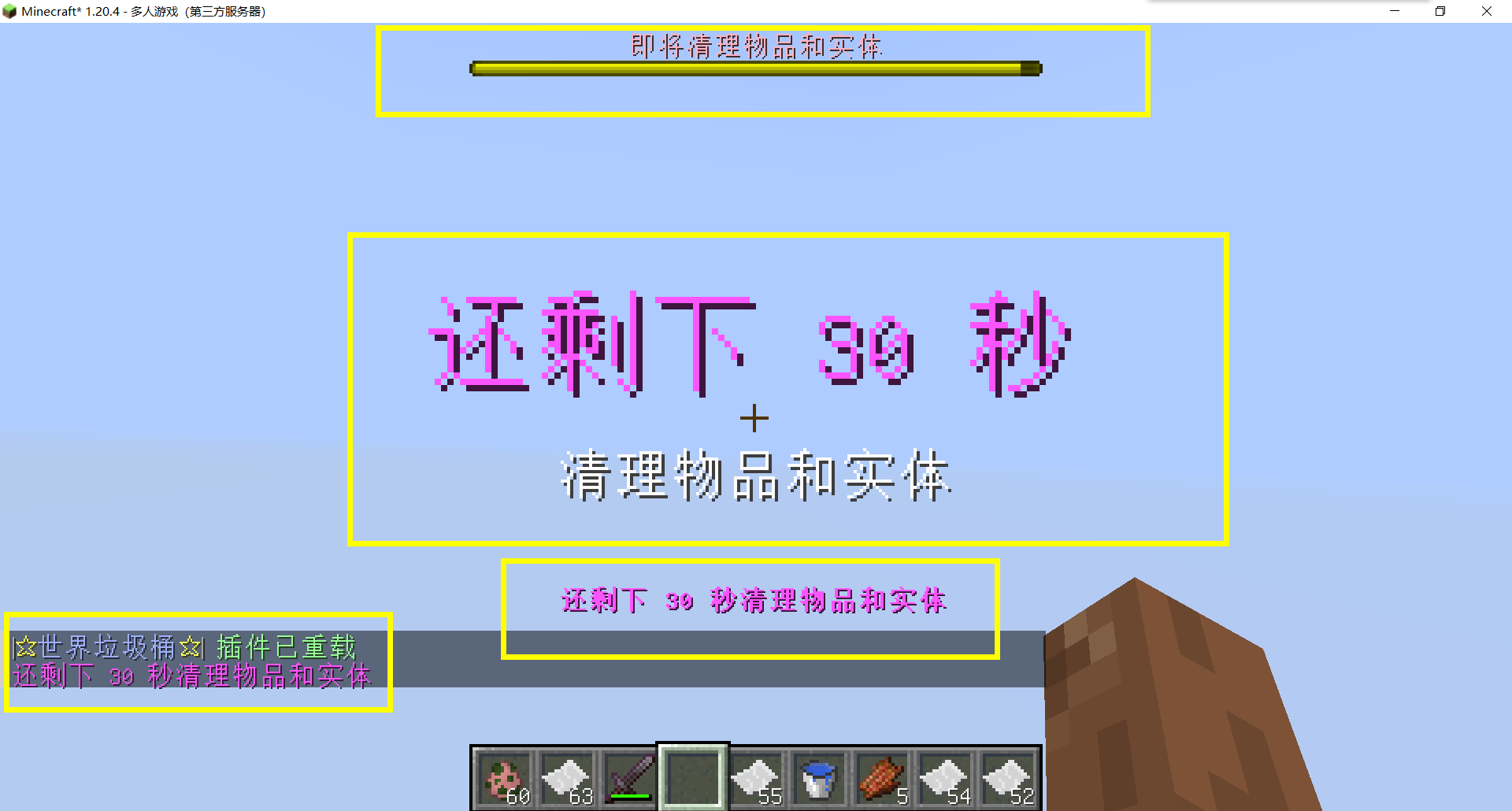
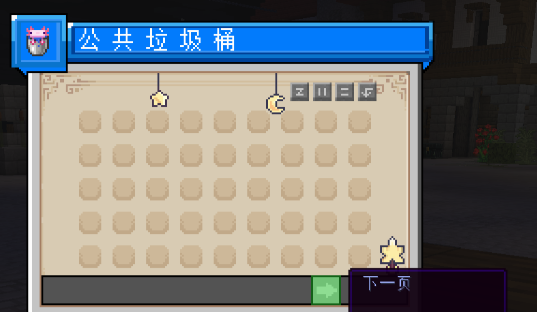
– Thank you to QQ 1664907770 (“笑脸猫”) for providing the material package for the “itemsadder” plugin (applicable to public trash cans) [Click here to download](https://www.hostize.com/zh/v/3TE06XKXx8) (IteamsAdder/WorldTrashCan config and resource)
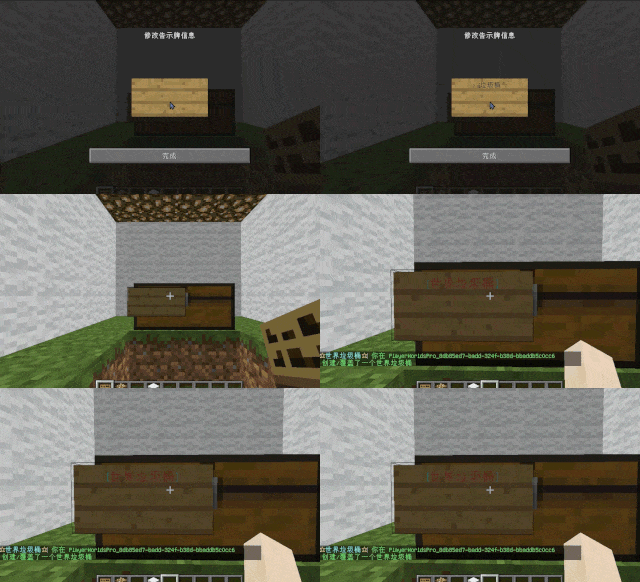
– **Player-Created World Trash Bin:**
Players have the ability to create a trash bin in their world.
Similar to the mechanics of previous sign-locked chests, the font on the sign will undergo a
transformation after creation.
When the cleaning process is initiated, items will be automatically added to the home trash bin.
Configurable settings allow players to specify detection names and transformed names after cleaning.
“To meet the demands of a small number of people, here is a reminder”
How to create a world trash can:
Place the chest on the ground, hold the signboard and right-click on the chest. Enter [世界垃圾桶] in the configuration file (configured in Set. SighCheckName), and once the font is converted, it is created. Every time the garbage is cleaned, it will be placed in the marked chest
In the default configuration file, the names of the three worlds “world, dim-1, dim1” are disabled, creating a “world trash can” (excluding op)
– **Support for Multiple Home Trash Bins:**
Players can use commands to grant special players the ability to place additional home trash bins.
Default quantities for home trash bins are configurable.
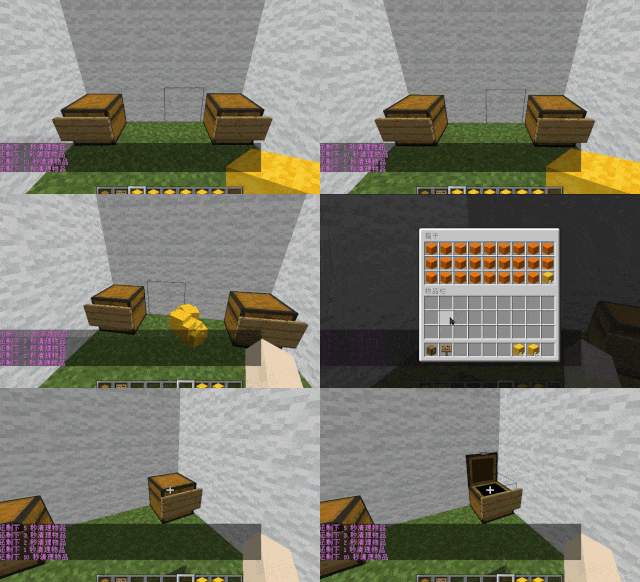
– **Home Trash Bin Overflow to Public Trash Bin:**
Items from home trash bins overflow into the public trash bin.
Public trash bins can have a configurable maximum page count and a blacklist.
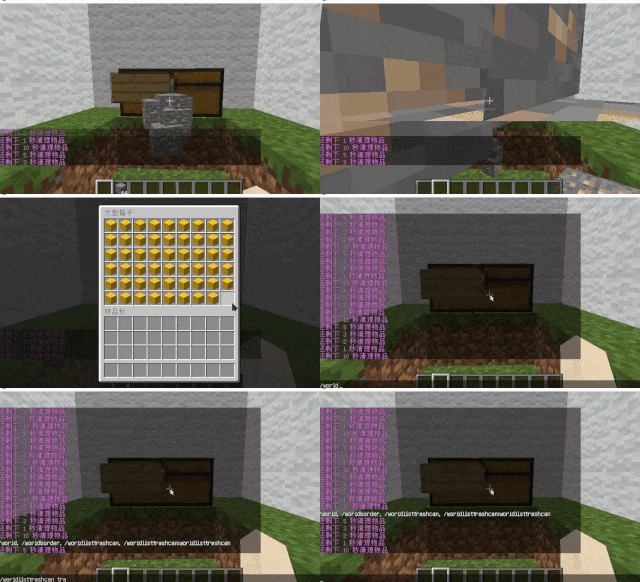
– **Item Exclusion and Public Trash Bin Handling:**
Players can add items to the home trash bin blacklist to prevent their recycling.
Excluded items go directly to the public trash bin.
Configuration includes support for excluding items with special lore (e.g., items from the QS shop with
showLocation).
Public trash bins can either clear new items during each sweep or accumulate all trash without clearing.
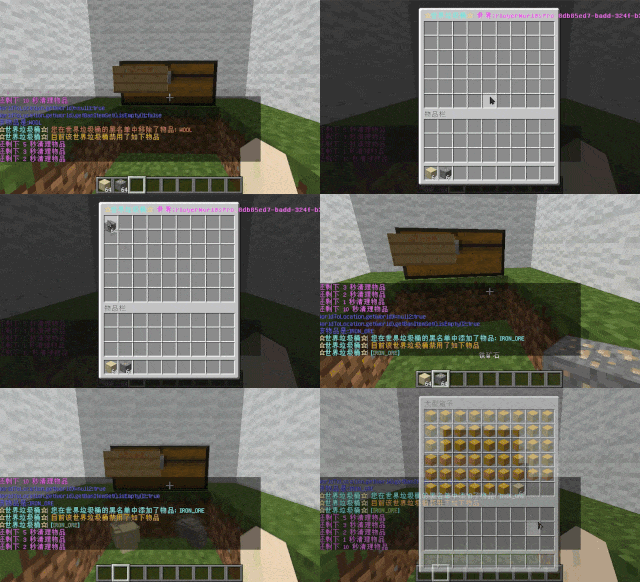
– **The public trash can can enable logging:**
Record what items the player took away

– **Entity Cleanup:**
Optional cleanup of all animals/monsters.
Command (/WorldListTrashCan Look) to view entity types and configure entity blacklists/whitelists.
Support for cleaning special entities from mod.
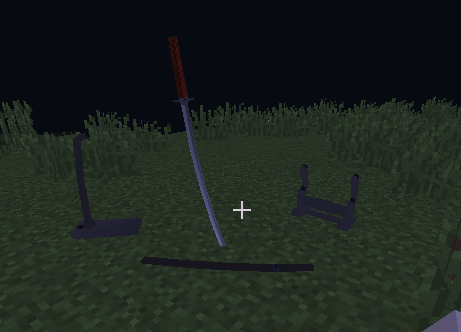
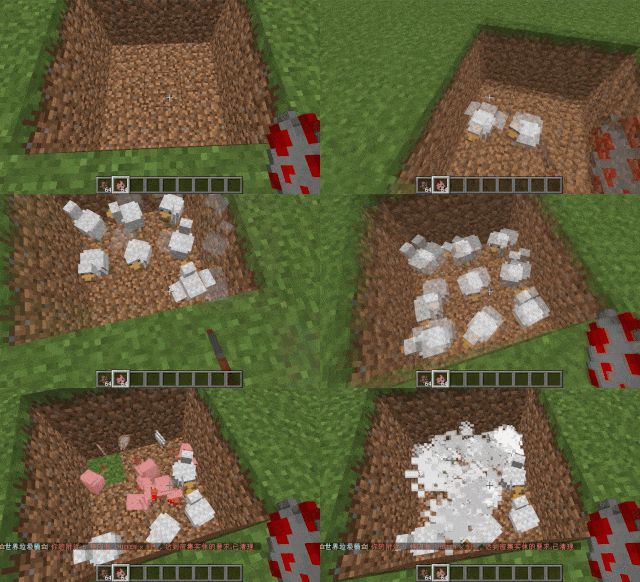
– **Dense Entity Cleanup:**
Configurable radius, target quantity, kill or remove options, and player notifications for dense entity
cleanup.
– **Spam/Command Limitations:**
Configurable chat/command intervals, whitelist commands, and informative messages.
Defense against item dropping.
Players can manually enable or disable the item-drop defense mode.
– **Performance Optimization:**
All optimizations have configurable options in the settings.
1. Quick removal of uncollectible arrows (e.g., arrows from skeletons or bows with infinite
enchantments).
2. Prohibit players from trampling on farmland
### How to Install
—
– **Throw it into the Plugins folder**
### Commands:
—
– **/wtc reload**
Reloads the plugin.
– **/wtc GlobalTrash**
Opens the public trash bin.
– **/wtc help**
Displays help information.
– **/wtc ban**
Opens the local world trash blacklist GUI.
– **/wtc Look**
Right-click to get entity type (useful for adding to the configuration blacklist/whitelist).
– **/wtc GlobalBan**
Opens the global world trash blacklist GUI.
– **/wtc add [WorldName] [Quantity]**
Sets the maximum quantity for the trash bin in the specified world (defaults to the world at your feet if not specified).
– **/wtc DropMode**
Opens or closes drop mode.
### Placeholders
—
– **%WTC_ClearTime%**:
Time until the next cleaning.
### Permission
—
– **WorldListTrashCan.BanGui**:
Permission to open the GUI for adding items to the player’s home trash bin blacklist.
– **WorldListTrashCan.GlobalTrashOpen**:
Permission to open the global trash bin.
– **WorldListTrashCan.help**:
Permission to access command help.
– **WorldListTrashCan.DropMode**:
Permission to open or close drop mode.
***(The above is available by default)***
– **WorldListTrashCan.GlobalBan**:
Permission to open the global trash bin blacklist GUI.
– **WorldListTrashCan.Look**:
Permission to right-click and query the entity type.
***(The above is not available by default)***
A lightweight and intuitive plugin that displays in-game time and player coordinates directly on the screen. Designed for Minecraft servers using Spigot, Paper, or Bukkit, this plugin adds practical functionality without clutter.
💡 Features:
– Displays Minecraft time in a readable format (Day/Night)
– Shows XYZ coordinates precisely
– Compatible with most modern server versions
– 📁 Installation Instructions
– Download the .jar file from the Modrinth page
– Place it inside your server’s /plugins folder
– Restart or reload the server
– Edit config.yml to customize display options
WorldGuardRegionProtect
**If you with try first newest, use the latest dev build
Start from version 1.8.0.21 will support Bukkit/Spigot/Folia and other forks of Paper.
Versions after 1.0.3.21 above require JAVA 21+!
If you need plugin support JAVA 17+, so you need just download 1.0.2.17 special version
This is not a WorldGuard. This plugin addon for a WorldGuard!
You don’t know where you can get WG for new released versions?
So you just can check on EngineHub from original authors for dev-builds.**
**Do you want protect from superpickaxe? Or feauters protection for players? Look at premium version.
The free version of the plugin will continue to be updated!
❤️Click here to check out the plus version! ❤️**
Do you speak multiple languages? If so, we always welcome contributions to our [Crowdin project](https://crowdin.com/project/worldguardregionprotect)
If you have a idea for plugin, you can created issue on [github](https://github.com/RSTeamCore/WorldGuardRegionProtect/issues/new/choose)
## Support
When reporting a bug:
Use [the issue tracker](https://github.com/RSTeamCore/WorldGuardRegionProtect/issues)! Don’t report bugs in the reviews and discussions. Please search for duplicates before reporting a new issue!
Provide as much information as possible. Provide your WorldGuardRegionProtect version and Spigot/Paper version.
Provide any stack traces or “errors” using [pastebin](http://pastebin.com/).
## [Join us in the discord!](https://discord.gg/kvqvA3GTVF)
## Opportunities of plugin
By entering the name of the region in the plugin config.yml, you will add protection by plugin. Nobody can interact with the region that is registered in config.yml. Even the operators are not able to do this!
This plugin is for extended protection of an existing region from WorldGuard. For example, possible damage region from the administration. Who has permission access from plugin WorldGuard, or from operators.
## With plugin, you can do advanced protect your region
1. Nobody cannot break or place blocks in region.
2. It is possible to enable/disable the limitation of interaction with the transport.
3. Protecting frame, painting from any damage from arrows, trident, snowball, eggs, enderpearl and player.
4. Protect from any change in the frame (On 1.18 MC glow frame too).
5. Nobody cannot damage armor stand and taking or place armor from it.
6. Cannot use none of the buckets in region.
7. Creeper, Wither, Ghast, Primed TNT, cannot blowing up stuff in the region. Skeleton, Stray and Shulker bullet cannot destroy frame/glow frame and painting.
8. TNT, minecart with TNT, Respawn Anchor and ender crystal can’t damage any blocks/frames in region.
9. Support for banned dangerous commands. Separate commands were added and tested used by FastAsyncWorldEditWorldEdit in the protected region.
10. Nobody cannot remove region or change flags in protected region. Just example using like:
– “/rg rem spawn”,
– “/rg rem -f spawn”,
– “/rg rem -f spawn -w world”,
– “/rg addowner spawn Steve” etc.
11. You can specify a special region inside the protected region in which you can “break and place” or “only break” (specified in config.yml)
## Permissions
1. If you need give access to region for Builder team or any member from your staff, just add permissions on LuckPerms or PermissionsEx: wgrp.regionprotect
2. Who has the permissions star, I mean ‘*’ in LuckPerms or PermissionsEx may will be given access to protected region by WGRP.
3. By default, all who is operators are not allowed access into the region.
## Permissions:
– wgrp.command.wgrpbase – access to /wgrp command.
– wgrp.command.reload – access to /wgrp reload and /wgrp reloadmsg command to reload the configurations file.
– wgrp.command.spy – notifies the administrator about interacting with the protected region (BREAK or PLACE only now).
– wgrp.regionprotect – access to protected regions.
– wgrp.notify.admin – notifies the administrator when an attempt is made to use WGWE(FAWE) commands in a protected region.
– wgrp.command.addregion – access to the command with the ability to add a region to the protected region by admin.
– wgrp.command.removeregion – access to the command with the ability to remove the region from the protection by admin.
## Commands:
– /wgrp help – help on all commands.
– /wgrp about – additional information, useful!
– /wgrp reload – reload config.yml and language files.
– /wgrp addregion [region] [world] – add a region to the configuration for protection.
– /wgrp removeregion [region] [world] – delete a region from the configuration to remove protection.
View the default config you [can here](https://github.com/RSTeamCore/WorldGuardRegionProtect/blob/master/wgrp-common/src/main/resources/config.yml)!
WarpAreas by wolferynsito is a utility plugin for Bukkit/Paper servers that simplifies region management. Instead of typing long commands, you can manage your WorldGuard flags through a clean Graphical User Interface (GUI).
Features
Quick Access: Open the flags menu with /wap.
Automatic Detection: Automatically detects the WorldGuard region you are currently standing in.
User Friendly: No more memorizing flag names; just click to toggle settings.
Commands
/wap: Opens the flags GUI for the current region.
Requirements
WorldGuard
WorldEdit
WorldGuard ExtraFlags Plus
# WorldGuard ExtraFlags Plus
**Release 4.3.13**
An advanced WorldGuard extension that adds over 30+ extra region flags for full control of player behavior, teleportation, and region rules — featuring Folia support, item blocking (Mace, Firework, Wind Charge, Totem, vanilla Spears), throwable-only blocking (`disable-throw` for egg, snowball, pearl, XP bottle), optional PacketEvents/ProtocolLib packet hooks for full `disable-completely` coverage, and fully customizable messages.
> 🎚️ **XP-Based or PlaceholderAPI (integer output) based region entry limits**
—
## ⚠️ Warning DO NOT USE BOTH PLUGINS TOGETHER!
> If you’re upgrading from `WorldGuardExtraFlags` to `WorldGuardExtraFlagsPlus`, make sure to:
> – **Remove** the old `WorldGuardExtraFlags.jar` plugin file
> – **Only keep** `WorldGuardExtraFlagsPlus.jar` on your server
> – Both plugins cannot coexist – they will conflict with each other
—
## Key Features
– ✅ **Folia support** – fully compatible with async region handling
– 🛡️ **New flag:** `disable-completely` – blocks all usage of specified items *(MACE, FIREWORK_ROCKET, WIND_CHARGE, TOTEM_OF_UNDYING, TRIDENT, vanilla spear tiers 1.21.11+, plus **`SPEAR`** for all tiers at once)*
– *Note: `permit-completely` is replaced. Please use `disable-completely` instead.*
– *Spear **Lunge** (packet **STAB**, including **Lunge** enchant) requires **PacketEvents** or **ProtocolLib** on the server for reliable blocking; without either, Lunge may bypass region checks.*
– 🎯 **New flag:** `disable-throw` – blocks **launching** only these throwables: **`EGG`**, **`SNOWBALL`**, **`ENDER_PEARL`**, **`EXPERIENCE_BOTTLE`**. Tridents and wind charges stay on `disable-completely`.
– 🎚️ **New flags:** `entry-min-level` / `entry-max-level` – restrict entry by **XP level** or **PlaceholderAPI values**
– 💬 **Customizable messages** via `messages-wgefp.yml` (disable, recolor, or use placeholders)
– 🔁 **Message cooldown system** to prevent spam (default 3 seconds)
– 🏪 **New flag:** `villager-trade` – control villager trading in regions
– 🚫 **New flag:** `disable-collision` – disable player collision in regions
– *Uses Minecraft’s native scoreboard teams to control collision. TAB plugin is supported with API integration. May conflict with other plugins that use teams. See (public-documents/disable-collision flag documentation.md) for details.*
– 📝 **PlaceholderAPI Chat Integration** – chat prefix/suffix supports PlaceholderAPI placeholders
– 🧱 **New flags:** `allow-block-place` / `deny-block-place` / `allow-block-break` / `deny-block-break` – fine-grained block placement and breaking control
– 📦 **New flags:** `deny-item-drops` / `deny-item-pickup` – restrict specific items from being dropped or picked up (works when WorldGuard allows drops/pickups)
– 🔨 **New flag:** `permit-workbenches` – block workbench usage (anvil, crafting table, ender chest, etc.) and crafting table crafting in regions
– *Note: `permit-workbenches CRAFT` now only blocks crafting table (3×3) crafting, not inventory (2×2) crafting. Use `inventory-craft` flag to block inventory crafting.*
– 🎨 **New flag:** `inventory-craft` – block inventory crafting (2×2 grid) in regions
– 🛡️ **Godmode & Fly Flag Enhancement** – The `godmode` and `fly` flags now also disable EssentialsX godmode/fly when entering regions with these flags disabled (EssentialsX integration)
– 👥 **New flag:** `player-count-limit` – limit maximum number of players in a region
– 🎯 **New flag (experimental):** `chambered-enderpearl` – mitigates chambered ender pearl bypasses (pearls thrown outside denied regions are removed when the shooter enters a region where the flag denies); subject to change.
—
## About
WorldGuard protects land by defining regions.
**WorldGuard ExtraFlags Plus** extends it with even more customization — adding powerful flags that modify gameplay, teleportation, commands, and behavior within regions.
—
## Included Flags (30+)
> Here’s a quick overview — all managed with standard WorldGuard flag commands.
For comprehensive usage examples and detailed flag documentation, see:
**[Complete Flag Usage Guide](https://github.com/tins-dev/WorldGuardExtraFlagsPlus/blob/master/.media/flag-usages.md)**
The jar declares **`api-version: 1.21`** in `plugin.yml` so Paper **1.21.x** servers (and forks such as Canvas) load it; the project still compiles against the pinned Paper API artifact in the root `pom.xml`.
—
## Message Customization
All plugin messages live in `plugins/WorldGuard/messages-wgefp.yml`.
– Edit freely to match your style
– Use `{required}`, `{current}`, `{item}`, `{workbench}` placeholders (e.g. **`disable-throw-blocked`** uses `{item}`)
– Color codes supported (`&c`, `&7`, etc.)
– Disable messages with `””`
– Reload instantly using `/wgefp reload` or `/wg reload`
—
## Authors
– **ExtraFlags Plus Developer:** [tins](https://github.com/tins-dev)
– **Original ExtraFlags Author:** [isokissa3](https://joniaromaa.fi)
⭐ If you like this project, give it a star on [Github](https://github.com/tins-dev/WorldGuardExtraFlagsPlus)
Worldguard Auto Replant
## 🌾 WorldGuard Farming Flags
A WorldGuard extension plugin that adds two powerful farming flags to make survival and Skyblock servers more fun and user-friendly.
—
## ✨ Features
– 🌱 **`auto-replant` flag** – When enabled, crops (wheat, carrots, potatoes, beetroot) will **automatically replant** after being harvested. No more replanting by hand!
– 🚜 **`break-crops` flag** – Allows players to **harvest crops** in regions where block-breaking is normally denied. Perfect for community farms.
– 🔒 **Region-Specific Control** – Both flags can be toggled on/off per WorldGuard region.
– ⚡ **Seamless Integration** – Works alongside all standard WorldGuard flags.
– 🧩 **Lightweight & Simple** – Single-purpose plugin built just for farming mechanics.
—
## ⚡ Usage
1. Select or create a WorldGuard region.
2. Apply the flags:
“`bash
/rg flag auto-replant allow
/rg flag break-crops allow