Glass Networking
This is a library mod that makes it insanely easy to add and use custom packets.
Not as flexible and extensible as StationAPI’s system, but it works well for those who don’t want to make StationAPI a hard dependency. Compatible with StationAPI.
## Features:
– Server and client know if each other has the mod, while still being able to connect to vanilla servers and clients.
– Automatic packet short-circuiting for clients in singleplayer, or servers sending packets to itself, allowing for less side checks.
## How to use (modders)
###### Assumes you already know a little on how packets work.
– Implement the `GlassPacketListener` class and implement the method. There’s a `registerGlassPacket` convenience method.
– Add an entrypoint for `glassnetworking`, and point it to your new class.
– The applicator field is where you should insert a lambda or method reference to handle what should happen when your packet is received.
– Send packets from wherever you need in code, and watch as things just work(tm).
Glass Config API
An API heavily inspired by [Cloth Config](https://modrinth.com/mod/cloth-config) for beta 1.7.3, which makes it extremely easy to add configuration to your mod.
For players, this adds an autogenerated config screen to [ModMenu Beta](https://modrinth.com/mod/modmenu-beta) for easy editing of config files. This won’t do anything without any mods that use this.
This has a relatively flexible API which can be used to add custom configuration screens, values, and save/load logic. There’s also built-in support for multiplayer syncing, hot-reloading of configs, and descriptions, which are saved inside the JSON file.
GameplayEssentials Babric
# GameplayEssentials for Minecraft Beta 1.7.3
A babric mod for Minecraft Beta 1.7.3 that fixes gameplay bugs and adds a few gameplay features.
* Mod works on Multiplayer with [GlassConfigAPI](https://modrinth.com/mod/glass-config-api) version 3.0+ used to sync configs!
* [StationAPI](https://modrinth.com/mod/stationapi) is optional and used for recipe configs
## Gameplay Bugfixes
* Fix bucket being consumed when lava bucket is used in furnace
* Fix slimes not dropping slimeballs when an attack brings them below zero health
* Fix minecarts stopping on items/arrows
* Fix mobs jittering in multiplayer
* Fix fish flying above player head (default: false)
* Default false because during multiplayer testing it was found that vanilla behavior is more correct
## Gameplay Features
* Change bed behavior: vanilla, disable nightmares, set spawn-point only, or disable entirely
* Allow disabling block interactions with a keybind (thereby allowing things like placing torches on crafting tables)
* Allow disabling eating when at max health (default: false)
* Allow pressure plates to be placed on fences
* Allow sugar cane to be placed on sand
* Allow trapdoors to be placed without support
* Change jack-o’-lantern recipe to be shapeless
* Change stairs recipe output (output: 1-16, default: 4)
* Requires StationAPI to be installed
* Change trapdoor recipe output (output: 1-8, default: 2)
* Requires StationAPI to be installed
* Add ability to equip/swap pieces of armor with `right-click`
## Installation using Prism Launcher
1. Download an instance of Babric for Prism Launcher: https://github.com/babric/prism-instance
2. Install Java 17 and set the instance to use it: https://adoptium.net/temurin/releases/
3. Add GlassConfigAPI 3.0.2+ to the mod folder for the instance: https://modrinth.com/mod/glass-config-api
4. Add Glass Networking to the mod folder for the instance: https://modrinth.com/mod/glass-networking
5. (Optional) Add StationAPI to the mod folder for the instance: https://modrinth.com/mod/stationapi
6. (Optional) Add Mod Menu to the mod folder for the instance: https://modrinth.com/mod/modmenu-beta
7. Add this mod to the mod folder for the instance: https://github.com/telvarost/GameplayEssentials-StationAPI/releases
8. Run and enjoy! 👍
## Feedback
Got any suggestions on what should be added next? Feel free to share it by [creating an issue](https://github.com/telvarost/GameplayEssentials-StationAPI/issues/new). Know how to code and want to do it yourself? Then look below on how to get started.
## Contributing
Thanks for considering contributing! To get started fork this repository, make your changes, and create a PR.
If you are new to StationAPI consider watching the following videos on Babric/StationAPI Minecraft modding: https://www.youtube.com/watch?v=9-sVGjnGJ5s&list=PLa2JWzyvH63wGcj5-i0P12VkJG7PDyo9T
Foodies [StationAPI]
**For beta 1.7.3 and STAPI**!
**Foodies** adds new crops, meats, ingredients and crafted food. All that using existing vanilla mechanics, not complicating game itself. Use it to add more roleplay to your world, build cosy farm, or simply get more sources of food.
### New: BEES
Mod introduces real size bees producing honey. Find wild bee nest, catch bees, build own beehives and watch them work. Use honey for cooking or honeycomb decorative blocks.
## Main Features
– **Wild crops** – Break plants to acquire new crops, or collect them with shears to decorate your base. Every plant grows in different biome, making exploration more rewarding.
– **Mysterious seeds** – Dead bush now drops mysterious seeds that can grow into any overworld crop.
– **Unique crops** – Carrots, potatoes, onions are cabbage have classic mechanics, but tomatoes includes option to right-click to harvest only the fruits without breaking whole plant. Hellish chilli grows on gravel, requires lava nearby instead of water, and uses glowdust instead of bonemeal to speed up growth (also same harvest mechanics as tomatoes).
– **Animal drops** – Most animals drop meat now (beef, mutton, chicken, calamari) and ZombiePigman drops Hellish chilli.
– **More uses for old items** – Eggs, milk and sugar now are useful for more than 1 recipe.
– **Simple crafting** – Recipes are made to be easy, no need to follow 3 steps to get simple cake.
– **Soups** – I’m in a soup store and I bring 6 more uses for bowl (technically 2 of them are not soups).
– **Juices** – Craft glass bottles and fill them with juice, 3 flavours to chose from. Right click with bottle on cactus to fill it with cactus juice.
– **Sandwiches** – Crafted with whatever you like the most.
– **Honey Bees and Beehives** – Wild bee nests generate on oak and birch trees. You can collect them with axe to move around. Catch bees into a jar and craft own beehive. Catching bees reduce population of beehive and requires time to go back to normal.
– **Honey** – Harvest honey by right-clicking full beehive. Honey is produced quicker when there are more flowers for bees to pollinate. Use honey to craft sweets, honey glazed meats or decorative honeycomb blocks.
## Required dependencies
– **[StationAPI](https://modrinth.com/mod/stationapi)**
– **[FarnUtil](https://modrinth.com/mod/farnutil)** – Required for versions 1.1+
– **[Glass Config API](https://modrinth.com/mod/glass-config-api)** – Required only to change default mod config.
Mod config with GCAPI
– Raw crops (carrots, potatoes, onions etc) stack size
– Raw crops heal value
– If juicing cactus breaks the block
– Wild bee nests generation rarity
– Amount of bee particle generation
– If bees are rendered on flowers
– Bee buzzing sound volume
## Compatibility
– **[Campfire-StationAPI](https://modrinth.com/mod/campfire-stationapi)** – Every oven recipe also works with Campfire mod, allowing you to cook meat on it.
– **[BH Creative](https://modrinth.com/mod/bh-creative)** – Foodies has own creative tab with every new item.
– **[Always More Items](https://modrinth.com/mod/always-more-items)** – Recomended to use to see all the recipes added by Foodies.
– Foodies overwrites drops for sheep, cow, chicken, squid, zombiepig, deadbush and changes itemdye (bonemeal) behaviour. Mods that do the same thing will create conflicts.
## Notes
There are salt blocks and cooking station left in the mod. They have no real function, but I left them to be used as decoration. I’m planning to utilise them in future versions.
It’s my first big java mod and also first time creating pixel-art assets. I’m open for any suggestions and help.
Font Fixer
## Summary
This mod fixes and extends the Font Renderer in Legacy versions of Minecraft by essentially backporting a newer version of the `FontRenderer` class (1.5.2 was used as the base in version 1; 1.12.2 is used as the base in version 2).
## Details
In particular, the following bugs have been fixed and features have been added:
– Fix the text width calculation and shadows when rendering non-ASCII characters
– Change Font height to 9 instead of 8
– Add support for glyphs/unicode characters
– Add missing formatting and color codes
## Installation
### As a ModLoaderMP / Forge mod
This mod needs to be installed as a **jar-mod**. That means, you have to…
1. Be sure to back up your `minecraft.jar`!
2. Extract the content of the mod zip into the `minecraft.jar` file
3. Delete the `META-INF` folder in there
4. Overwrite any existing files when doing so!
5. ???
6. Profit!
### As a Fabric mod
Just place the mod file in your mods folder 🙂
## Issues
– Some **OptiFine** versions have minor issues with Font Fixer installed (e.g., custom fonts do not work)
– ~~Some unicode characters could not be rendered~~ – this has been fixed in version **2**!
F3DeathCoords
A mod that displays your death coordinates in the Debug Menu when you die. It will disappear after you log out of a world/server.
Requires **[F3Mod](https://modrinth.com/mod/f3mod)**!
> If you’re gonna play on a **server**, remember to ask if the mod is allowed.
Elevators
# Elevators
Elevators is a b1.7.3 [StationAPI](https://github.com/ModificationStation/StationAPI) mod that adds elevator blocks that are highly inspired by the mod [OpenBlocks](https://www.curseforge.com/minecraft/mc-mods/openblocks)
## Features
– Elevator block that allows you to travel to other elevator blocks above or below it
– Directional elevator block that puts the players horizontal direction in the direction it is placed
– Elevator dying by right clicking placed elevators with dye
– Configurable distance limit via GCAPI
## Recipes
[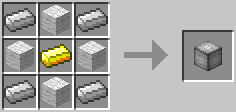](https://postimg.cc/RNmc2YH0)
[](https://postimg.cc/G4hvmszw)
## Requirements
[StationAPI](https://github.com/ModificationStation/StationAPI)
[GCAPI](https://modrinth.com/mod/glass-config-api)
[ModMenu](https://github.com/calmilamsy/ModMenu)
## Screenshots
[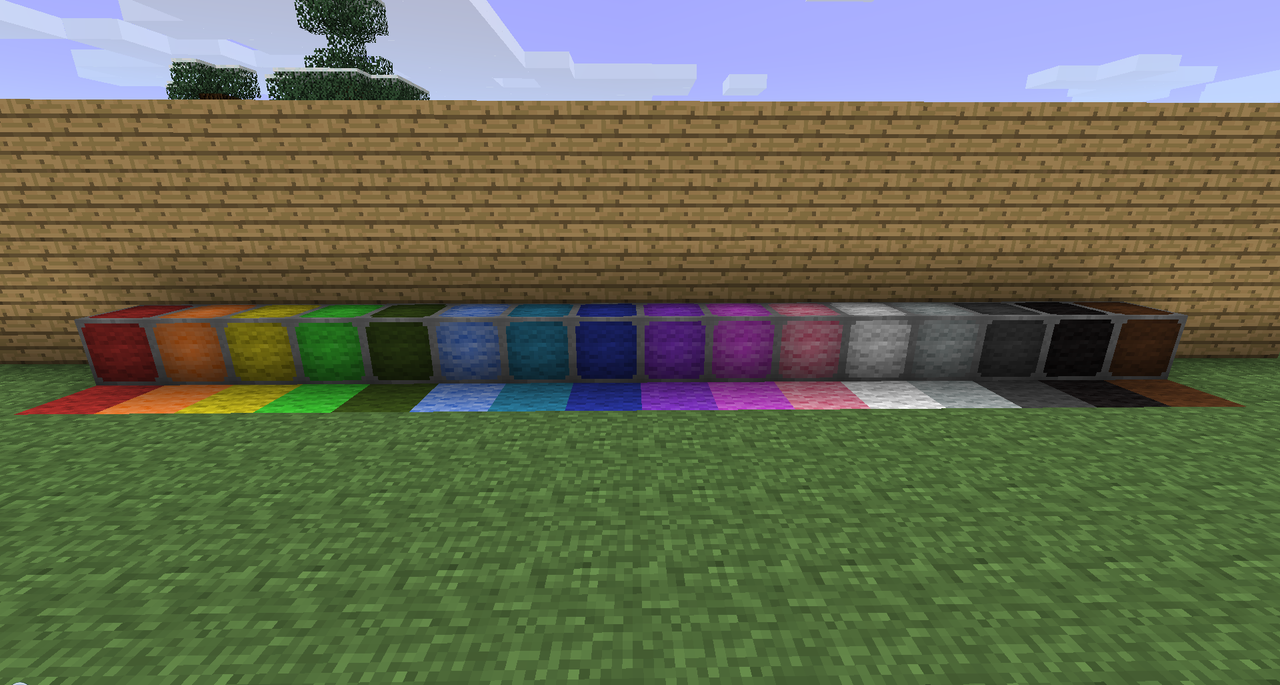](https://postimg.cc/LhLtCSh7)
[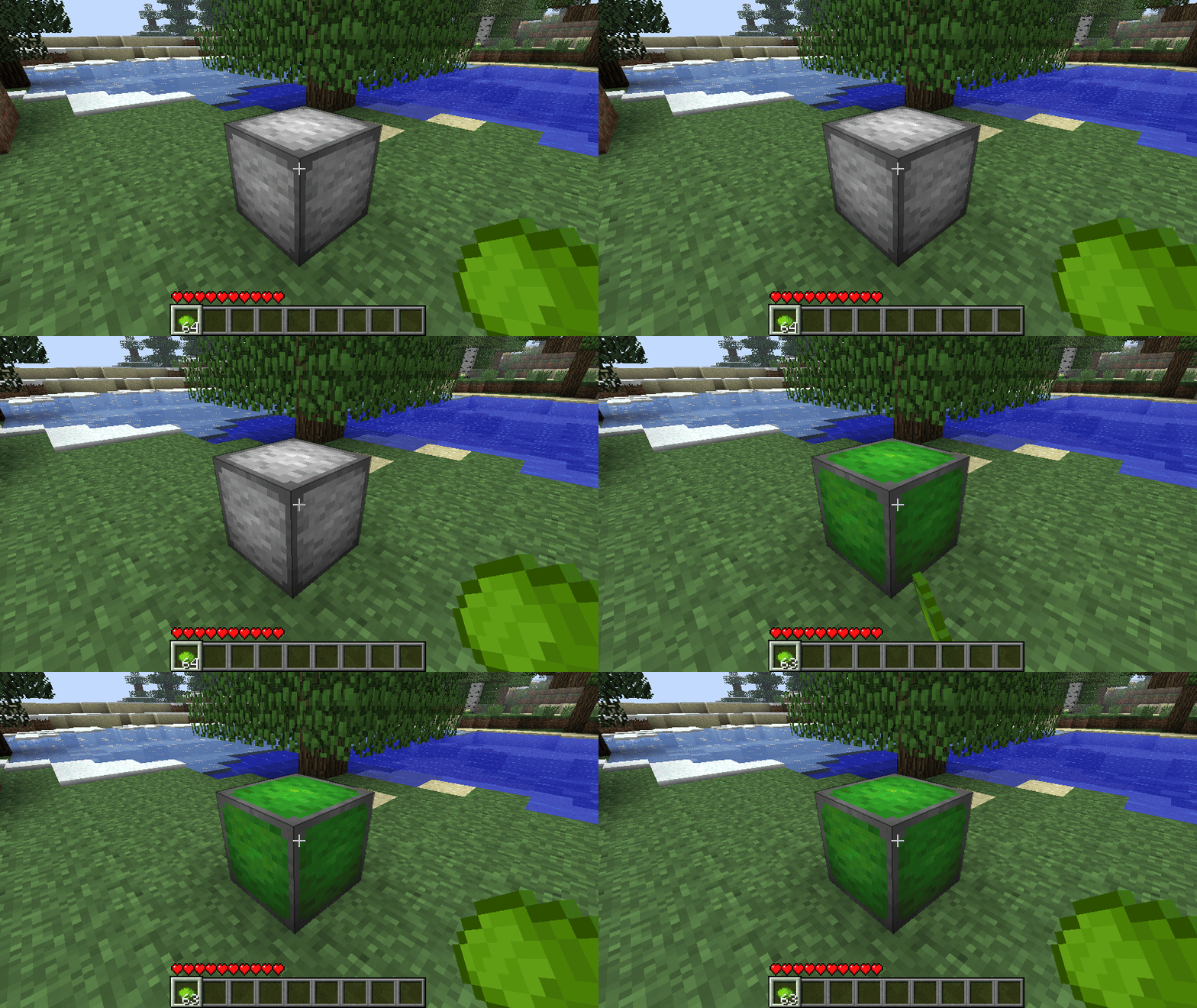](https://postimg.cc/tZLz1CJd)
## Extra credits
The sound of the elevator is by [LloydEvans09](https://freesound.org/people/LloydEvans09/sounds/185849/) on freesound. License: Attribution 4.0
Elemental Creepers StationAPI
# Elemental Creepers
This version is for b1.7.3, Station API, and the Babric (fabric for beta) toolchain.
* Original Minecraft Forum Post: https://www.minecraftforum.net/forums/mapping-and-modding-java-edition/minecraft-mods/1275396-1-5-1-elemental-creepers-v3-2-1-daawwwwwww
## Config and Features (Installation Instructions at the Bottom)
### Added Config Using [GlassConfigAPI](https://modrinth.com/mod/glass-config-api)
* Modify spawn rate of each creeper type
* Modify explosion radius/intensity of each creeper type
* Modify if creeper types spawn everywhere or only in their specific biomes
* To see which creepers spawn where when enabled scroll down to the bottom of the page
### Added Creeper Types
– CookieCreeper – explodes into cookies
– EarthCreeper – explodes into dirt
– ElectricCreeper – explodes into lightning
– FireCreeper – explodes into fire
– GhostCreeper – explodes damaging nearby entities
– IceCreeper – explodes into snow/freezing nearby water
– MagmaCreeper – explodes into lava
– PsychicCreeper – explodes launching nearby entities into the air
– WaterCreeper – explodes into water
## Original Showcase Videos
## Installation using Prism Launcher
1. Download an instance of Babric for Prism Launcher: https://github.com/babric/prism-instance
2. Install Java 17 and set the instance to use it: https://adoptium.net/temurin/releases/
3. Add GlassConfigAPI 3.0.2+ to the mod folder for the instance: https://modrinth.com/mod/glass-config-api
4. Add Glass Networking to the mod folder for the instance: https://modrinth.com/mod/glass-networking
5. Add StationAPI to the mod folder for the instance: https://modrinth.com/mod/stationapi
6. (Optional) Add Mod Menu to the mod folder for the instance: https://modrinth.com/mod/modmenu-beta
7. Add this mod to the mod folder for the instance: https://github.com/matthewperiut/elementalcreepers-fabric-b1.7.3/releases
8. Run and enjoy! 👍
## Creeper Biomes (if config for biome specific spawning is enabled)
* Electric Creeper – Rainforest, Savanna, and Sky
* Psychic Creeper – Taiga, Shrubland, and Sky
* Ice Creeper – Tundra, Ice Desert, Seasonal Forest, and Sky
* Ghost Creeper – Ice Desert (and they have a chance to spawn when other creepers die)
* Water Creeper – Swampland and Rainforest
* Cookie Creeper – Seasonal Forest
* Earth Creeper – Plains and Taiga
* Fire Creeper – Desert and Nether (Hell)
* Magma Creeper – Nether (Hell)
Elemental Arrows
Elemental Arrows adds several arrow with different effects upon landing.
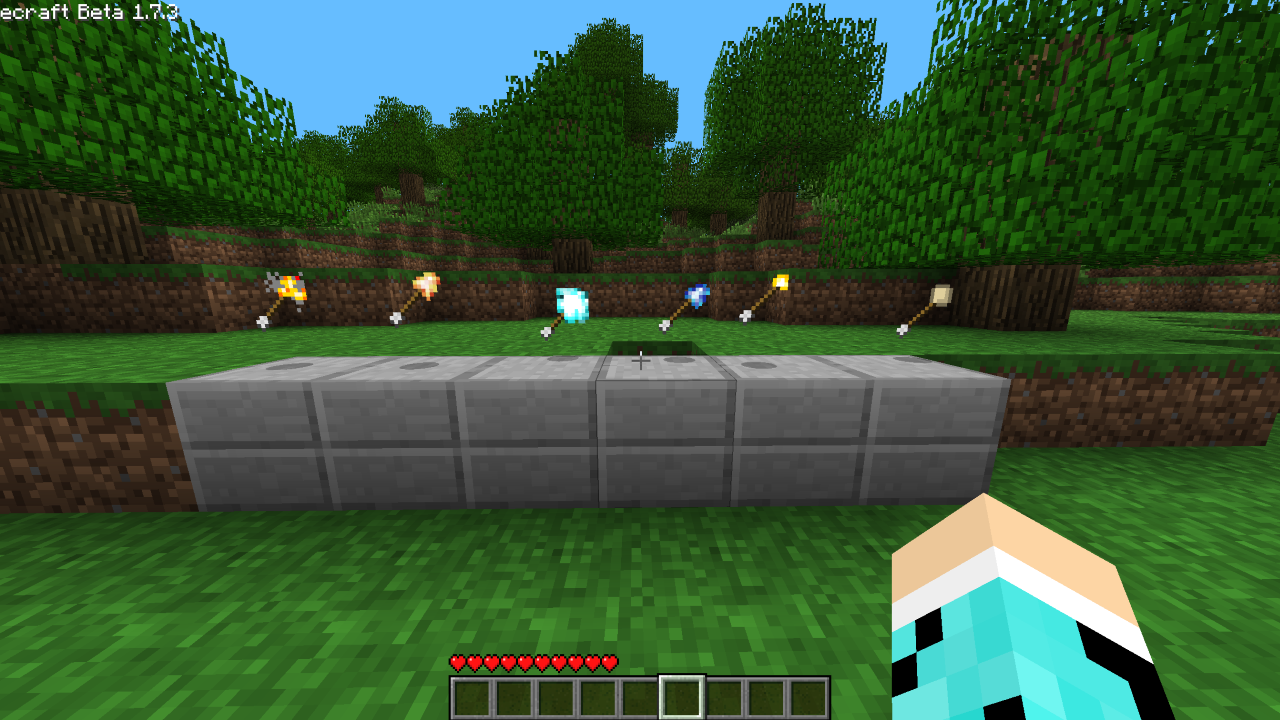
**Explosive Arrow** – Explodes upon impact
**Fire Arrow** – Will set entity or block it impacts with on fire
**Ice Arrow** – Extinguishes fire, solidifies obsidian, freezes water and breaks torches upon impact
**Lightning Arrow** – Spawns a lighting upon impact
**Torch Arrow** – Places a torch upon impact
**Egg Arrow** – Spawns a chicken upon impact
Detoxify
> I have opened a support discord, join now! https://discord.gg/uHm8EbfCFr
# Detoxify
**Detoxify** is a lightweight yet powerful AI chat moderation tool that classifies messages into multiple categories, allowing you to finely tune what gets caught by the filter. Despite its performance, it uses **less than 150MB of RAM**, making it extremely efficient for both server and client use.
—
### How It Works
Detoxify uses the **detoxify AI model** to classify chat messages. Each message is analyzed and assigned scores for categories such as:
* Toxicity
* Severe Toxicity
* Obscene content
* Threats
* Insults
* Identity Attacks
These scores allow you to configure thresholds and customize exactly which messages are filtered.
—
### Installation
#### Server
1. Download the correct server version of Detoxify.
2. Place the `.jar` file in your `plugins` or `mods` folder.
3. Start your server.
4. The configuration will be located in:
* Modded platforms: `config/Detoxify`
* Plugin platforms: `plugins/Detoxify`
#### Client
1. Download the correct client version of Detoxify.
2. Place the `.jar` file in your `mods` folder.
3. Any messages classified as toxic will be hidden in chat, but still logged for review.
4. The configuration will be located in:
`.minecraft/config/Detoxify`
—
### Permissions
> This is only on paper and spigot, on fabric and neoforge you need to be op
1. detoxify.notify -> Gives you permissions to receive notifications when a player is flagged.
2. detoxify.admin -> Gives you permission to receive update notifications
—
### Configuration Options
This configuration works for both client and server. It allows fine-tuning of message thresholds and debug options:
“`properties
####################################
# #
# Detoxify Configuration #
# #
####################################
# Whether or not there should be debug message
debug=false
############################
# Value Settings #
############################
toxicity=0.9
severe-toxicity=0.5
obscene=0.25
threat=-1.0
insult=-1.0
identity-attack=-1.0
############################
# Message Settings #
############################
player=§cYour message was removed for violating chat rules.
staff=§c%s’s message has been removed [%s]
console=§c%s’s message has been removed [%s]
“`
—
### Skript Support
> Note: Only available for Spigot and Paper platforms
Detoxify integrates with Skript for custom chat filtering. It provides a single expression that returns `true` or `false` depending on whether a message is considered toxic:
“`skript
is [the] %string% toxic
detoxify %string%
“`
#### Examples
“`skript
on chat:
if detoxify message is true:
cancel event
send “&cThat message was blocked for toxicity!” to player
“`
“`skript
on chat:
if is the message toxic is true:
cancel event
send “&cThat message was blocked for toxicity!” to player
“`