Yeth’s TPA
**Yeth’s TPA is a Teletransportation Accept mod for Minecraft designed to be compatible, stable, and sufficient.**
## Commands
– **/tpa ** Sends a TPA request to a user
– **/tpa accept ** Accepts a TPA request from a user
– **/tpa here** Sends a TPA Here request to a user
– **/tpa cancel** Cancels an outgoing TPA request
– **/tpa ignore ** Ignores a player from making TPA requests
– **/tpa help** Sends a list of all commands
– **/tpa disable** Disables TPA requests from being sent to you
– **/tpa enable** Enables TPA requests to be sent to you
– **/tpa setting ** Configures settings in TPA
## Features
– Automatic expiry of TPA requests
– TP delay w/ countdown
– Multiple request handling
– Permissions for server owners
– Anti-TPA-traps
## Support
Yeth’s TPA supports the following mod loaders:
– Fabric
– Neoforge
– Forge
– Quilt
– Legacy Fabric
– Babric
– Ornithe
– BTA
– LiteLoader
For Minecraft versions 1.7.2 – 26.1.2
No Screen Bobbing
Minecraft’s view bobbing feature does two things: It shakes the screen during gameplay (aka view/screen/world bobbing; most noticeable when in thirdperson) and also moves the hand (hand bobbing). This mod removes screen bobbing while preserving hand bobbing. I personally use this because I’d like my crosshair to stay static for speedbridging but like the bobbing hand and viewmodel.
This is a client-side mod and has no dependencies.
UniWrench
This mods adds a wrench which is meant to be intercompatible between any mod that implements it.
– By default it adds a “Universal Wrench” and 2 default wrench modes : Wrench and Rotate
– Mods can also extend the WrenchBase to make their own wrench which is compatible with other wrenches
– Mods can add their own wrench modes to either the default Universal Wrench or their own wrenches
UniTweaks
# UniTweaks
[](https://wakatime.com/badge/user/38aa5505-b4f7-4c8d-849e-7c33caecee59/project/018cfcb9-ebf8-4fea-b92d-62b38b8ed951)




### Note: Nearly all of the listed tweaks and bugfixes are toggleable
## Tweaks
### General
* Disable pausing on lost focus
* Allow for changing the autosave interval (defaults to 30s)
* Enable the TCPNoDelay flag on the network socket
* Packet Speedup Patch – Removes an artificial delay when processing packets (upto 392ms for sending an action and
receiving a response)
* Raw Input
* Disables the non-functional controller initialization code
* Allow changing the Resource URL (Defaults to Betacraft)
* Allow disabling loading certain dimensions on server
### User Interface
* Photo Mode for taking isometric screenshots of your world
* Show quit button on the main menu
* Improved controls menu
* Hide the achievement toast
* The Done Button in Achievements will lead to ingame menu instead of unpausing
* Disable the entity id nametags when debug menu is open
* Front View Third Person
* Clear text fields using the right mouse button
* FOV Slider with proper hand adjustment
* Brightness Slider
* Cloud Height Slider
* Clouds Toggle
* Fog Density Slider
* GUI Scale Slider
* FPS Limit slider
* Render Distance slider that goes up to 32 chunks
* Main Menu Panorama like in Beta 1.8 with a customizable background (default to the Glacier background)
* Show the version text in game and allow its customization
* Rebindable Hotbar Keys and Function Keys (F1,F2,F3,F5,F6,F11)
* Dismount Keybind
* Keybind for releasing the mouse from the game window
* Armor Outlines in Player Inventory
### Gameplay
* No Food Wastage – Prevents you from eating when your health is already full
* Pick Block from Inventory – Allow picking blocks from inventory
* Shift Placing – Bypassing block’s use actions on blocks when crouching
* Right Click Armor Equip – Equip/Swap armor by right-clicking it
* Fence Jumping – Allows you to jump on fences
### Features
* Fast Leaf Decay
* Better Burning
* Burning Skeletons have a 70% chance of shooting a burning arrow
* Burning Arrows ignite entities
* Mobs on fire attacking player have a 30% chance to spread that fire onto the player
* Step Assist – Allows you to step up one block
* Zoom Key
* Sounds for Chest, Item Breaking, Sheep Shearing and Eating
### Tweaks
* Make sugar cane placeable on sand
* Boats drop themselves when broken by a player
* Boats don’t break on impact
* Pumpkins and Jack’o’Lanterns placeable like normal – lifted restrictions on the block below having to be solid
* Fences placeable like normal – lifted restrictions on the block below having to be solid or fence
* Fences connect to blocks
* Bookshelves drop 3 books
* Allow placing pressure plates on fences
* Harvestable Cobwebs and Tall Grass using Shears
* Expand the chicken hitbox to modern size
* Stackable Chests
* Prevent damaging Flint and Steel on failed ignite
* Ability to disable sleeping but still allow setting spawnpoints at beds
* Ability to disable spawning mobs when going to sleep (Nightmares)
* Prevent items and arrows from stopping minecarts
* Allow igniting entities using Flint and Steel
* Ability to place trapdoors without supporting block
* Beta 1.8 Leaves Shading
### Old Features
* Disable Dead Bush Generation
* Disable Tall Grass Generation
* Punch TNT to light it
* Punch Primed TNT to defuse it
* Punch Sheep for wool
* Hoes Grass for Seeds
* Boat Elevators
* Ladder Gaps
* Minecart Boosters
### Recipes
* Tool & Armor Repair recipes
* More Furnace Fuels
Modern Recipes
* Shapeless Flint and Steel
* Shapeless Mushroom Stew
* Shapeless Chest Minecart
* Shapeless Furnace Minecart
* Shapeless Sticky Piston
* Books Require Leather
* Wool Redyeing
* 6 Slabs per Craft
* Button requires 1 stone
* Modern Fence Recipe
* Snow Layer Recipe
* 3 Ladder per Craft
Tweaked Recipes
* Shapeless Jack o’ Lantern
* Adjustable Stairs per Craft
* Adjustable Trapdoors per Craft
Obtainable Recipes
* Craftable Grass Blocks
* Craftable Cobwebs
* Craftable Fire
* Craftable Coal Ore
* Craftable Iron Ore
* Craftable Gold Ore
* Craftable Lapis Ore
* Craftable Diamond Ore
## Bugfixes
* Bit Depth Fix – Fixes Z-Fighting on AMD graphic cards
* Far Lands Jitter Fix – Fixes jittering near farlands
* Slime Split Fix – Fixes slimes not splitting when their health is below zero after dying
* Nightmare Pathfinding Fix – Fixes the nightmares being able to path and wake up player thru walls
* Multiplayer Entity Physics Fix – Fixes jittering caused by client interpolation
* Boat Dismount Fix – Fixes sometimes falling through the boat when dismounting it
* Sleeping Camera Rotation Fix – Fixes the sleeping camera being rotated the wrong way
* Stairs Drop Fix – Stairs now drop themselves
* Block Effectiveness Fix – Fixes axes and pickaxes not being effective on various blocks
* Axe : Crafting Table, Wooden Slab, Wooden Stairs, Fence, Wooden Door, Ladder, Sign, Pumpkin, Jack o’ Latern,
Wooden Pressure Plate, Jukebox and Noteblock
* Pickaxe : Furnace, Cobblestone Stairs, Bricks, Redstone Ore, Iron Door, Rails, Dispenser, Stone Pressure Plates
and Spawner
* Pig Drop Saddle Fix – Fixes saddled pig not dropping saddle on death
* Fence Bounding Box Fix – Fence’s bounding box now better reflect its current shape
* Pick Block Fix – Fixes some blocks not being pickable using Pick Block
* Spring Propagation Fix – Fixes water source blocks not forming when a block below is water
* Lava Without Source Fix – Flowing lava now correctly dissapears when source block is removed
* Bow Held Fix – Bows are now being held correctly and not as only items
* Leggings Riding Fix – Fix leggings not adjusting while riding
* ItemStack Rendering Fix – Fixes itemstacks being render below text in containers
* Fish Velocity Fix – Fix fish flying way behind the player when caught
* Furnace Consume Bucket Fix – Fixes furnace consuming bucket when fueled with lava
* Armor Icon Fix – Fixes armor icons not being displayed
* Dropped Item Size Fix – Fixes some blocks being too large when dropped
* Breaking Animation Fix – Fixes the breaking animation sometimes not being visible from below
* Death Screen Formatting Fix – Fixes the score color on death screen
* Hotbar Rendering Fix – Fixes hotbar turning white when looking at entity with no clouds rendering on Fast graphics
* Wooden Slab Mining Fix – Fixes wooden slabs only being mineable with a pickaxe
* Grass Block Item Fix – Fixes Grass Block item not rendering properly
* Multiplayer Block Mining Delay Fix – Fixes the inconsistent delay between mining blocks in multiplayer
* Last Durability Fix – Fixes blocks not dropping when mined with the last durability point of the tool
* Fence Lighting Fix – Fixes fence bottom face being dark when placed on a block
* Video Settings Slider Fix – Fixes sliders not being slidable in the video settings screen
* Fullscreen Cursor Fix – Fixes cursor not being centered when opening inventories in fullscreen
* Torch Bottom Texture Fix – Fixes torches not having a bottom textures
* Slab Crash Fix – Fixes slabs with no name crashing the game
* Block Entity Loading Fix – Stops the game from erasing an entire chunk when block entity fails to load
TelsTerrain StationAPI
# TelsTerrain StationAPI for Minecraft Beta 1.7.3
A StationAPI mod for Minecraft Beta 1.7.3 that tweaks ore generation, sand generation, and more!
* Mod works on Multiplayer with [GlassConfigAPI](https://modrinth.com/mod/glass-config-api) version 3.0+ used to sync configs!
* All changes are disabled by default, enable what you want!
* NOTE: Terrain tweaks do not affect already generated chunks.
## Water and Lava Shaping
This mod adds the ability to enable water and lava shaping using wooden bowls:
* Right click any water or lava block with a wooden bowl to lower its level
* Lava will consume the bowl when its level is lowered, bring a lot of bowls if you want to shape lava significantly
## Old Terrain Features
This mod adds the ability to disable any vanilla terrain decorations that you don’t want!
* For the Overworld you can now disable:
* Cave & Soil Features: caves/tunnels, dungeons, dirt deposits, gravel deposits, and beach clay
* Fluid Features: waterfalls, lavafalls, ponds of water, and ponds of lava
* Ores: Coal, iron, gold, diamond, lapis lazuli, and redstone
* Small Plants: dandelions, roses, tall grass, dead bushes, sugar cane, cacti, red mushrooms, and brown mushrooms
* Trees: small oak, large oak, birch, and pine
* For the Nether you can now disable:
* Tunnels
* Lava Springs/Lavafalls
* Fire Patches
* Glowstone Clusters: A & B
* Small Plants: red mushrooms and brown mushrooms
## New Terrain Features
This mod adds the ability to enable custom biome ore/soil feature distribution (pros/cons list):
* NOTE: Soil types only effect generation if their block generation is enabled (i.e. sand, sandstone, ice, and clay).
* Also note that cave soil blocks only generate between Y levels 0 and 47.
| Biome | Soil Type | Pros | Cons |
|:—————:|————-|:————–|:————-|
| Rainforest | Sandy | 150% Dungeons | 50% Pumpkins |
| Plains | Sedimentary | 150% Dirt | 50% Gravel |
| Swamps | Clayey | 150% Coal | 50% Gold |
| Taiga | Icy | 150% Gravel | 75% Redstone |
| Forest | Normal | 150% Iron | 50% Lapis |
| Desert | Sandy | 200% Lapis | 50% Roses |
| Savanna | Sandy | 200% Diamonds | 75% Dungeons |
| Tundra | Icy | 150% Redstone | 75% Dirt |
| Seasonal Forest | Normal | 200% Gold | 75% Iron |
| Shrubland | Sedimentary | 200% Pumpkins | 75% Coal |
| Ice Desert | Icy | 200% Roses | 50% Diamonds |
* Ability to enable cave sand, affects the following biomes
* Rainforest
* Desert
* Savanna
* Ability to enable cave sandstone, affects the following biomes
* Plains
* Shrubland
* Ability to enable cave ice, affects the following biomes
* Taiga
* Tundra
* Ice Desert
* Ability to enable cave clay, affects the following biomes
* Swamps
* Ability to enable desert stone/gravel swap
* Below deserts swaps stone for sandstone and gravel for sand
* Ability to increase sandstone blast resistance (recommended if you enable desert stone swap)
* Ability to enable nether clay
* Adds a very very small amount of clay to the nether walls and ceiling
## Tips and Tricks (Icy Caves)
Cave ice can be really annoying to deal with. I recommend using a mod like [GoldenTweaks](https://modrinth.com/mod/goldentweaks-stationapi) to collect the ice.
You could also use a mod like [NowObtainableRecipes](https://modrinth.com/mod/nowobtainablerecipes-stationapi) to get a sponge to soak up the water from melted ice.
This mod also provides water shaping with a wooden bowl that you could use to remove melted ice water.
Another suggestion is to use an alternative light source in ice caves since torches can be knocked out easily by flowing water.
## Installation using Prism Launcher
1. Download an instance of Babric for Prism Launcher: https://github.com/babric/prism-instance
2. Install Java 17 and set the instance to use it: https://adoptium.net/temurin/releases/
3. Add GlassConfigAPI 3.0.2+ to the mod folder for the instance: https://modrinth.com/mod/glass-config-api
4. Add Glass Networking to the mod folder for the instance: https://modrinth.com/mod/glass-networking
5. (Optional) Add StationAPI to the mod folder for the instance: https://modrinth.com/mod/stationapi
6. (Optional) Add Mod Menu to the mod folder for the instance: https://modrinth.com/mod/modmenu-beta
7. Add this mod to the mod folder for the instance: https://github.com/telvarost/TelsTerrain-StationAPI/releases
8. Run and enjoy! 👍
## Feedback
Got any suggestions on what should be added next? Feel free to share it by [creating an issue](https://github.com/telvarost/TelsTerrain-StationAPI/issues/new). Know how to code and want to do it yourself? Then look below on how to get started.
## Contributing
Thanks for considering contributing! To get started fork this repository, make your changes, and create a PR.
If you are new to StationAPI consider watching the following videos on Babric/StationAPI Minecraft modding: https://www.youtube.com/watch?v=9-sVGjnGJ5s&list=PLa2JWzyvH63wGcj5-i0P12VkJG7PDyo9T
TelsDrinks StationAPI
# TelsDrinks StationAPI for Minecraft Beta 1.7.3
### How to get ingredients:
This mod adds apples as a rare drop from seasonal forest oak leaves and as a super rare drop from normal forest oak leaves.
* Look for the green grass!
* Apples are used to make apple cider and hot cider.
This mod also adds cocoa as a rare drop from rainforest oak leaves.
* Look for ferns on top of really green grass!
* Cocoa is used in the brewing of many of the mods signature drinks <3
Sticks were added as a rare oak leaf drop in other biomes to help signify that the mod is working.
* If the biome is dropping sticks it won't drop apples or cocoa!
### How the mod works:
* Kettles are heated by placing lava, fire, or a lit furnace below them.
* When kettles are heated the hot variant of a drink is given.
* Right click with a mug to take a drink out of a kettle.
* Each kettle has a liquid level meter on the side to show how much is left.
* Drinks can be used to restore hearts, poison your friends, or just be aesthetically pleasing :)
## Installation using Prism Launcher
1. Download an instance of Babric for Prism Launcher: https://github.com/babric/prism-instance
2. Install Java 17 and set the instance to use it: https://adoptium.net/temurin/releases/
3. Add StationAPI to the mod folder for the instance: https://modrinth.com/mod/stationapi
4. (Optional) Add Mod Menu to the mod folder for the instance: https://modrinth.com/mod/modmenu-beta
5. Add this mod to the mod folder for the instance: https://github.com/telvarost/TelsDrinks-StationAPI/releases
6. Run and enjoy! 👍
## Feedback
Got any suggestions on what should be added next? Feel free to share it by [creating an issue](https://github.com/telvarost/TelsDrinks-StationAPI/issues/new). Know how to code and want to do it yourself? Then look below on how to get started.
## Contributing
Thanks for considering contributing! To get started fork this repository, make your changes, and create a PR.
If you are new to StationAPI consider watching the following videos on Babric/StationAPI Minecraft modding: https://www.youtube.com/watch?v=9-sVGjnGJ5s&list=PLa2JWzyvH63wGcj5-i0P12VkJG7PDyo9T
StationAPI
StationAPI provides numerous systems and APIs for modding Minecraft Beta 1.7.3
From simple events to advanced renderer and world save format.
Wiki: https://github.com/ModificationStation/StationAPI/wiki
Skylands Portal
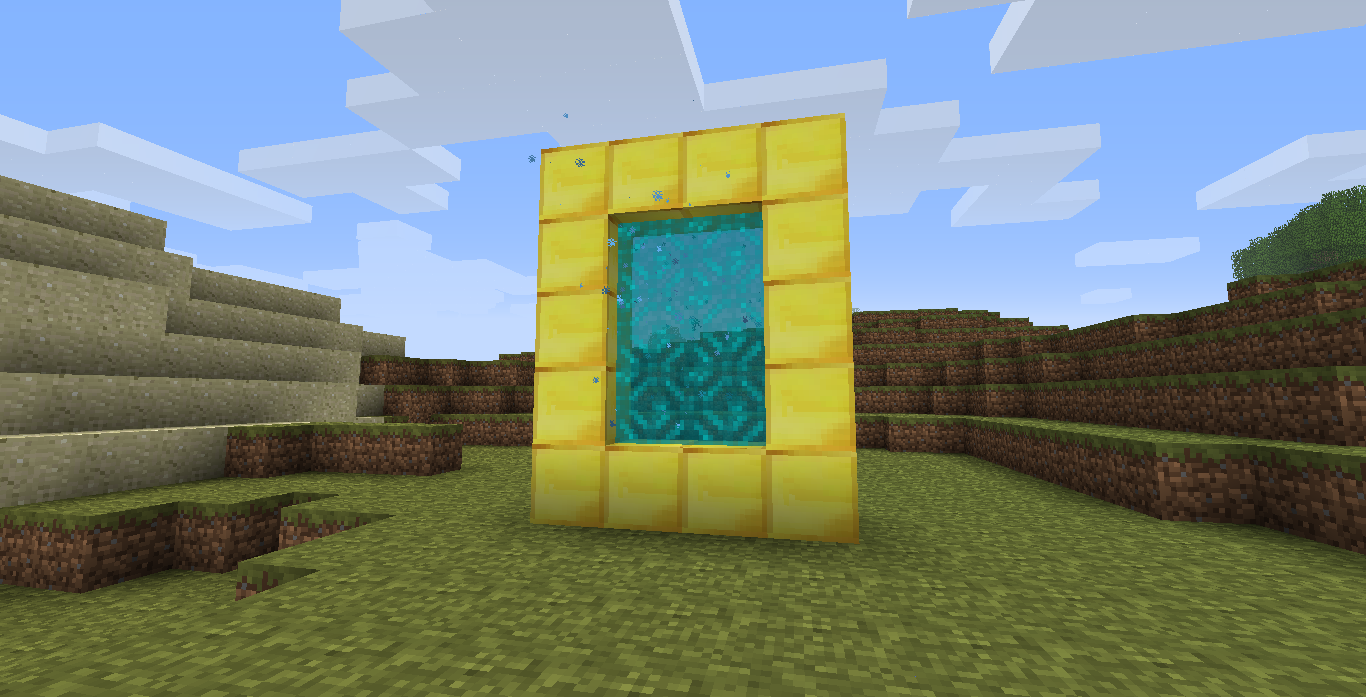
This is a simple mod that adds a portal allowing players to travel to the Skylands dimension. It integrates seamlessly with the game and provides an alternate world above the clouds for exploration and building.
## Items
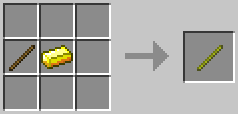
The Golden Stick is crafted using 1 Stick and 1 Gold Ingot in a shapeless recipe.
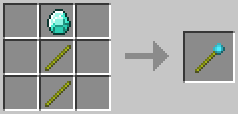
The Magic Wand of Skylands is crafted using 2 Golden Sticks and 1 Diamond. It is the item used to light the Skylands portal, and it can only be used once.
## Requirements
### Babric
* [StationAPI](https://modrinth.com/mod/stationapi)
* [Glass Config API](https://modrinth.com/mod/glass-config-api)
* [Mod Menu Babric](https://modrinth.com/mod/modmenu-babric) (Optional, for in-game configuration)
### Risugami’s ModLoader
#### for b1.8.1
* [ModLoader](https://mcarchive.net/mods/modloader?gvsn=b1.8.1)
* [ShockAhPI r9](https://mcarchive.net/mods/shockahpi?gvsn=b1.8.1)
* [ShockAhPI r9 fix](https://github.com/ItsElix99/Skylands-Portal/raw/refs/heads/b1.8.1-ml/ShockAhPI%20r9%20fix.zip)
* [GuiAPI](https://mcarchive.net/mods/guiapi?gvsn=b1.8.1) (Optional, for in-game configuration)
#### for b1.7.3
* [ModLoader](https://mcarchive.net/mods/modloader?gvsn=b1.7.3)
* [ShockAhPI r5.1](https://mcarchive.net/mods/shockahpi?gvsn=b1.7.3)
* [GuiAPI](https://mcarchive.net/mods/guiapi?gvsn=b1.7.3) (Optional, for in-game configuration)
#### for b1.6.6
* [ModLoader](https://mcarchive.net/mods/modloader?gvsn=b1.6.6)
* [GuiAPI](https://mcarchive.net/mods/guiapi?gvsn=b1.6.6) (Optional, for in-game configuration)
SimpleNetherOres
Simple mod that adds more ores into the Nether dimension for Minecraft beta 1.7.3 (for StAPI)
**Ores List:**
– Coal Ore (drops 1 coal)
– Iron Ore (drops itself, smelts into iron ingot)
– Gold Ore (drops itself, smelts into gold ingot)
– Diamond Ore (drops 1 diamond)
– Redstone Ore (drops 1-5 redstone)
– Glowstone Ore (drops 2-4 glowstone)
– Lapis Ore (drops 3-6 lapis)
SameOldSpells StationAPI
# SameOldSpells StationAPI for Minecraft Beta 1.7.3
Some basic world control using spells!
* Requires [Zastavka API](https://modrinth.com/mod/zastavkaapi) (used for freeze effect with ice spells)
* Mod works on Multiplayer with [GlassConfigAPI](https://modrinth.com/mod/glass-config-api) version 3.0+ used to sync configs!
## List of changes
Note that all changes can be individually disabled using GlassConfigAPI if undesired
### Same Old Spells
Adds a couple unique spells to the game that are activated on entity collision:
– Arrow Spell: Fires an arrow in each cardinal direction (North, East, South, and West)
– Single use, crafted from 1x spell vessel and 4x arrows
– Crafting recipe is shaped with spell vessel in the center and arrows placed vertically and horizontally beside it
– Dark Spell: Makes night begin
– Single use, crafted from 1x spell vessel and 1x obsidian
– Dark Spell Cube: Makes it midnight
– Infinite use, NOT craft-able
– Fire Spell: Sets an entity on fire
– Single use, crafted from 1x spell vessel and 1x fire
– Fire is now craft-able via placing UNUSED flint and steel in the crafting grid (recipe output is 3x fire)
– Configuration available to craft it directly from 1-3x spell vessels and 1x unused flint and steel (output is 1-3x fire spells)
– Fire Spell Cube: Sets an entity on fire only while in the spell cube
– Infinite use, NOT craft-able
– Grass Spell: Clears the weather
– Single use, crafted from 1x spell vessel and 1x dandelion (Vanilla b1.7.3 Minecraft just calls this item “Flower”)
– Grass Spell Cube: Clears the weather
– Infinite use, NOT craft-able
– Holy Spell: Spawns lightning
– Single use, crafted from 1x spell vessel and 1x bookshelf
– Holy Spell Cube: Spawns lightning
– Infinite use, NOT craft-able
– Ice Spell: Freezes an entity
– Single use, crafted from 1x spell vessel and 1x ice
– Ice is now craft-able via placing 2x snow block and 1x water bucket in the crafting grid
– Configuration available to craft it directly from 2x snow block, 1x water bucket, and 1x spell vessel
– Ice Spell Cube: Periodically freezes an entity in the spell cube
– Infinite use, NOT craft-able
– Light Spell: Makes daytime begin
– Single use, crafted from 1x spell vessel and 1x glowstone
– Light Spell Cube: Makes it midday
– Infinite use, NOT craft-able
– Spell Vessel: Does nothing
– Single use, crafted from 1x glowstone dust and 4x snow blocks
– Crafting recipe is shaped with glowstone dust in the center and snow blocks placed vertically and horizontally beside it
– Rock Spell: Starts a thunderstorm
– Single use, crafted from 1x spell vessel and 1x iron block
– Rock Spell Cube: Starts a thunderstorm
– Infinite use, NOT craft-able
– Water Spell: Starts rain
– Single use, crafted from 1x spell vessel and 1x lapis lazuli block
– Water Spell Cube: Starts rain
– Infinite use, NOT craft-able
## Special thanks to Rocetti/kcilds for the tile art <3
Find their original post at OpenGameArt.org here:
[https://opengameart.org/content/universal-fantasy-roguelike-tileset-16x16](https://opengameart.org/content/universal-fantasy-roguelike-tileset-16x16)
## Installation using Prism Launcher
1. Download an instance of Babric for Prism Launcher: https://github.com/babric/prism-instance
2. Install Java 17 and set the instance to use it: https://adoptium.net/temurin/releases/
3. Add GlassConfigAPI 3.0.2+ to the mod folder for the instance: https://modrinth.com/mod/glass-config-api
4. Add Glass Networking to the mod folder for the instance: https://modrinth.com/mod/glass-networking
5. Add StationAPI to the mod folder for the instance: https://modrinth.com/mod/stationapi
6. Add ZastavkaAPI to the mod folder for the instance: https://modrinth.com/mod/zastavkaapi
7. (Optional) Add Mod Menu to the mod folder for the instance: https://modrinth.com/mod/modmenu-beta
8. Add this mod to the mod folder for the instance: https://github.com/telvarost/SameOldSpells-StationAPI/releases
9. Run and enjoy! 👍
## Feedback
Got any suggestions on what should be added next? Feel free to share it by [creating an issue](https://github.com/telvarost/SameOldSpells-StationAPI/issues/new). Know how to code and want to do it yourself? Then look below on how to get started.
## Contributing
Thanks for considering contributing! To get started fork this repository, make your changes, and create a PR.
If you are new to StationAPI consider watching the following videos on Babric/StationAPI Minecraft modding: https://www.youtube.com/watch?v=9-sVGjnGJ5s&list=PLa2JWzyvH63wGcj5-i0P12VkJG7PDyo9T